You open YouTube Studio, head to Revenue, and see a set of numbers that seem close enough to be interchangeable until they aren’t. CPM looks healthy. Views look decent. Your actual earnings don’t match the story those metrics seem to promise.
That gap is where most creators get stuck.
If you’ve been searching for the rpm meaning on YouTube, the short version is simple: RPM is the clearest picture of what your channel earns. Not what advertisers paid before platform deductions. Not what a niche is supposed to earn in theory. What landed on your side of the dashboard after YouTube took its cut and after all views, monetized or not, were counted.
A lot of advice stops at “pick a better niche.” That’s lazy advice. Niche matters, but it doesn’t explain why two channels in the same lane can perform very differently. The useful work happens inside the video itself: ad opportunities, viewer behavior, monetized playback rate, and whether your content structure supports revenue without killing retention. If you follow creator-focused breakdowns on the Thumbo AI blog, you’ve probably already noticed that better packaging and better video structure usually move revenue together, not separately.
Table of Contents
- Your Guide to True YouTube Earnings
- What RPM Really Means on YouTube
- RPM vs CPM The Ultimate Showdown
- Key Factors That Influence Your YouTube RPM
- Actionable Strategies to Increase Your RPM
- Your RPM Questions Answered
Your Guide to True YouTube Earnings
Most creators start by tracking views, click-through rate, and watch time. That makes sense. Those numbers tell you whether people are clicking and staying. They do not tell you what your channel is earning efficiently.
RPM is the metric that connects attention to money. If your views rise but RPM stays weak, your channel may be growing without becoming meaningfully more profitable. If RPM rises while views stay flat, you may be building a healthier business even before your next breakout video lands.
That’s why RPM matters more than most creators think. It acts like your take-home number. It absorbs the messiness that CPM doesn’t capture, including the fact that not every view gets monetized and not every dollar comes from ads alone.
Why creators misread revenue data
A common mistake is treating high CPM like proof of strong earnings. It isn’t. A strong CPM can sit next to disappointing RPM if ad delivery is weak, viewers skip fast, or too many views never produce monetized playbacks.
Another mistake is blaming revenue entirely on niche. Niche absolutely influences earnings, but creators often use it as an excuse to ignore the parts they control. Video length, pacing, where ad breaks naturally fit, and whether viewers stay long enough to support monetization all matter.
Practical rule: If you want to understand your business, track RPM like a creator and use CPM like a diagnostic.
What actually helps
The useful way to read RPM is to treat it as an output metric. Then work backward.
- Check revenue composition: Look at whether your money is coming only from ads or also from memberships, Premium revenue, and viewer support features.
- Review your video structure: Weak structure usually hurts both retention and monetization.
- Compare formats separately: Long-form and Shorts behave differently, so mixing them can hide what’s really happening.
- Look for efficient videos: Some videos won’t lead in views, but they’ll demonstrate superior earning efficiency.
Creators who understand RPM stop asking, “How many views did this get?” and start asking, “How much value did each block of views produce?”
What RPM Really Means on YouTube
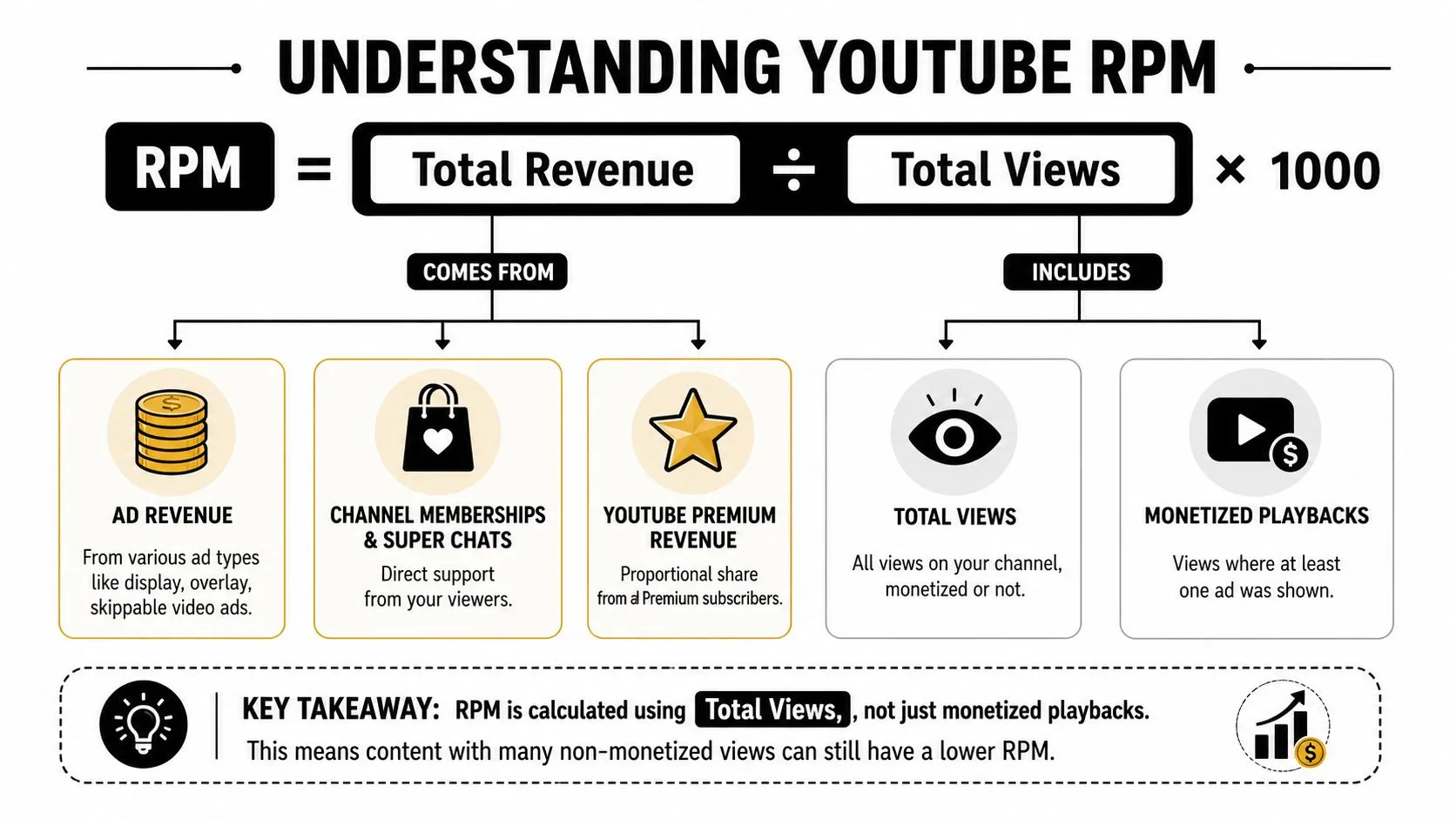
RPM stands for Revenue Per Mille, and on YouTube it means the amount a creator earns per 1,000 total video views after YouTube deducts its platform share. The formula is (Total Revenue ÷ Total Views) × 1,000, per YouTube’s official definition of RPM.
What goes into the formula
The phrase “total revenue” matters more than most creators realize. RPM isn’t limited to ad earnings. It includes platform-mediated revenue sources shown in YouTube Analytics: ad revenue after YouTube’s share, YouTube Premium, channel memberships, Super Chat, and Super Stickers, according to YouTube’s own RPM documentation.
YouTube’s standard ad split also matters here. For watch-page ad revenue, creators receive 55% and YouTube keeps 45%, which is one reason RPM sits below the advertiser-side numbers many creators focus on, as set out in the YouTube partner earnings overview.
The simplest way to think about RPM
CPM is closer to a gross number. RPM is your net creator number.
If your channel earns $800 from 80,000 views, the RPM is exactly $10, because ($800 ÷ 80,000) × 1,000 = $10.
That example clears up one of the biggest misconceptions creators have. You are not measuring what happened on only the ad-served views. You are measuring earnings across all views used in the calculation.
RPM tells you what each 1,000 views were worth to you, not what those views were worth to advertisers.
Why this matters in practice
A creator can have a video with strong watch performance and still be disappointed by earnings if the monetization layer is weak. On the other hand, a video that is built well for monetization can outperform expectations even without blockbuster reach.
That’s why the rpm meaning on YouTube isn’t just definitional. It’s operational. Once you understand that RPM is built from total revenue over total views, your strategy changes. You stop chasing vanity metrics and start paying attention to which videos convert audience attention into earnings.
RPM vs CPM The Ultimate Showdown
Creators confuse RPM and CPM because both sit in the same revenue neighborhood. They are not the same metric, and using one in place of the other leads to bad decisions.
CPM is about advertiser cost. RPM is about creator earnings.
The clean distinction
CPM measures what advertisers pay per 1,000 ad impressions. It reflects ad-side pricing. It’s useful, but it doesn’t tell you what you took home.
RPM measures what you earned per 1,000 total views on your content after YouTube’s deduction and after non-monetized views are factored in. If you care about your business, RPM is the number that answers the core question.
Here’s the side-by-side view.
| Metric | What It Measures | Who It’s For | Calculation Basis |
|---|---|---|---|
| RPM | Creator earnings per 1,000 total views | Creators | Total revenue divided by total views, then multiplied by 1,000 |
| CPM | Advertiser cost per 1,000 ad impressions | Advertisers and creators analyzing ad pricing | Ad impression pricing before creator take-home earnings |
Why RPM is usually lower
There are two practical reasons.
First, YouTube takes a share of ad revenue before the creator sees the rest. That changes the earnings number immediately.
Second, not every view is monetized with an ad. Some viewers won’t receive an ad. Some views come from contexts that don’t generate the same monetization outcome. RPM absorbs that reality because it uses total views as the denominator.
This is why a creator can stare at a healthy CPM and still feel underpaid. CPM can be strong while RPM remains soft if monetization density is weak.
What CPM is still good for
CPM isn’t useless. It can tell you whether advertisers value your audience and topic. If CPM trends upward, that can indicate stronger advertiser demand around your content category or audience mix.
But CPM becomes dangerous when creators treat it as an earnings forecast. It isn’t one.
- Use CPM to judge advertiser demand: It helps explain the market around your content.
- Use RPM to judge channel efficiency: It shows how well your videos convert views into actual revenue.
- Use both together for diagnosis: A high CPM with low RPM usually means something in monetization execution is underperforming.
A lot of creator frustration comes from reading CPM as if it were a paycheck. It’s not.
The better question to ask
Don’t ask, “Is my CPM good?”
Ask, “If my CPM is good, why isn’t my RPM following?” That question pushes you toward the controllable parts of the system. Ad placement, video pacing, monetized playback rate, and format choices matter far more than most surface-level RPM guides admit.
Key Factors That Influence Your YouTube RPM
RPM moves for reasons inside and outside your control. Some of them are structural. Some are editorial. Some are market conditions. If you want to diagnose low RPM correctly, you need to separate those buckets.
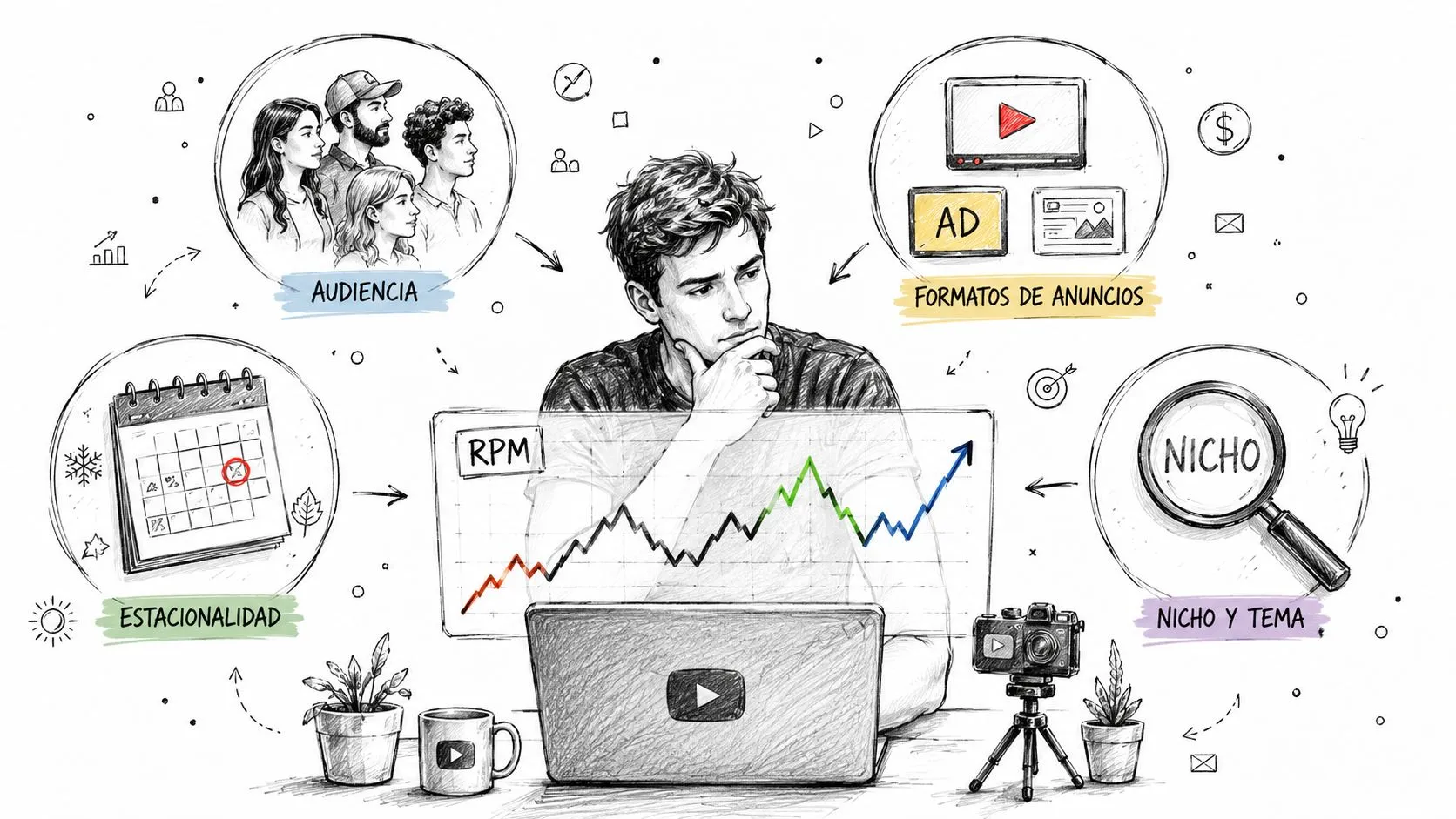
A useful baseline comes from this creator discussion of how YouTube RPM works. It notes that RPM varies significantly by niche and geography, and that a channel earning $800 from 80,000 views has a $10 RPM. It also points out that RPM includes only platform-mediated revenue, so outside income like merch promoted in videos doesn’t count in the calculation.
Audience geography and niche
Geography changes advertiser demand. Some audiences attract more valuable ad spend than others. You can feel this in your analytics even when your content style stays the same.
Niche has a similar effect. Finance and tech often attract stronger RPM than broad entertainment because advertisers bid differently around those audiences. That doesn’t mean every creator should pivot into a topic they don’t understand. It means the market value of the audience matters.
Seasonality and format
Revenue doesn’t stay flat through the year. Advertiser demand shifts, and creators often see that reflected in RPM swings. If you compare one month to another without accounting for seasonal buying patterns, you can draw the wrong conclusion about your content quality.
Format matters too. Longer videos usually give you more room to build natural monetization opportunities. Shorter videos can still perform well, but they offer less flexibility for ad structure.
What does not count
This part gets overlooked constantly. RPM does not include external revenue such as merch sales pushed from your video, affiliate income earned off-platform, or direct brand deals handled outside YouTube Analytics.
That distinction matters because creators sometimes think a highly profitable video off-platform should also show a strong RPM. Those are different revenue systems.
| Factor | How it affects RPM |
|---|---|
| Geography | Changes advertiser demand around your viewers |
| Niche | Influences how valuable advertisers find the audience |
| Seasonality | Shifts ad demand over time |
| Video format | Affects monetization opportunities inside the content |
| External income | Doesn’t count toward YouTube RPM |
Low RPM doesn’t always mean weak content. Sometimes it means your audience mix, format, or monetization path is doing exactly what the dashboard says it’s doing.
The practical use of this section is diagnosis. Before changing your topic, figure out whether your RPM problem is a market issue, a format issue, or an execution issue.
Actionable Strategies to Increase Your RPM
The biggest RPM gains usually don’t come from changing your channel identity overnight. They come from improving how your videos carry monetization.
One of the most useful missing concepts here is monetized playback rate, often shortened to MPR. A breakdown of RPM vs CPM and creator earnings notes that MPR is a primary reason RPM diverges from CPM: content length, ad placement, and audience mix can produce very different RPMs for creators sitting in the same niche.
Improve the parts inside the video
If your CPM is respectable but your RPM feels weak, MPR is often where the leak is.
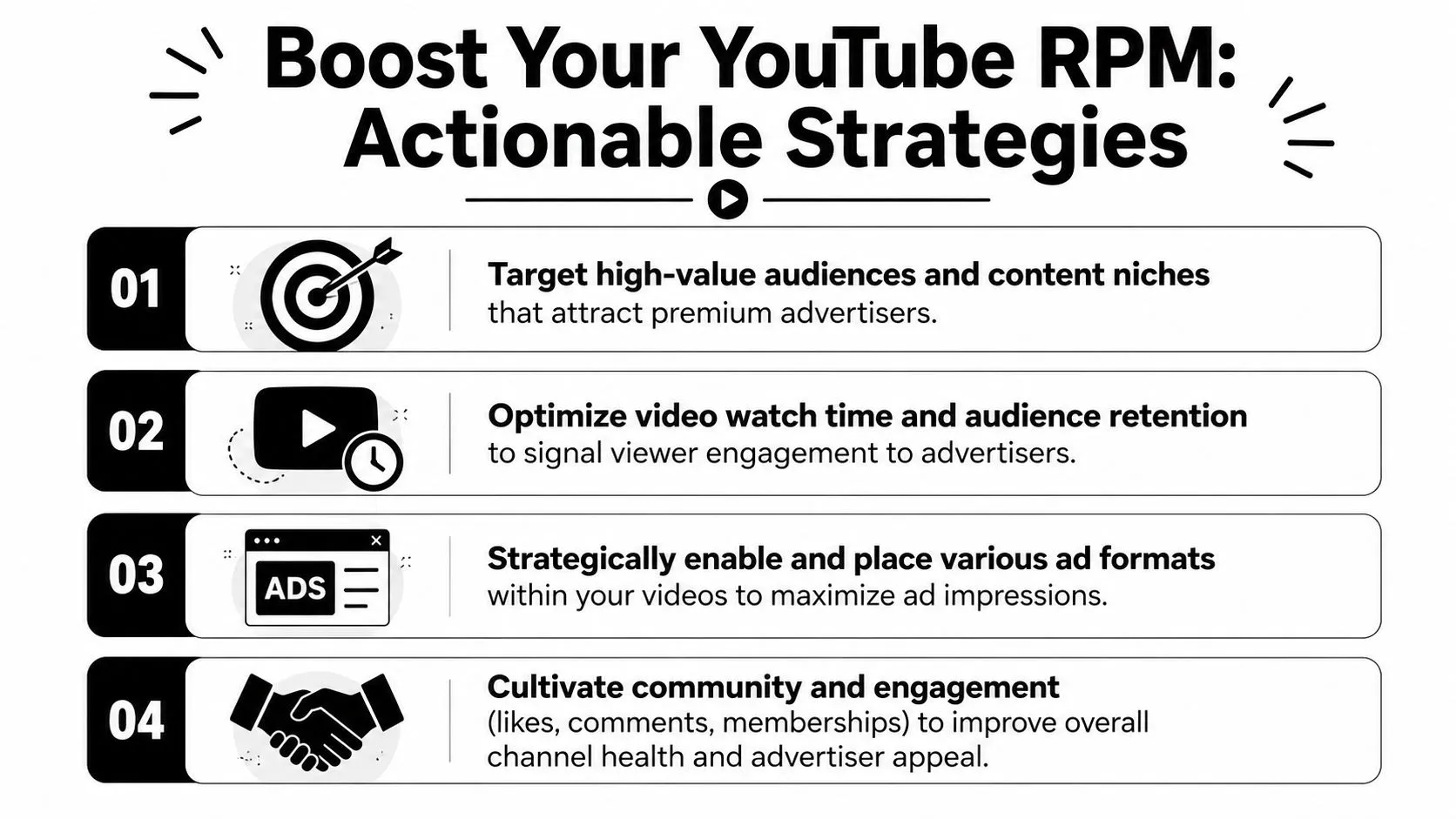
Start by looking at how your videos are structured around ad tolerance. Videos that ram ads into awkward moments train viewers to disengage. Videos that build clean transitions and natural pauses give you a better shot at keeping both retention and monetization healthy.
- Use natural breakpoints: Mid-rolls work best when they land at a transition, reveal, chapter change, or pacing reset.
- Keep the opening strong: If viewers drop before the video settles, monetization opportunity shrinks with them.
- Avoid cluttered pacing: Chaotic intros and delayed value delivery hurt both retention and ad delivery.
Build for monetization without breaking retention
A lot of creators make the mistake of adding monetization tools after the edit is done. That’s backward. Revenue should be considered during scripting and structure.
Think in segments. If a video has clear beats, it’s easier to place monetization around them without damaging the viewing experience. If the video is one long blob of information with no relief points, every ad feels more intrusive.
Field note: The best-earning videos often don’t feel “more monetized” to the viewer. They feel better structured.
Raise the revenue side of RPM
RPM improves when total revenue improves relative to views. That means ads are only part of the picture.
Channel memberships, Super Thanks, Super Chat, and Premium revenue all feed the total revenue side of the RPM formula. Creators who build community usually give themselves more ways to earn from the same audience.
That doesn’t mean begging for support in every upload. It means giving people a reason to care enough to support the channel when those features are available.
Package videos for better-quality traffic
Traffic quality matters. Better packaging often leads to better audience fit, and better audience fit tends to support stronger viewing behavior. Thumbnails are central to that. If you want to sharpen that part of your workflow, this guide to YouTube thumbnail size is a practical place to tighten the basics.
Good packaging doesn’t just increase clicks. It helps attract the right clicks. That matters because misleading traffic can inflate views while weakening the session quality that supports monetization.
A better RPM strategy looks like this:
- Script videos with clear internal chapters.
- Place ads where viewers expect a transition.
- Make the first stretch of the video worth staying for.
- Add support features that increase total revenue beyond ads.
- Improve packaging so the audience arriving is the audience most likely to stay.
That mix works better than chasing a “high RPM niche” you don’t know how to serve.
Your RPM Questions Answered
Most RPM confusion disappears once you stop treating revenue as a single ad number. A few practical questions still come up all the time.
Where do you find RPM in YouTube Studio
You can find it directly in YouTube Studio under Analytics > Revenue. That’s where YouTube places RPM alongside the other revenue metrics.
If you don’t check this tab regularly, you miss one of the most useful profitability signals on the platform.
Why is Shorts RPM so much lower
A major reason is that YouTube Shorts RPM is based on engaged views, not raw plays, as explained in this breakdown of what YouTube RPM means for Shorts. On top of that, Shorts ad revenue is pooled and shared across creators, so Shorts RPM typically lands far below long-form.
That catches a lot of creators off guard. They see big Shorts view counts and expect long-form style revenue logic. That’s not how Shorts monetization works. The engaged-view model changes the economics.
Can a video with fewer views have a higher RPM
Yes. That happens all the time.
A lower-view video can attract a more valuable audience, support better monetization density, or generate more platform-mediated revenue per viewer. A higher-view video can go broad, pick up weaker monetization behavior, and end up looking worse on earning efficiency.
Fewer views don’t automatically mean less efficient revenue. Sometimes they mean a tighter, better-monetized audience.
Is RPM the best metric for actual earnings
If your goal is understanding what your channel really earns from YouTube itself, yes. It’s the clearest single metric for that job. For a broader creator business view, you’d also track off-platform revenue separately because RPM doesn’t include it.
If you’re building a YouTube channel seriously and want stronger clicks from the right audience, Thumbo AI helps you create thumbnails that look built for YouTube instead of rushed in five minutes. Better packaging won’t fix weak content, but it does help strong videos earn the attention they deserve.