

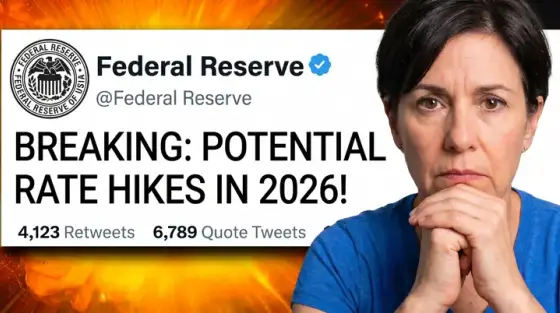
What makes a great finance thumbnail
Finance is the niche where a thumbnail has to win two arguments at once. It needs enough tension to stop the scroll - a falling chart, a big number, a worried face - and enough credibility that a viewer trusts you with a topic that touches their money. Lean too hard on hype (stacks of cash, rented sports cars, "GET RICH" in yellow) and the viewers you actually want, the ones who invest and stay subscribed, read it as a scam.
The covers that work look like the front page of a good business magazine: one clear subject, one number or claim, a restrained palette. Thumbo’s finance style pack (preselected by the button above) was built from covers like the examples here. Describe the video ("index funds, a cracked piggy bank, the market chart dipping, my worried face on the right") and the AI composes it, with your real face if you add persona photos once.
Finance thumbnail ideas
- The one number. Put the figure the video is about on the cover - "$10,000", "4%", "-38%". Money viewers scan for numbers first, and a specific number reads as research while "a lot of money" reads as hype.
- Chart with a verdict. A simple line chart with one dramatic move and a single word on it ("CRASH?", "FINALLY"). Keep it to one line and one turning point; a real dashboard is unreadable at feed size.
- The newsroom frame. For market and policy news: a central-bank building, a ticker, a headline-style text strip. Borrowing news-broadcast grammar signals timeliness - viewers expect the video to be about this week.
- Then vs now prices. What $100 bought twenty years ago next to what it buys today, or rent in one city a decade apart. Two prices side by side make inflation and compounding stories instantly concrete.
- The mistake warning. Your cautious face next to the thing to avoid - a credit card, a hidden fee line, a "guaranteed" offer stamped with a red X. Avoiding a loss is the strongest pull in personal finance.
- Portfolio reveal. "My entire portfolio at 30" with a pie chart or a blurred brokerage screen. Transparency formats build trust because the viewer feels they get to check your work.
Finance thumbnail background and text tips
Backgrounds: dark navy, deep green or charcoal, with one accent color reserved for the number or the chart line. Avoid rainbow gradients and stock-photo cash piles; they pattern-match to scam ads. If you show money, show it the way a newspaper would - a single bill, a coin stack, a receipt - not a mountain of it.
Text: one number plus at most three words, in a clean bold sans. Red for losses, green for gains, and nothing else in those two colors so the signal stays readable. Never promise a return on the image ("make 20% a month") - it attracts the wrong audience and burns trust with the right one.
Prefer to do it by hand?
All the manual steps are covered by our free browser tools: study what already works with the YouTube thumbnail downloader, crop your image to the exact 1280×720 with the thumbnail resizer, and squeeze it under YouTube’s upload limit with the 2 MB compressor. No signup, nothing leaves your browser.