You’ve probably seen this happen. A creator hits 500 subscribers, gets excited that monetization is finally open, applies to the YouTube Partner Program, gets accepted, and then stares at their dashboard wondering why ad revenue still isn’t showing up.
That confusion is common because most explanations treat YouTube monetization like one switch. It isn’t. The YouTube Partner Program has become a two-tier system, and if you don’t understand that split, you can make the wrong content decisions for months.
If you’re asking what is YouTube Partner Program, the useful answer isn’t just “it’s how creators make money.” Rather, it’s YouTube’s gatekeeping and revenue framework for deciding when your channel is ready for fan funding, when it’s ready for ad sharing, and what standards you need to maintain to stay in.
Table of Contents
- What Is the YouTube Partner Program
- YPP Eligibility The Two Tiers of Monetization
- Applying to the YPP A Step-by-Step Guide
- Common YPP Rejections and How to Fix Them
- How to Meet YPP Requirements Faster
- Your Next Steps and YPP FAQ
What Is the YouTube Partner Program
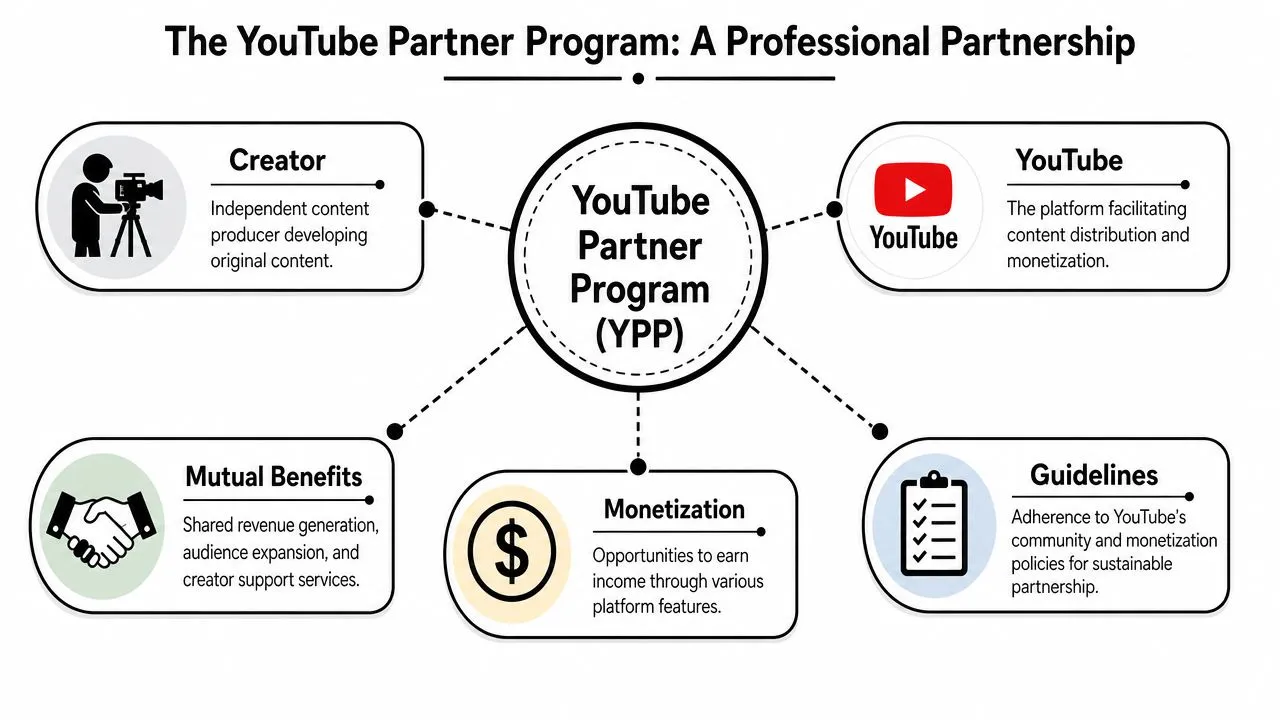
The YouTube Partner Program, usually shortened to YPP, is YouTube’s formal monetization partnership for creators. If you want the practical version of what is YouTube Partner Program, it’s the point where your channel stops being just a publishing account and starts operating inside YouTube’s revenue system.
It isn’t only about turning ads on. It’s a business relationship. You publish original content, follow platform and monetization rules, build audience trust, and YouTube gives you access to monetization tools and revenue participation.
Why YPP matters beyond the money
YPP is massive in scale. It launched in 2007 and has grown to include over 3 million creators worldwide, and Google has paid out more than $70 billion to artists, creators, and media companies over the past three years through the program, according to Adweek’s report on the YouTube Partner Program.
That scale matters because it tells you something important. YouTube isn’t casually handing out monetization. It’s running one of the biggest creator payment systems in digital media, and entry into that system comes with conditions.
Practical rule: Treat YPP like a professional approval process, not a creator milestone badge.
What the partnership actually means
Once your channel enters YPP, YouTube is effectively saying your content, account setup, and policy compliance are strong enough to participate in its monetization ecosystem. That includes revenue tools, but it also includes expectations.
The trade-off is straightforward:
- You get earning access: Monetization features become available once you qualify for the right tier.
- You accept policy scrutiny: Your content has to keep meeting monetization standards.
- You work within YouTube’s system: Payment setup, verification, channel standing, and account compliance all matter.
A lot of new creators ask what is YouTube Partner Program as if it’s a single reward at the end of growth. That’s the wrong mental model. It’s better to think of YPP as a framework that rewards channels that are both watchable and reliable.
YPP Eligibility The Two Tiers of Monetization
Many creators find themselves confused at this point. YPP doesn’t have one entry point anymore. It has two tiers, and the difference between them is the difference between “I can use monetization features” and “I can earn from ads.”
Start with the side-by-side view.
Tier 1 and Tier 2 compared
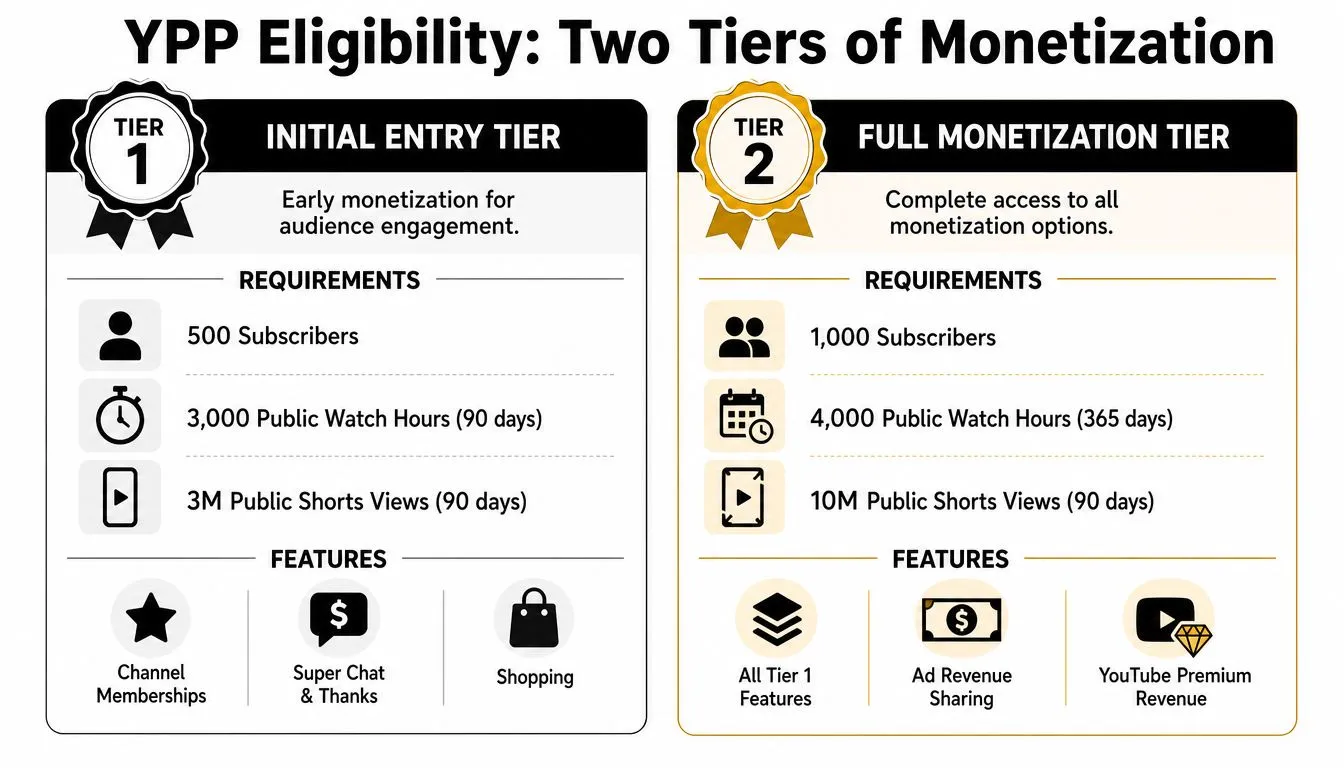
| Tier | Requirements | What it unlocks |
|---|---|---|
| Tier 1 | 500 subscribers and either 3,000 watch hours or 3 million Shorts views | Fan funding and shopping features |
| Tier 2 | 1,000 subscribers and either 4,000 watch hours or 10 million Shorts views | Full ad revenue sharing plus broader monetization access |
Those thresholds come from YouTube Creators’ explanation of Partner Program eligibility.
The critical point is this: Tier 1 is not ad monetization. It gives you access to fan funding tools and shopping features. Tier 2 is the level that enables ad revenue sharing.
That’s why creators often feel like YouTube moved the goalposts. They didn’t misunderstand the application. They misunderstood the structure.
What creators usually assume, and what actually happens
Many creators hear “you can join YPP at 500 subscribers” and translate that into “ads start at 500 subscribers.” That’s not how it works.
Here’s the cleaner way to view it:
- At 500 subscribers: you can qualify for early monetization features tied to audience support.
- At 1,000 subscribers: you can qualify for the monetization layer most creators typically mean when they say “YouTube pays me,” which includes ad revenue sharing.
If your goal is ad income, 500 subscribers is progress. It isn’t the finish line.
That’s why strategy matters. If your content plan only gets you over the first threshold, you may technically be in YPP and still feel like monetization “isn’t working.”
The real trade-off between the two tiers
Tier 1 rewards creator-audience connection. Tier 2 rewards sustained content performance at a level YouTube is willing to monetize through ads. Those are related, but they are not the same thing.
This is also where creators should start learning how channel economics work. If you’re trying to understand the money side of YouTube more clearly, it helps to learn what RPM means on YouTube because raw views alone rarely tell the full story.
A practical breakdown:
- Tier 1 fits channels with loyal early audiences: Livestreaming, niche communities, and personality-led formats can benefit here.
- Tier 2 fits channels with sustainable viewing behavior: Long-form libraries, stronger retention, and repeatable topics usually matter more.
- The gap matters: A creator can celebrate “monetization” and still earn nothing from ads because they haven’t crossed into the full tier.
There’s also an emotional trap here. Hitting 500 subscribers feels like arrival. In practice, it’s usually the point where your strategy needs to get stricter. You stop chasing any view you can get and start building the kind of watch behavior that supports full monetization.
Applying to the YPP A Step-by-Step Guide
Once your channel is eligible, the application itself is straightforward. Most delays don’t come from the clicks. They come from channels applying before the account setup is clean.
What to do before you click apply
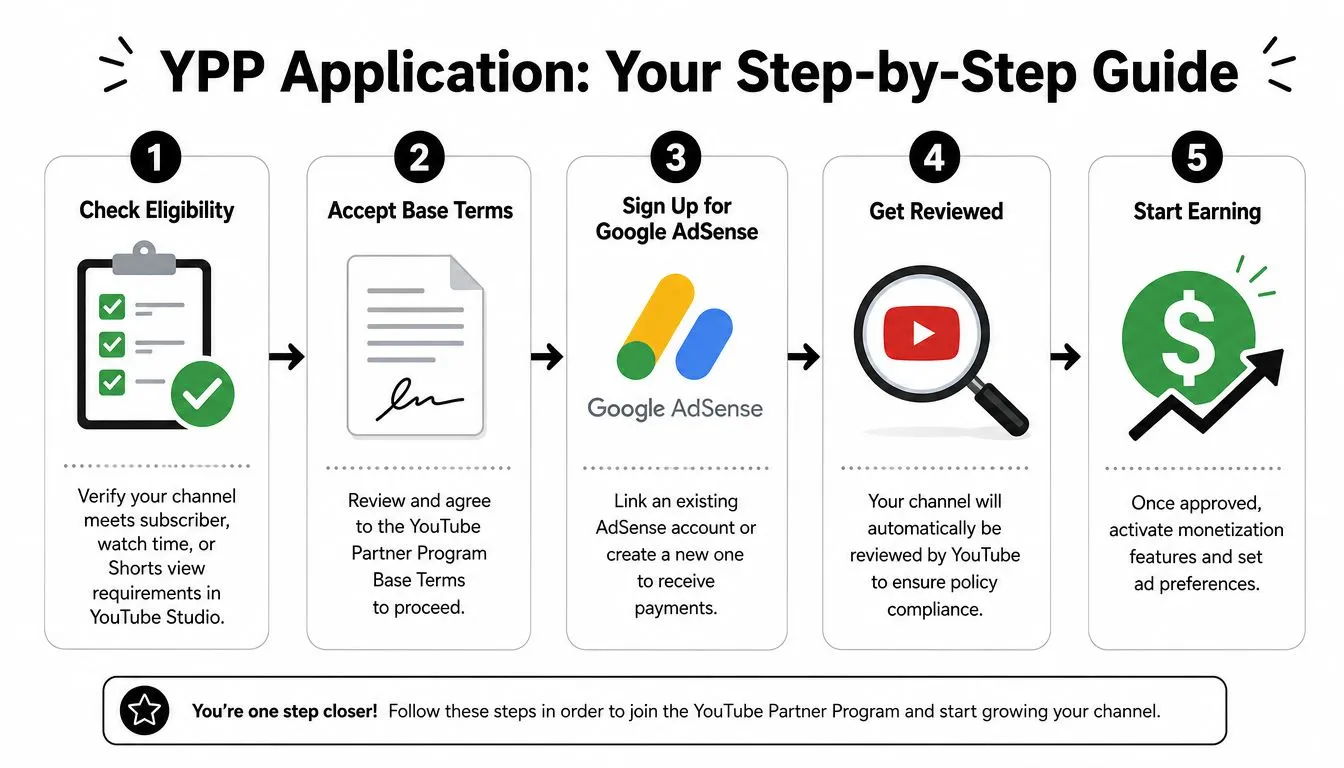
Open YouTube Studio and go to the Earn tab. That’s where YouTube shows your current progress and whether your channel can start the application.
Before you touch the forms, check your channel presentation. If your branding assets are messy, your thumbnails look inconsistent, or your uploads use oversized images that slow down your workflow, clean that up first. Even simple utility tools like an image compressor for YouTube assets can help keep your files manageable while you prep channel visuals and supporting graphics.
Use this quick pre-application checklist:
- Confirm your thresholds: Make sure the subscriber and watch metric you’re relying on are fully met inside Studio.
- Check your recent uploads: If your channel has a mixed identity, review what a human reviewer will see first.
- Review your monetizable content mix: If your strongest-performing videos are also your least original, fix that before applying.
The actual application flow inside YouTube Studio
The process usually moves in a simple sequence.
First, accept the YouTube Partner Program terms when the option becomes available in the Earn tab. After that, connect a Google AdSense account. If you already have one, make sure it’s the one you want tied to your YouTube earnings. If you don’t, create it carefully and make sure the account details match what you’ll use for payments.
Then YouTube reviews the channel.
Here’s where creators make avoidable mistakes:
- They rush AdSense setup: mismatched details can create friction later.
- They apply the moment the threshold appears: if the channel still has questionable videos, that timing can backfire.
- They ignore channel presentation: reviewers don’t look at numbers in isolation. They look at the actual content.
Apply when your channel looks coherent, not just when the dashboard says you can.
The smartest approach is to treat the review like an audit. Ask what a reviewer will conclude after opening your homepage, checking your recent uploads, and looking for originality, consistency, and compliance. If you don’t like the answer, wait and fix the channel first.
Common YPP Rejections and How to Fix Them
Hitting the thresholds only gets your application considered. Approval still depends on technical readiness and the kind of content you publish.
Some rejections are mechanical. Others are judgment calls based on how your videos are put together.
The technical requirements that block applications
A few requirements are absolute. To apply, creators must have zero active Community Guidelines strikes, must enable two-step verification on their Google Account, must have advanced features access, and must link an active Google AdSense account. If any one of those is missing, the application can be rejected automatically, as summarized in Backstage’s guide to YPP requirements.
That means you should audit account readiness before worrying about anything more abstract.
Use this order:
- Start with channel standing: If there’s an active strike, stop there and resolve that issue first.
- Check account security: Two-step verification isn’t optional.
- Confirm feature access: Advanced features should already be enabled before you apply.
- Verify AdSense status: The account needs to be active and properly linked.
If one of these is wrong, content quality won’t save the application.
The content problems that trigger rejection
The harder category is content originality. YouTube wants channels that add value, not channels that mostly rearrange material that already exists.
The common failure patterns usually look like this:
- Reused content: uploads that depend heavily on footage, clips, or material that the creator didn’t meaningfully transform.
- Repetitious content: videos that feel mass-produced, lightly varied, or too thin in original contribution.
- Low-value packaging: channels where titles and thumbnails promise one thing but the actual content doesn’t deliver much.
A practical test helps. Ask whether a real viewer would say, “This creator added a distinct point of view,” or whether they’d say, “This is mostly a repost with minor edits.”
YouTube isn’t only checking whether you made the file. It’s checking whether you made the content meaningfully yours.
Fixes usually come from strengthening authorship:
- Add commentary that changes how the material is understood.
- Build videos around your analysis, not around borrowed clips.
- Make your on-camera presence, narration, editing choices, or expertise clearly central.
- Remove weak uploads that make the channel look automated, duplicated, or assembled for volume.
Creators often focus on what they can get away with. That’s the wrong approach for YPP. Build a channel that’s obviously original at a glance, and the review process gets easier.
How to Meet YPP Requirements Faster
The fastest path to YPP usually isn’t the flashiest one. It’s the path that builds sustained watch behavior.
A lot of creators try to brute-force growth with Shorts because Shorts can move subscriber counts and visibility quickly. That can help. But if your real goal is full monetization, Shorts-only thinking can waste time.
Why long-form strategy usually wins
A key rule catches many creators off guard. Public watch hours from Shorts views do not count toward the 4,000-hour eligibility threshold for long-form ad revenue, according to YouTube Help’s monetization eligibility page.
That changes the strategy completely.
If you build your whole channel around Shorts and only aim for broad reach, you can hit audience momentum without building the watch-hour base that supports the full ad tier. That’s the trap. Shorts can create the feeling of progress while your channel remains structurally underbuilt for long-form monetization.
What actually moves a channel toward eligibility
When I audit smaller channels, the pattern is usually clear. The channels that reach monetization in a durable way don’t just get clicks. They get the right clicks from the right viewers, and those viewers stay.
Focus on these levers:
- Topic selection: Pick subjects with enough viewer intent that people are willing to stay for the answer.
- Thumbnail accuracy: Your thumbnail has one job. Attract the click from the right person without setting the wrong expectation.
- Opening retention: The first moments of a video must confirm the promise fast.
- Format consistency: Repeating a format that works is more useful than constantly reinventing the channel.
This is why thumbnail strategy matters so much. A weak thumbnail starves a good video. A misleading thumbnail gets a click but can sabotage retention. The sweet spot is a thumbnail that earns curiosity while matching the substance of the video.
If you want examples of angles and packaging approaches that fit long-form growth, study strong YouTube thumbnail ideas for different content styles. Not to copy them blindly, but to understand how visual framing shapes click quality.
Here’s the practical hierarchy I recommend:
- Build around long-form first if full ad monetization is your priority.
- Use Shorts as support, not as your only growth engine.
- Match thumbnails to actual payoff so viewers don’t bounce when the video starts.
- Make sequels to topics that hold attention, not just to topics that spike impressions.
A channel grows faster when every video teaches you what your audience will actually finish.
The creators who reach YPP cleanly usually stop chasing vanity metrics early. They start asking better questions: Which videos generate real session time? Which topics attract the most committed viewers? Which packaging choices bring in people who stay?
Those questions lead to monetization far more reliably than chasing random spikes.
Your Next Steps and YPP FAQ
If you’ve made it this far, the core point should be clear. YPP is not one monetization switch. It’s a staged system, and the gap between early access and ad revenue is where many creators get confused.
Quick answers creators usually need
Can I be in YPP and still not earn ad revenue? Yes. That’s the core two-tier reality. The entry tier at 500 subscribers allows access to fan funding and shopping, while the 1,000-subscriber tier is required for ad revenue sharing. For long-form ads, creators receive 55% of ad revenue, as explained in Uppbeat’s breakdown of the YouTube Partner Program tiers.
What if my application gets rejected?
Treat it like a channel audit result, not a personal verdict. Check technical readiness first, then review whether your content looks original, consistent, and clearly valuable.
Should I focus on Shorts or long-form to qualify?
It depends on your monetization goal. If the goal is full ad monetization, long-form usually gives you a more reliable path because the channel has to prove sustained viewing depth, not just fast reach.
Does hitting the threshold mean I should apply immediately?
Not always. If your library still contains weak or questionable uploads, clean the channel first. A slightly delayed application is often better than a rushed rejection.
The smartest next move
Open your channel and sort your videos into three groups:
- Keep and build on: original videos with clear audience pull
- Improve: videos with decent topics but weak packaging or retention
- Hide or move past: uploads that make the channel look thin, repetitive, or borrowed
Then decide which tier you’re targeting.
If you’re below 500 subscribers, build proof of audience fit. If you’re between 500 and 1,000, stop thinking “I’m monetized now” and start thinking “How do I cross into ad-sharing territory?” That mindset shift alone saves creators a lot of time.
The right next step is rarely “upload more.” It’s usually “publish more of the right format, for the right viewer, with better packaging and stronger retention.”
If you want help improving the part of YouTube growth that most directly affects clicks and watch behavior, try Thumbo AI. It’s built for creators who want faster, sharper thumbnail creation without turning their workflow into a design project.