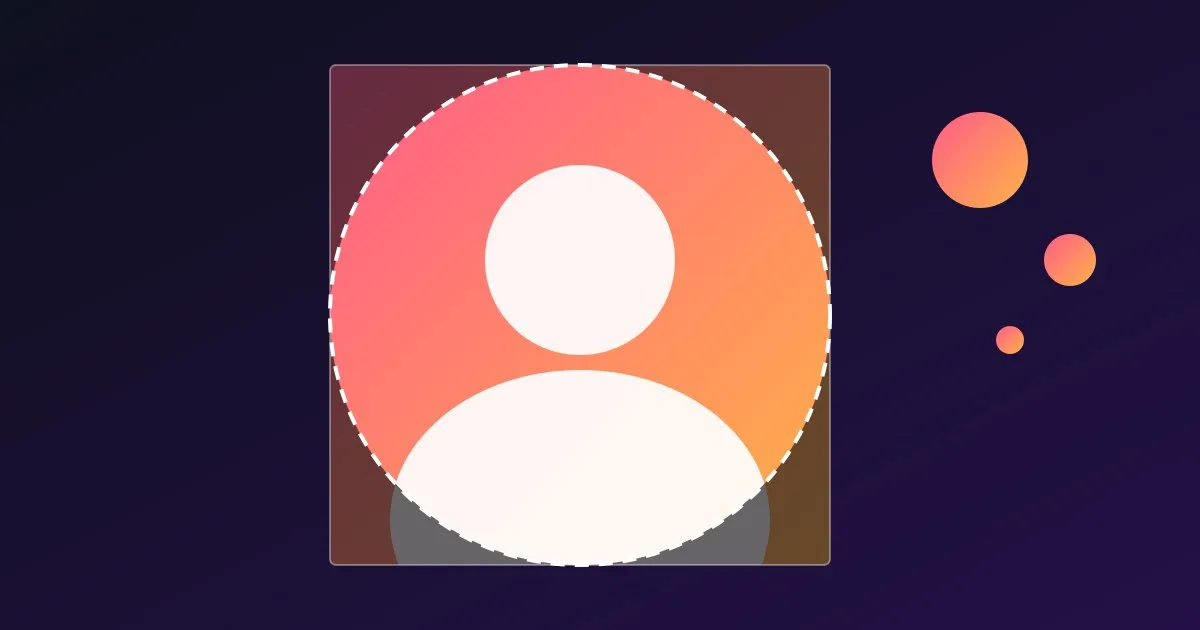
A TikTok pfp (profile picture) is the small round photo that sits next to every video you post, every comment you write and every search result you show up in. Viewing it at a readable size is a different story: in the app it opens as a modest enlargement, and a screenshot of it is soft. This guide shows how to view and save a TikTok profile picture in full size, what we measured about the sizes TikTok actually stores, how to prepare a square image that survives the circle crop, and how to keep your TikTok photo consistent with your YouTube channel.
Table of Contents
- How to View a TikTok Profile Picture in Full Size
- How to Save a TikTok PFP
- What Size Is a TikTok Profile Picture
- The Circle Crop and the Safe Area
- How to Change Your TikTok Profile Photo
- What Makes a PFP Work at Tiny Sizes
- Match Your TikTok and YouTube Branding
- FAQ
How to View a TikTok Profile Picture in Full Size
There are three ways, and only one of them gives you the real file.
- Tap the picture in the app. Open the profile and tap the photo. TikTok shows a larger version, which is fine for a quick look but still a screen-sized view, not a file you can keep.
- Open the profile in a browser. On tiktok.com the photo is drawn small and cropped to a circle, and right-clicking it will not reliably give you the full-size file.
- Paste the username into a downloader. The free TikTok Profile Picture Downloader takes a username (like
@tiktok) or a profile link, asks TikTok’s public profile page for the account’s avatar, and shows it next to the real pixel size of each version it finds. You can use@name, plainname, atiktok.com/@namelink, or a link with extra tracking text after it.
The tool reads only the public profile page TikTok shows to a visitor who is not logged in, so it cannot see anything behind a login, and it says so plainly when TikTok does not answer. After a lookup the page address ends in ?u=username, so you can copy the link and share it, and the page also has a “Check your own photo” box that shows your picture as a circle and warns if it is not square or under 1080 x 1080.
How to Save a TikTok PFP
Saving is one click once the picture is on screen: press the download button on the size you want. The image downloads straight from TikTok’s own image servers to your device, and we do not re-compress it.
Download the file rather than bookmarking the image: links from TikTok are signed and expire after a while. And pick the largest size for anything you will resize, because scaling a big image down is clean while scaling a small one up is what makes a picture look blurry in a media kit. A screenshot captures only what your screen shows, usually a few hundred pixels plus interface edges.
What Size Is a TikTok Profile Picture
TikTok does not publish one clear pixel requirement that we can point to, so we measured instead. On 2026-11-20 we fetched the public profile of the official @tiktok account and found that TikTok stores each avatar at three sizes:
| Version | Size |
|---|---|
| Largest | 1080 x 1080 pixels |
| Medium | 720 x 720 pixels |
| Small | 100 x 100 pixels |
All three are square JPEGs. That is a snapshot of one account on one day, not a rule from TikTok, but it tells you what a practical target looks like: the biggest version TikTok keeps is a 1080 x 1080 square. Our recommendation is to upload a square image of at least 1080 x 1080 pixels, so nothing TikTok stores for you has to be scaled up from a smaller file.
The Circle Crop and the Safe Area
TikTok shows your profile photo as a circle. You upload a square; the circle is cut from it when the picture is displayed. The four corners disappear, which is about 21.5 percent of a square’s area.
The practical rule is to keep everything that matters inside the circle:
- On a 1080 x 1080 square, the circle is 1080 pixels across. As our own rule of thumb (not a TikTok spec), keep faces, letters and logos inside the middle 760 pixels or so (about 70 percent), which leaves breathing room so nothing touches the edge.
- Center the subject. A face that sits low in the square gets its chin clipped once the circle is applied.
- Do not put text near the corners. It will be cut.
The file you download is the full square, so you will see the corners the circle hides.
How to Change Your TikTok Profile Photo
The steps below are the common path in the TikTok app; menus move around between releases, so look for the matching labels if yours differ.
- Open the app and go to your Profile tab.
- Tap Edit profile.
- Tap Change photo (or tap the picture itself).
- Choose a photo from your library or take a new one, then adjust the crop and confirm.
- Save your changes.
If you still see the old picture after saving, close and reopen the app.
What Makes a PFP Work at Tiny Sizes
Your photo spends most of its life as a small circle in a comment thread or a feed, far smaller than the 1080 pixels you uploaded. A few things hold up at that size:
- One clear subject. A tight crop on a face, or one bold shape or letter, reads. A group shot or a busy scene turns to noise.
- High contrast against the background. TikTok is used in light and dark modes, so a picture that is very light or very dark overall can vanish into the page. Mid-contrast edges and a defined subject survive both.
- A readable face. If you are the brand, your face is the most recognizable thing you have. Look at the camera and keep your eyes visible.
- No small text. Anything beyond a few letters is unreadable in a small circle.
- Good light. Soft, even light from the front beats a dark selfie.
A quick test: shrink the image to thumbnail size and look at it from arm’s length. If you cannot tell what it is, simplify it.
Match Your TikTok and YouTube Branding
If you post on TikTok and YouTube, your profile photo is the first thing a viewer can recognize across both. The goal is that someone who sees your face or logo in a TikTok comment, then sees your YouTube channel in search, links the two without thinking.
- Use the same image where you can. One square master, exported once, goes on every platform. If you need to rebuild it, start from the largest file you have. If you lost the original, pull your own current avatar with the downloader and use that as the source.
- Keep the palette consistent. Pick two or three colors and use them in your avatar, your banner and your thumbnails. Colors are what people remember when a face is small.
- Check the YouTube side too. YouTube has its own size rules and circle crop; our guide to the YouTube profile picture size covers them, and the YouTube Profile Picture Downloader pulls any channel’s avatar the same way the TikTok tool does.
- Let your thumbnails echo your avatar. If your face is your avatar, use the same face and background color on your thumbnails; if it is a logo, reuse its color as the accent. A feed of related-looking videos is easier to recognize than a feed of one-offs.
If you reuse TikToks on YouTube Shorts, the TikTok Thumbnail Downloader saves a public TikTok’s cover when TikTok shares it, a handy reference for rebuilding a vertical thumbnail at full size.
FAQ
How do I see a TikTok profile picture in full size?
Paste the username or profile link into a TikTok profile picture downloader such as the free tool on Thumbo. It shows the largest version TikTok serves for that account, with the real pixel size, and lets you download it. In the app you can tap the photo for a bigger view, but that is not a file you can keep.
What size is a TikTok profile picture?
TikTok does not publish a single number we can cite. When we checked the public @tiktok profile on 2026-11-20, TikTok stored the avatar at 1080 x 1080, 720 x 720 and 100 x 100 pixels, all square JPEGs. Uploading a square of at least 1080 x 1080 is a safe target.
Is a TikTok profile picture square or round?
You upload a square and TikTok displays it as a circle. Keep faces and logos in the middle of the image so the circle crop does not clip them.
Can I download the profile picture of a private account?
Usually yes. TikTok’s logged-out profile page normally shows the profile picture even when the account is private, and the tool reads exactly that page. It cannot see anything behind a login, and if TikTok shows a particular account to nobody who is logged out, the tool says so.
Why does the downloader say it could not get the picture?
Either the username is misspelled, the account does not exist or was banned, or TikTok did not answer our request. TikTok sometimes limits automated lookups, so wait a few minutes and try again. If it keeps failing for a username you know exists, the profile may be hidden from logged-out visitors.
Is it okay to reuse someone’s TikTok profile picture?
For reference or credit, usually yes. It belongs to the account owner, so never use it to imitate them or as your own image.