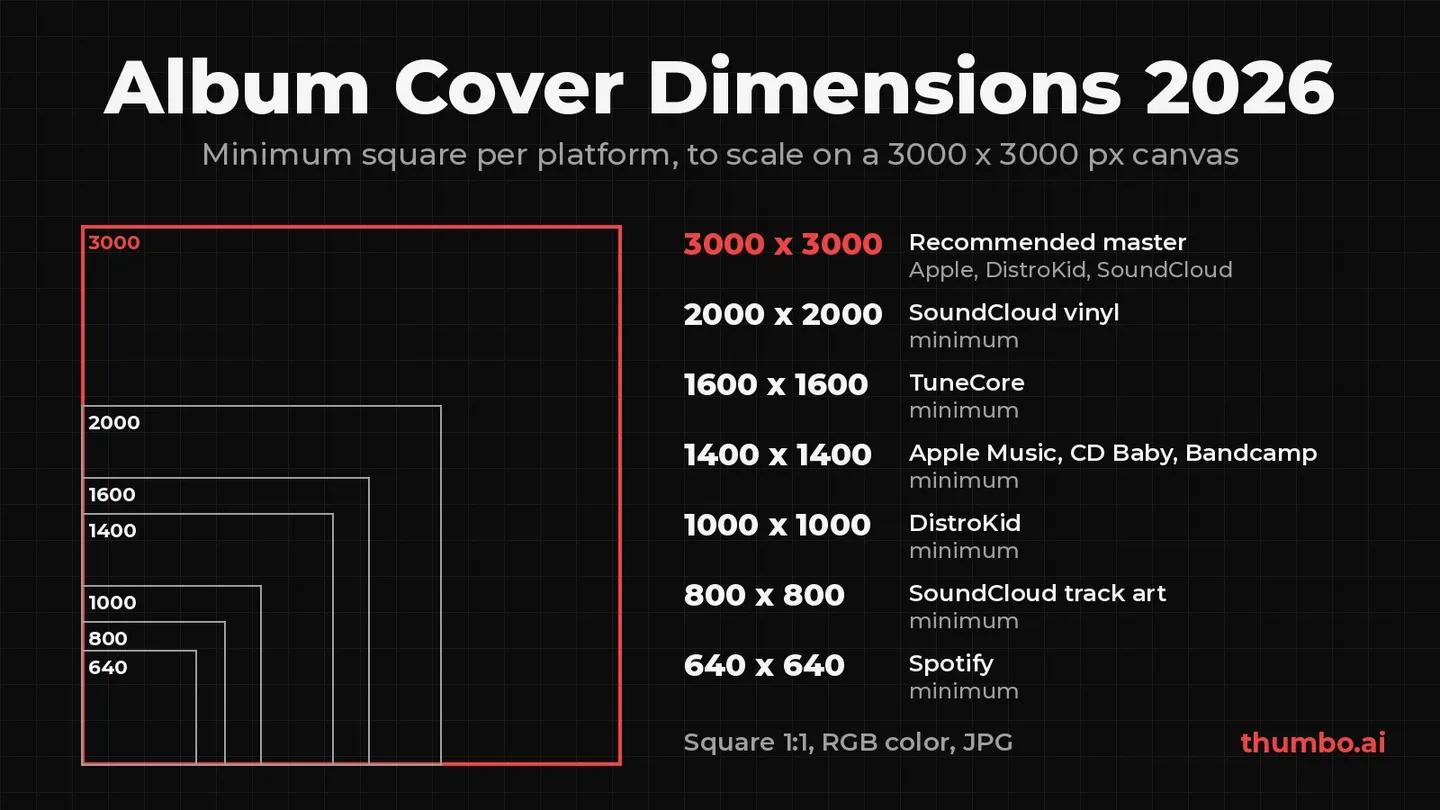
The standard album cover dimensions are 3000 x 3000 pixels: a perfect 1:1 square in RGB color, saved as a high-quality JPG. That one file clears every streaming spec in this guide. Apple Music recommends 3000 x 3000 or larger with a 1400 x 1400 minimum (Apple), DistroKid calls 3000 x 3000 ideal with a 1000 x 1000 minimum (DistroKid Help), and Spotify accepts any square between 640 and 10000 pixels on a side (Spotify for Artists).
The confusing part is that guides quote different minimums for the same store, and some quote numbers no platform publishes. This guide takes every number from the platform’s own help page, explains which minimum actually applies to your upload, lists the content rules that get covers rejected, and gives the print sizes for CD and vinyl.
Table of Contents
- Album Cover Dimensions at a Glance
- Album Cover Size by Platform
- Why Guides Disagree on the Minimum
- File Format, Color and DPI
- What Gets an Album Cover Rejected
- Designing a Cover That Reads at Thumbnail Size
- Print Sizes for CD and Vinyl
- One Cover, Every Format: YouTube and Spotify Canvas
- How to Export a Cover Step by Step
- Common Album Cover Mistakes
- Album Cover Action Plan
- FAQ
Album Cover Dimensions at a Glance
| Spec | Use this | Why |
|---|---|---|
| Size | 3000 x 3000 px | Above every minimum below, and exactly CD Baby’s maximum |
| Shape | 1:1 square | Spotify, Apple Music and Bandcamp all require a square |
| Color | RGB (sRGB) | Spotify asks for sRGB; DistroKid, CD Baby and TuneCore ask for RGB, not CMYK |
| File type | JPG | Accepted by Spotify, Apple Music, DistroKid, CD Baby, TuneCore and SoundCloud |
| File size | Under 25 MB (under 2 MB for SoundCloud track art) | CD Baby’s cap; SoundCloud’s track artwork limit |
| DPI | 300 if the art will be printed | Pixels decide quality on screens; DPI matters for print |
If you remember one line: 3000 x 3000 px, square, RGB, JPG, and no URLs, logos or prices on the art.
Album Cover Size by Platform
Every row below comes from the platform’s own help page, read on October 9, 2026.
| Platform | Minimum | Recommended or maximum | Formats | Other limits |
|---|---|---|---|---|
| Spotify | 640 x 640 | Up to 10000 x 10000, “the highest resolution available” | TIFF, PNG, JPG | sRGB, 24 bits per pixel, no upscaling |
| Apple Music | 1400 x 1400 | 3000 x 3000 or larger | JPEG or PNG (100% quality) | Must be square |
| DistroKid | 1000 x 1000 | 3000 x 3000 ideal | .jpg | RGB, one image only |
| CD Baby | 1400 x 1400 | 3000 x 3000 maximum | PNG, GIF, JPG, JPEG | RGB, 72-300 dpi, under 25 MB |
| TuneCore | 1600 x 1600 | Not stated | JPG or GIF | RGB |
| Bandcamp | 1400 x 1400 | ”Bigger is better” | Not stated | Square |
| SoundCloud track art | 800 x 800 | Not stated | .jpg or .png | Under 2 MB |
| SoundCloud vinyl | 2000 x 2000 | 3000 x 3000 | PNG or JPEG | RGB, 300 dpi, under 300 MB |
Spotify
Spotify’s cover art requirements are the loosest on size: a 1:1 image “between 640px - 10000px wide and tall” in TIFF, PNG or JPG. The stricter lines are about quality. Spotify asks for “the highest resolution available”, says “Don’t upscale images”, and wants an sRGB color space at 24 bits per pixel with color profiles applied directly, because it does not support embedded color profiles or orientation metadata.
In practice, most artists never upload to Spotify directly. The cover goes to a distributor, and the distributor’s spec is the one your file has to pass first.
Apple Music
Apple’s delivery guidelines recommend 3000 x 3000 pixels or larger, set a 1400 x 1400 minimum, require a square, and accept JPEG or PNG at 100% quality. Apple also adds content rules: original art is preferred, the art must not be misleading (for example, it cannot prominently feature an artist who does not perform on the album), and advertising of any kind is not accepted, including URLs, logos and dates for future releases.
DistroKid, CD Baby and TuneCore
These are the specs that decide whether your upload goes through:
- DistroKid: .jpg, at least 1000 x 1000, ideally “perfectly square, and 3000x3000 pixels”, in RGB. Smaller or rectangular art gets adjusted automatically, with “a risk that our fixed version won’t look exactly as you intended”. The file must be one image, not multiple pages of art, and the same artwork should not be reused across releases (DistroKid Help).
- CD Baby: 1400 x 1400 minimum and 3000 x 3000 maximum, PNG, GIF, JPG or JPEG, 72-300 dpi (300 is best), under 25 MB, RGB not CMYK. If the artist name and release title appear on the cover, they must match the submission exactly, and a plain color square with no text may not be accepted (CD Baby Help).
- TuneCore: JPG or GIF, a perfect square, at least 1600 x 1600, RGB color mode (black and white images included). Art headed for Amazon’s on-demand physical CDs needs 300 DPI (TuneCore).
Bandcamp and SoundCloud
Bandcamp’s design tutorial asks for square album art of at least 1400 x 1400 (“bigger is better”) and notes that jewel case booklet designs may need trimming to fit the square.
SoundCloud has three different numbers depending on where the art goes:
- Track artwork on SoundCloud itself: .jpg or .png, at least 800 x 800, under 2 MB (SoundCloud Help).
- Changing art on a live distribution release: at least 3000 x 3000, .jpg or .png (SoundCloud Help).
- Vinyl distribution: square, 2000 x 2000 minimum, 3000 x 3000 recommended, RGB, 300 dpi, PNG or JPEG under 300 MB (SoundCloud Help).
The 2 MB track art cap is the one that catches people. A detailed 3000 x 3000 cover saved at maximum JPG quality can land above it. The free image compressor lowers JPG quality step by step until the file fits under 2 MB, keeps the full 3000 x 3000 dimensions whenever quality alone gets there, and runs in the browser without uploading the file.
Why Guides Disagree on the Minimum
Search for album cover requirements and you will see 640, 1000, 1400, 1500, 1600 and 3000 quoted as the minimum, sometimes for the same store. Three things cause the mess:
- Store minimum vs distributor minimum. Spotify itself accepts 640 x 640, but you rarely upload to Spotify directly. DistroKid’s floor is 1000, CD Baby’s and Apple’s is 1400, TuneCore’s is 1600. The number that binds is the strictest one on your route to the store.
- Distributors restate store rules in their own words. TuneCore’s cover art guide says an album cover “must be in a 1500×1500 pixel format to get your music on Spotify”, while Spotify’s own page lists 640 px as the lower bound. Both can be true for a TuneCore upload, since TuneCore’s own 1600 minimum is higher than either.
- Minimum is not the same as recommended. Apple’s minimum is 1400, but it recommends 3000 or larger. Guides that print only one number pick whichever suits their table.
The way out is simple: skip the minimums entirely. A 3000 x 3000 file is above every minimum in this guide, is exactly CD Baby’s maximum, and meets the 3000 x 3000 that SoundCloud asks for when artwork on a live release is changed. It is the one size that every spec here accepts.
File Format, Color and DPI
Format. JPG is the safe default. DistroKid asks for .jpg, TuneCore lists JPG or GIF, and every other platform here accepts JPG too. PNG works on Spotify, Apple Music, CD Baby and SoundCloud, but not on every distributor, so keep a JPG export of the final cover.
Color. Screens use RGB. Spotify asks for sRGB with 24 bits per pixel; DistroKid, CD Baby and TuneCore all specify RGB, and CD Baby spells out “not CMYK”. If a design file was set up for print in CMYK, convert the export to RGB before uploading. DistroKid notes that CMYK or grayscale files can trigger an upload error and that re-saving in RGB fixes it.
DPI. On a screen, only pixel dimensions matter: a 3000 x 3000 file looks the same at 72 or 300 dpi. DPI only counts for print. CD Baby accepts 72-300 dpi and calls 300 the best, TuneCore requires 300 DPI for on-demand CDs, and SoundCloud’s vinyl spec asks for 300 dpi. Setting 300 in the export costs nothing.
Do not upscale. Spotify says it directly, and SoundCloud’s vinyl guidelines reject art that is a scaled-up version of a smaller image. Enlarging a 1000 px image to 3000 px adds pixels but no detail. If the source is small, recreate the art at full size.
What Gets an Album Cover Rejected
Size errors show up the moment you upload. Content problems are easier to miss, because the file itself is technically fine. These rules come from DistroKid, TuneCore, Apple and CD Baby:
| Element | Who rejects it | Fix |
|---|---|---|
| Website URLs, QR codes, social handles | DistroKid (all three), TuneCore (URLs, handles), Apple (URLs) | Put links in the release description, not the art |
| Prices, “new”, “latest single”, “limited edition”, “exclusive” | DistroKid (prices), TuneCore (prices and time words) | Keep the cover timeless |
| Streaming service or social media logos | DistroKid, TuneCore, Apple | No third-party logos at all |
| ”CD”, “Compact Disc”, “Digital Exclusive” | DistroKid, TuneCore | Do not reference a format |
| Blurry, pixelated, rotated or cut-off images | DistroKid, TuneCore, Apple | Export from a full-size source |
| Unlicensed or stock photos | DistroKid | Use original art or art you hold the rights to |
| Text that does not match the artist name or title you submitted | CD Baby | Match the metadata letter for letter |
| A featured artist who does not perform on the release | Apple | Only show performing artists |
| The same artwork as an earlier release | DistroKid | Make each release visually distinct |
| Image squeezed into one corner with white space around it | TuneCore | Fill the whole square |
DistroKid also lists nudity, and SoundCloud’s vinyl guidelines rule out offensive imagery. The pattern behind all of these: the cover is a piece of art, not an ad, and stores treat anything that reads as marketing as a reason to reject.
Designing a Cover That Reads at Thumbnail Size
The cover is uploaded at 3000 px, but most listeners first see it as a small tile in a playlist, a search result or a lock screen. Design for that small size first:
- One focal point. A face, an object or a single shape. Three competing elements turn into noise at playlist size.
- Big, short type, or none. Artist name and title are optional on most stores (CD Baby is the exception that leans toward including them). If you add text, keep it to a few words in a heavy typeface. The guide to the best fonts for YouTube thumbnails covers typefaces that survive small sizes, and the same logic applies to covers.
- Strong contrast. Light subject on a dark field or the reverse. Mid-tone on mid-tone disappears in dark mode.
- Keep text away from the edges. A margin of roughly a tenth of the width on each side keeps titles clear of any crop, rounded corner or overlay a player might add.
- Check it small. Shrink the export to a tile about the size of a thumbnail on a phone. If the title becomes unreadable, cut words or make it bigger.
Print Sizes for CD and Vinyl
Print is a separate job: sizes are in inches or millimeters, color is CMYK, and resolution is 300 dpi at the final size.
| Format | Print size | At 300 dpi |
|---|---|---|
| CD jewel case front insert | 4.75 x 4.75 in, plus 0.125 in bleed per side | 1425 px trimmed, 1500 px with bleed |
| CD sleeve | 5 x 5 in, plus 0.125 in bleed per side | 1500 px trimmed |
| 12 inch vinyl sleeve, 3 mm spine (flat template) | 633 x 315 mm | 315 mm tall: about 3720 px |
CD sizes come from 4OVER4’s disc packaging guide, which also asks for text to stay 0.125 in inside the trim. The vinyl figure is from Unchained’s pressing templates, which advise setting the document to CMYK, keeping placed images at 300 dpi at final size, and never scaling the template, because resizing moves the trim, fold and spine away from where the plant cuts.
The useful takeaway: a 3000 px master covers a CD with room to spare, but not a 12 inch sleeve. Printed across a 315 mm panel, 3000 px works out to about 242 dpi. If vinyl is in the plan, build the master at about 3720 px or more from the start, then export a 3000 x 3000 copy for streaming. Spotify accepts up to 10000 px and Apple asks for 3000 or larger, but CD Baby caps uploads at 3000, so keep both files.
One Cover, Every Format: YouTube and Spotify Canvas
The square cover is only one of the images a release needs. Two more come up for most artists:
YouTube. An official audio upload, visualizer or lyric video needs a 16:9 thumbnail, and a square cover does not fit that frame. The free YouTube thumbnail resizer handles the conversion: drop in the cover, choose the YouTube thumbnail preset (1280 x 720), and pick Fit (blurred edges). The whole cover stays visible in the middle and the empty sides fill with a blurred copy of the art, which looks intentional instead of letterboxed. The YouTube thumbnail size guide has the full YouTube specs.
For videos that are not straight releases, such as studio sessions, breakdowns and reactions, YouTube rewards a different thumbnail language: a face, an emotion and a clear claim. The music thumbnail maker explains how the two styles differ, and Thumbo’s AI thumbnail generator builds 16:9 YouTube thumbnails from a video topic and a style. It makes YouTube thumbnails, not square store covers, so the album art itself still comes from your designer or your own file. Before posting full songs or covers on YouTube, the guide to songs on YouTube and copyright explains what triggers a claim.
Spotify Canvas. Canvas is a short vertical loop that, in Spotify’s words, “appears in the Now Playing View instead of your album artwork”. Spotify’s Canvas guidelines ask for a 9:16 file, 3-8 seconds long, between 720 and 1080 px tall, as an MP4 or JPG. The square cover is still required for the release; Canvas only takes over that one screen, so build it from the same art to keep the release recognizable.
How to Export a Cover Step by Step
- Set up the canvas. Create a 3000 x 3000 px document in RGB at 300 dpi. For a vinyl release, start larger (about 3720 px or more) and keep that file as the master.
- Design inside a margin. Keep text and key shapes about a tenth of the width away from each edge.
- Check the content rules. No URLs, handles, QR codes, prices, store or social logos, format words or time words. If artist name and title appear, match the metadata exactly.
- Preview it small. Shrink a copy to phone-tile size and confirm the focal point and any text still read.
- Export the store file. Save as JPG at high quality, 3000 x 3000, RGB, with any embedded color profile converted into the image rather than attached.
- Make the SoundCloud copy if needed. If the JPG is over 2 MB, run it through the compressor for SoundCloud track art.
- Make the YouTube version. Convert the square to a 1280 x 720 thumbnail for the release’s YouTube upload.
- Keep the master. Store the layered source file. Art changes on a live release go through the distributor’s process: SoundCloud, for example, asks for a 3000 x 3000 file for artwork changes on a live release.
Common Album Cover Mistakes
| Mistake | What happens | Fix |
|---|---|---|
| Uploading a non-square image | Rejected, or adjusted automatically by the distributor | Crop to 1:1 yourself |
| Upscaling a small image to 3000 px | Soft, blurry cover; can be rejected | Rebuild the art at full size |
| Exporting in CMYK | Upload error on DistroKid; CD Baby asks for RGB, not CMYK | Export in RGB |
| Uploading 4000 px to CD Baby | Above its 3000 x 3000 maximum | Export a 3000 x 3000 copy |
| 3000 px master for a 12 inch sleeve | About 242 dpi in print | Build the master at about 3720 px or more |
| Social handle or URL on the cover | Rejected by DistroKid, TuneCore and Apple | Move links to the description |
| Title on the art differs from the metadata | Rejected by CD Baby | Match text exactly |
| Reusing last single’s artwork | DistroKid may reject duplicates | New art per release |
| Thin text near the edges | Unreadable or clipped at tile size | Heavy type, inside the margin |
Album Cover Action Plan
- Build a square master at 3000 x 3000 px (larger if vinyl is planned), RGB, 300 dpi.
- Keep one focal point and few or no words, all inside a margin.
- Strip anything that reads as marketing: URLs, handles, logos, prices, “new”.
- Check it at phone-tile size.
- Export a 3000 x 3000 JPG for your distributor.
- Make a sub-2 MB copy for SoundCloud track art and a 1280 x 720 version for YouTube.
- Keep the layered master for future edits and print.
FAQ
What size should an album cover be?
3000 x 3000 pixels, square, RGB, saved as JPG. That size is above every platform minimum (Spotify 640, DistroKid 1000, Apple Music and CD Baby 1400, TuneCore 1600) and is exactly CD Baby’s maximum.
What is the minimum album cover size for Spotify?
Spotify’s own page lists 640 x 640 pixels as the lower bound and 10000 x 10000 as the upper bound. Your distributor’s minimum is usually higher (1000 on DistroKid, 1400 on CD Baby, 1600 on TuneCore), so that is the number that applies to your upload.
Is 1400 x 1400 too small for an album cover?
It is the minimum for Apple Music, CD Baby and Bandcamp, so it uploads, but Apple recommends 3000 x 3000 or larger. Start at 3000 so the art stays sharp on large screens and you never have to redo it later.
Should album art be 72 or 300 DPI?
For streaming, DPI does not change anything: only the pixel size counts. Set 300 dpi anyway, because CD Baby calls it best, and print on CD or vinyl requires 300 dpi at the final size.
Can album covers have text?
Yes. The artist name and title are fine, and CD Baby leans toward including them, as long as they match your release metadata exactly. What gets rejected is promotional text: URLs, social handles, prices, and words like “new” or “exclusive”.
What size is a vinyl album cover?
A 12 inch record sleeve with a 3 mm spine uses a flat template of 633 x 315 mm in Unchained’s pressing templates. At 300 dpi, a 315 mm panel needs about 3720 px, so build vinyl art larger than the usual 3000 px streaming master and use the pressing plant’s own template.