You upload a video using a popular song, go to bed, and wake up to a YouTube notification. The video is still online, but a copyright notice has appeared. The monetization icon has changed, and the message says a rights holder is claiming part of the audio. You may be wondering whether you’ve lost the video, lost the revenue, or received a copyright strike.
Those are different outcomes. A Content ID claim often routes monetization or tracking to a rights holder without removing the video, while a formal takedown can remove the upload and create a strike. Shorts add another layer of confusion because songs selected through the Shorts audio library follow a different process from music added to a long-form video.
The practical way to understand songs on YouTube copyright is to stop treating every notice as a channel emergency. First identify which rights are involved, then determine what YouTube detected, what policy the rights holder selected, and whether you have a defensible reason to challenge it.
Table of Contents
- The Moment Every Creator Suddenly Googles This
- How Copyright Actually Works for Music on YouTube
- Content ID and the Automation Behind Most Claims
- Claims, Takedowns, and Strikes Explained
- Fair Use, Reaction Videos, and the Transformative Test
- Licensing Options for Creators Who Want to Use Songs
- A Pre-Upload Checklist and Post-Claim Playbook
- What This Means for Creators Going Forward
The Moment Every Creator Suddenly Googles This
The notification usually arrives after the creative work is finished. You’ve edited the cuts, balanced the voiceover, designed the thumbnail, and added a song that makes the opening feel energetic. The upload goes live, viewers begin arriving, and then YouTube Studio shows a copyright notice attached to the video.
The first mistake is assuming the notice explains the consequence. It doesn’t always. A claim might leave the video available while directing advertising revenue to a label, publisher, or other rights holder. It might track viewing activity, restrict the video in particular places, or block it altogether under the claimant’s policy. A claim also isn’t the same thing as a copyright strike.
Separate the fear from the actual decision
Start with three questions:
- What happened to the video? Is it still public, restricted, muted, or blocked?
- What happened to monetization? Is the claimant collecting revenue, sharing it under a relevant license, or tracking the upload?
- What rights are being asserted? The notice may identify a sound recording, a composition, or another piece of protected material.
That distinction matters because the right response changes with each answer. If you used a song knowingly and the rights holder has chosen to monetize the upload, accepting the claim may be more sensible than disputing it. If you own the recording or have written permission that covers YouTube use, a dispute may be appropriate. If the video has been removed through a formal complaint, you’re dealing with a more serious process than an ordinary Content ID notice.
Practical rule: A claim is a decision point, not a verdict about your channel.
The rest of this guide turns the notification into a workable playbook. You’ll learn how music rights are split, how automated matching works, why claims and strikes have different consequences, where fair use fits, and which music sources reduce avoidable problems. You’ll also see why the key question often isn’t “Will I get claimed?” but “Who gets paid if I use this song?”
How Copyright Actually Works for Music on YouTube
A song usually has two separate copyright layers. The first protects the composition, meaning the melody, lyrics, and underlying musical work. The second protects the sound recording, meaning the particular recorded performance you hear in a released track.
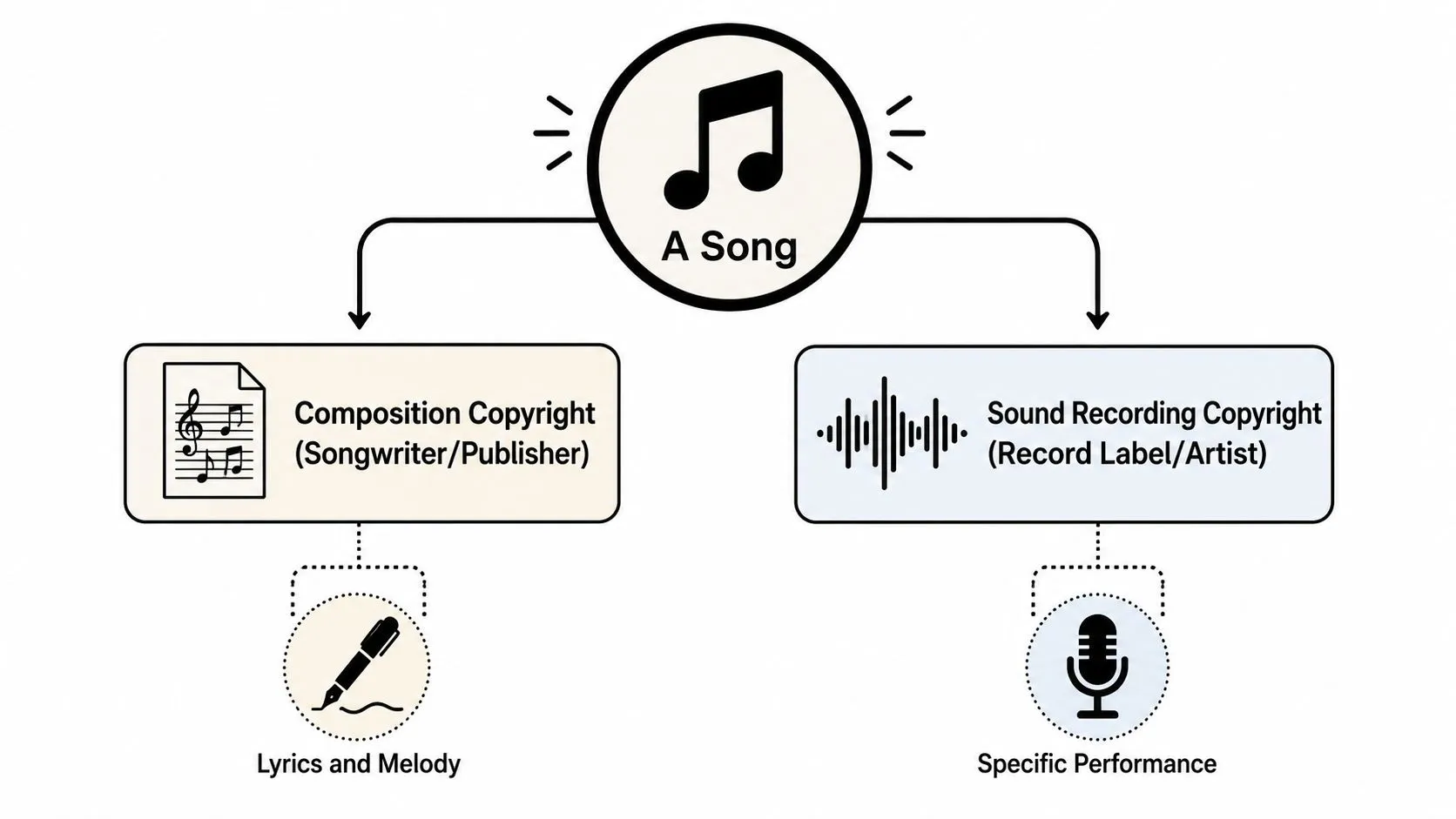
Think of those rights as a two-key lock. A label may control the master recording, while a songwriter, publisher, or collecting society controls the composition. Recording your own cover can give you rights in your new recording, but it doesn’t automatically give you control over the original melody and lyrics. Using the original recording in a video can require permission for the recording as well.
The three actors in the system
You, the creator, decide what audio to place in the video and whether you have permission to use it. Your intention matters to your creative goal, but it doesn’t replace a license or automatically prevent a match.
The rights holder may be a record label, artist, songwriter, publisher, distributor, or another party authorized to manage the work. Different parties can control different parts of the same song, which is why a permission agreement needs to describe the exact use.
YouTube hosts the upload and operates the Content ID infrastructure used by participating rights holders. The platform doesn’t transform an unlicensed song into free material just because the video is noncommercial or credits the artist.
Music rights cover several uses, including copying, distributing, performing, and synchronizing music with visual content. The synchronization question is especially important for video creators because you aren’t merely listening to a track. You’re pairing it with images, narration, gameplay, a tutorial, or another visual experience.
The scale is substantial. Google’s YouTube copyright Transparency Report says Content ID handled over 2.5 billion claims in 2025, and that Content ID partners accounted for more than 99% of all copyright actions on YouTube. For creators, that means music detection is built around automated rights management, not occasional manual review.
Content ID and the Automation Behind Most Claims
Content ID is YouTube’s matching system for copyrighted audio and visual material. YouTube describes it as a database containing reference files submitted by copyright owners. When you upload a video, the system compares its contents with those references and can identify a match without waiting for a person to listen through the entire upload.
A match doesn’t automatically mean the video disappears. The rights holder selects a policy for the material, and that policy generally determines whether YouTube tracks the upload, monetizes it, or blocks it. The same song can therefore produce different outcomes in different videos or territories.
What the three policies mean
Track lets the video remain available while the rights holder gathers viewing information. This can make sense when the owner wants visibility into how its material is being used without restricting access.
Monetize allows advertising or other revenue handling under the rights holder’s policy. In that situation, the video may stay public, but the creator shouldn’t assume the creator will receive the advertising revenue associated with the claimed music.
Block restricts the video, either broadly or according to the claimant’s rules. A block is more disruptive than a monetization claim because viewers may be unable to watch the upload.
Automation is the default rather than the exception. YouTube’s Content ID explanation describes a system that scans every upload against a database of audio and visual reference files submitted by copyright owners, with no person listening first. The transparency data above shows how seldom the result is challenged: uploaders disputed roughly 0.5% of Content ID claims in 2025. That combination is why a short audio excerpt can trigger a notice before anyone has considered your intent or context.
Suppose you add a brief section of a commercially released song beneath a travel montage. Content ID can identify the recording, connect the match to a participating rights holder, and apply that owner’s chosen policy. The system isn’t deciding that your video is criticism, advertising, parody, or background decoration. It’s identifying audio and applying the rights-management instruction attached to the reference file.
YouTube also distinguishes Content ID claims from copyright strikes. That distinction is central. An automated claim can affect the video’s revenue or availability, while a strike comes from a separate removal process.
Claims, Takedowns, and Strikes Explained
Creators often use claim, takedown, and strike as if they were interchangeable. They’re not. Treating them as one category can lead you to delete a video unnecessarily, dispute a valid claim without evidence, or ignore a formal removal notice that requires prompt attention.
| YouTube action | What it usually means | Main creator concern |
|---|---|---|
| Content ID claim | An automated match connected to a rights holder’s policy | Revenue, tracking, or video availability |
| Copyright takedown | A formal request to remove allegedly infringing material | The video may be removed |
| Copyright strike | A channel-level consequence associated with an accepted removal process | Channel standing and future access |
A standard Content ID claim is administrative. The claimant may monetize, track, or block the video, but the notice itself isn’t the same as a strike. A formal takedown is different because it asks YouTube to remove the video under a copyright complaint process. If YouTube accepts that request, the channel can receive a strike.
The dispute clock
If you believe the claim is wrong, read the claimant name, the matched segment, and the rights information before responding. YouTube’s transparency data states that, after a creator disputes a Content ID claim, the claimant must release it, reinstate it, or request removal within 30 days, or the claim expires automatically. The rule is described in the Content ID dispute process.
That window doesn’t mean every dispute deserves to be filed. A dispute should rest on a real basis, such as ownership, a license, permission, or a legally supportable exception. It shouldn’t be a tactic for delaying a legitimate rights holder.
If the music is accurately identified and you don’t have rights to use it, editing the claimed audio can be the cleanest solution. YouTube Studio may offer tools to remove or replace the relevant audio, or you can revise the project and upload a version using cleared music. Before publishing a replacement, review the visibility and metadata settings carefully. Guidance on visibility choices can help when you’re comparing private and unlisted YouTube videos.
A lost monetization opportunity is serious. It still isn’t the same operational problem as losing the upload or receiving a strike.
Fair Use, Reaction Videos, and the Transformative Test
Fair use can protect some uses of copyrighted material, but it isn’t a magic phrase that cancels a Content ID match. In the United States, courts evaluate the circumstances through four familiar factors: the purpose and character of the use, the nature of the copyrighted work, the amount used, and the effect on the market for the original.
A useful creator question is simple: Are you using the song to make a new point, or are you using it to make your video more enjoyable? A music reviewer who plays a short excerpt while analyzing the chorus is using the material as part of criticism or commentary. A gaming creator who places the same excerpt under a montage is usually using it as atmosphere.
Four questions before you rely on fair use
- Purpose and character: Does your video add analysis, criticism, parody, reporting, or another new purpose? Commercial context can be relevant, but commercial use isn’t automatically disqualifying.
- Nature of the work: A highly creative song receives strong protection, so this factor may not favor casual background use.
- Amount used: There’s no universal safe duration. A short but central hook can matter more than a longer, less significant passage.
- Market effect: Could your use substitute for the original, licensed use, or the value of the song in a way that harms its market?
Giving credit doesn’t create permission. Neither does saying you don’t own the song, choosing not to monetize, or keeping the excerpt below an invented time limit. Commentary helps only when it changes the purpose and context of the use, not when a creator adds a few spoken words over a song that remains the main attraction.
A reaction video also needs careful editing. Pause the song, discuss specific musical choices, and use only what supports the point. If viewers could remove your commentary and still consume the song as entertainment, your fair-use position is less comfortable.
For a practical publishing companion, review this guide to writing a useful YouTube video description. A clear description can document the purpose of a review or commentary video, but it still can’t replace legal analysis or permission.
Licensing Options for Creators Who Want to Use Songs
The safest music choice depends on the video, the channel, and the rights you need. Don’t ask only whether a track is popular or whether another creator used it. Ask whether the license covers YouTube, monetization, commercial use, territories, video duration, and the specific type of channel you operate.
Start with the lowest-friction sources
YouTube Audio Library is the natural first stop for many creators. It offers music and sound effects intended for use in videos, but you should still read the conditions attached to each track, especially attribution requirements.
Creator Music can suit creators who want recognizable tracks inside YouTube’s own licensing environment. Depending on the track and eligibility, the arrangement may involve purchasing a license or sharing revenue with the rights holder. Check the terms shown for the specific song rather than assuming every track uses the same model.
Royalty-free services such as Epidemic Sound and Artlist provide catalogs under their own subscription or licensing terms. “Royalty-free” doesn’t mean “copyright-free.” It means the agreement defines how you can use the music after meeting its conditions, so keep your account active when required and retain proof of the license.
A direct sync agreement can work for a major campaign, branded production, or distinctive song that isn’t available through a catalog. You’ll need to identify the composition owner and the sound-recording owner, then obtain written permission that covers your intended video use.
The Shorts rule many guides miss
Shorts don’t always follow the same path as long-form videos. YouTube says that adding a song from the Shorts audio library creates a special Content ID claim. Creators can’t dispute that special claim, and YouTube uses it for rights-holder analysis. The arrangement is different from adding a song obtained elsewhere, which can lead to standard claims or removals.
The length rule is especially important. YouTube states that a Short longer than one minute with an active Content ID claim is blocked. The rule is set out in YouTube’s guidance on managing Shorts as a rights holder.
That creates a practical decision tree:
- Shorts creator: Use the Shorts audio library when the track is available there, and check whether the planned duration creates a blocking risk.
- Long-form creator: Prefer the Audio Library, Creator Music, or a third-party license with clear YouTube terms.
- Brand or commercial producer: Obtain written clearance that covers synchronization, the recording, monetization, and the campaign’s intended distribution.
- Independent musician: Confirm who controls the master and composition before uploading a cover, collaboration, beat, or track registered through a distributor.
Recent YouTube Studio updates also include AI-powered song replacement, announced in May 2026, which generates royalty-free instrumental alternatives for a claimed track without rebuilding the entire edit. At launch it was limited to desktop YouTube Studio in the United States, with a wider rollout announced, so check whether it is available to your account before planning around it. Treat it as a remediation tool, not as permission to use any song you want.
A Pre-Upload Checklist and Post-Claim Playbook
A repeatable workflow prevents most rushed decisions. Before you export, identify every piece of music in the timeline, including intro sounds, samples, loops, covers, and background tracks. Then match each item to a source and a permission record.
Before publishing
- Verify ownership: Confirm whether you created the composition and recording, or whether another person, label, publisher, producer, or distributor controls part of it.
- Check the source: Look in YouTube Audio Library, Creator Music, or a reputable licensed catalog before importing a trending track from another platform.
- Read the license: Confirm YouTube use, monetization, commercial permissions, attribution, territory, and whether the license applies to your channel type.
- Save evidence: Keep receipts, written permissions, license terms, and correspondence in a folder named for the project.
- Prepare an alternative: Keep a cleared backup track with a similar mood so you can replace audio without rebuilding the entire video.
YouTube’s copyright system is built for volume. Google says that 2025 claim volume was up 14% year over year, and that rights holders chose monetization for over 90% of those claims, according to the Content ID summary in the Transparency Report. A claim is therefore often a revenue-routing event rather than an automatic removal, but you still need to inspect the exact policy applied to your upload.
After a claim appears
- Open the details: Identify the claimant, timestamp, matched asset, and policy.
- Choose the honest path: If the claim is accurate, accept it or edit the music. If you own the material or have permission, dispute it with specific evidence.
- Use replacement tools: YouTube Studio’s AI-powered song replacement, announced in May 2026, may let you swap a claimed track for a generated royalty-free alternative where the feature has rolled out to your account.
- Watch the status: A dispute can be released, reinstated, or escalated under the platform’s defined process.
- Escalate carefully: Don’t appeal merely because revenue matters. Appeal when your rights position is strong and your documentation supports it.
Never ignore a claim. Even when you decide to accept it, read the policy and confirm what happens to the video and its revenue.
Never dispute an accurate claim just because you dislike the result.
What This Means for Creators Going Forward
YouTube music copyright is increasingly a question of revenue routing, not just removal avoidance. Rights holders use automated matching to identify music, then choose whether to track, monetize, or restrict the associated upload. That makes a claim inconvenient, but it doesn’t automatically mean your channel is in danger.
Creators who use original music, the YouTube Audio Library, Creator Music, or properly documented third-party licenses can make copyright handling part of the production checklist instead of an upload-day surprise. Creators who rely on trending songs should treat the rights outcome as a known production consideration. The song may help the video, but the rights holder may control the resulting monetization or availability.
The best next step depends on your format:
- Small or new channel: Begin with cleared tracks from the Audio Library and learn how each attribution requirement works.
- Growing long-form channel: Compare Creator Music and licensed catalogs before building a regular format around recognizable songs.
- Shorts-heavy channel: Learn the Shorts audio library rules, especially the special claim structure and the blocking rule for longer Shorts with active claims.
- Music creator: Track ownership of both the composition and recording, and coordinate with collaborators, publishers, labels, and distributors.
If monetization is your goal, use this copyright framework alongside a practical guide to applying for monetization on YouTube. The strongest channel strategy pairs cleared audio with consistent publishing, accurate rights records, and videos that give viewers a reason to stay.
If you want to build a stronger YouTube presence around copyright-safe content, Thumbo AI helps creators produce attention-grabbing thumbnails without adding another music-rights risk to the workflow. Visit Thumbo AI to create polished thumbnail concepts for your next cleared-audio upload and make the video easier for viewers to discover.