You find the video through an old playlist, click the link, and land on a blank page. The title is gone, the thumbnail has vanished, and YouTube offers no public record explaining what happened. Maybe you uploaded it yourself. Maybe it was a music video, news clip, livestream, or creator upload you watched repeatedly. Either way, the first instinct is usually the same: search for a deleted YouTube videos archive and hope someone saved a playable copy.
That hope needs a practical boundary. Public archives can preserve a page, thumbnail, title, description, subtitles, or occasionally the media file, but they can’t guarantee restoration. The strongest recovery path depends on the original URL, the video ID, whether an archive crawled the page before removal, and whether that crawl captured the video stream instead of only the page shell. The process below covers public archives, owner-only restoration, third-party copies, title-only discovery, and backup habits that reduce the chance of permanent loss.
Table of Contents
- The Moment a YouTube Video Disappears
- Why YouTube Deletes So Many Videos
- Searching Public Archives for Deleted YouTube Videos
- Finding a Deleted Video When You Have Only a Title or Channel
- Metadata Recovery Versus Watchable Video Recovery
- Restoring Deleted YouTube Videos as the Original Creator
- Backup Habits That Make Archives Unnecessary
The Moment a YouTube Video Disappears
A small creator uploads a tutorial, edits the title once, and moves on. Two years later, they open the channel and find a 404 page where the tutorial used to be. They search an old laptop, check an external drive, scan Google Photos, and search Gmail for the upload notification. Nothing contains the original project or a clean export.
The creator then searches the exact title, checks the Wayback Machine, opens several mirror pages, and finds a thumbnail that looks familiar. The archived page shows the upload date and description, but the player never loads. That result feels close to recovery, yet it only proves that somebody captured information about the video. It doesn’t prove that anyone preserved a watchable file.
Viewers experience the same loss from the other side. A favorite music upload disappears after a copyright dispute. A news clip vanishes after a channel termination. A creator removes an old back catalog without warning. The missing video may have personal value, research value, or cultural importance, but YouTube doesn’t provide a public graveyard where every removed upload remains available for browsing.
Practical rule: Treat an archive as evidence and a possible lead, not as a guaranteed replacement for the original upload.
The Internet Archive does keep a long-running collection of crawled YouTube pages, and a community discussion of that collection is how many creators and researchers first find it. Check the collection itself rather than the summaries written about it. It currently holds roughly 970,000 archived YouTube page captures, which is a substantial record but nothing close to a complete index of everything the platform has removed. Scale is also not the same as playability, because a captured page can preserve the surrounding record without the video stream.
Your recovery search should therefore follow four paths:
- Public archives: Look for preserved pages, metadata, thumbnails, subtitles, and media captures.
- Owner restoration: Use YouTube-side options and your own files before relying on public sources.
- Third-party copies: Search mirrors, embeds, screen recordings, and community collections.
- Forward-looking backups: Keep source files, exports, captions, thumbnails, and identifiers under your control.
Why YouTube Deletes So Many Videos
YouTube videos disappear for different reasons, and the reason affects the recovery path. An uploader might delete a video while cleaning up a channel, lose it during a device reset, or remove it deliberately. A copyright owner might trigger a takedown, or a Content ID dispute might escalate. YouTube can also remove uploads for Community Guidelines violations, terminate an entire channel, or change a video’s visibility from public to private.
Some videos haven’t technically been deleted from the creator’s account. A private upload disappears from public search, while an age-restricted video may become inaccessible to part of its former audience. Regional blocking creates a similar experience. For a viewer in a blocked location, the video can be functionally absent even though it remains available elsewhere.
The volume of platform removals explains why a deleted YouTube videos archive has practical value. A 2025 analysis of Google Transparency Report data reported that YouTube removed 178.5 million videos, 138.5 million channels, and 24.7 billion comments between 2019 and 2024. The same analysis said automated systems triggered most removals, and that in 2024 alone more than 1.3 million removed videos had already passed 1,000 views before they came down. The Desk’s report on YouTube removal activity provides the cited context for those figures. The losses are not confined to uploads nobody was watching.
Common reasons and realistic archive prospects
| Deletion Cause | Typical Scale | Archive Recovery Likelihood |
|---|---|---|
| Creator deletion | One upload or a selected group | Depends on prior crawls, mirrors, and creator backups |
| Copyright takedown | Individual videos or related uploads | Metadata may survive, while playable media depends on captures |
| Policy removal | Single uploads or broader channel action | Public records can exist, but restoration requires owner action |
| Channel termination | Many uploads may disappear together | Channel-level archives and mirrors can help identify lost URLs |
| Privacy change | Public video becomes private or unlisted | Public archive coverage varies and may preserve only page details |
| Regional blocking | Access differs by location | A copy may remain available elsewhere, but rights still matter |
For copyright background on music uploads, this guide to songs on YouTube and copyright is useful context. The important operational point is simple: deletion happens continuously, so save URLs, IDs, and source files while the upload is still accessible.
Searching Public Archives for Deleted YouTube Videos
Start with the original watch URL if you have it. The 11-character video ID is especially valuable because archive systems can search that identifier across captures, reuploads, and related references. If you only have a channel link, playlist entry, email notification, or embedded page, preserve each clue before opening more searches.
Start with the Wayback Machine
Paste the full YouTube watch URL into the Wayback Machine, then inspect the calendar for captures made before the deletion. Open more than one date. An early capture might show the title and thumbnail, while another may contain a more complete page or a reference to a media file.

The honest expectation is that the Wayback Machine usually preserves thumbnails and metadata, not a playable video stream. Look for the player, an archived media request, or an Archive.org item that contains the file. A captured YouTube page that displays a title and blank player is still useful, but it belongs in the metadata category rather than full recovery.
For batch work, the Wayback CDX API can help you query captures associated with a host, path, or video ID. Save the capture timestamp and archive URL in a spreadsheet. That record matters because an archived result can disappear, fail to load, or become harder to locate as you work through other candidates.
Try Invidious and Piped references
Invidious and Piped are open-source YouTube frontends. Public instances sometimes retain video references, titles, channel details, or links that no longer load on YouTube itself. Instance availability changes, so search several current public instances rather than assuming one endpoint will work.
Their realistic expectation is narrower: an Invidious or Piped page may occasionally lead to a playable copy, but it may just expose preserved metadata or an error. Treat a working player as a lead to verify, not as proof that the copy is authorized for redistribution. If a mirror loads, record its URL, title, channel, and video ID immediately.
Check Google’s remaining traces
Search the exact title in Google, then try distinctive phrases from the description. Google snippets may retain wording after the original page disappears. Google Images can expose an indexed thumbnail, and older videos.google.com entries may reveal a title or video reference.
Google’s caches are shallow but worth checking. They rarely restore the media itself, yet a snippet can supply the missing video ID that enables a deeper archive search. Don’t stop after finding a thumbnail. Use the thumbnail filename, surrounding page text, and any visible identifier to locate embeds, forum posts, news references, or reuploads.
Finding a Deleted Video When You Have Only a Title or Channel
Losing the URL turns recovery into reconstruction. A title can produce false matches, especially when creators reuse phrases or reuploads receive new names. Start with the clues you still have, then preserve each candidate before deciding which one belongs to the original upload.
Search a distinctive phrase in quotation marks with site:youtube.com. Add the suspected channel, presenter, a memorable sentence from the description, or a specific topic phrase. Test spelling variations and older wording. Titles may change after publication, while a description fragment, thumbnail filename, or embedded link can remain elsewhere.
Build a candidate list
Use the title and channel clues in the Wayback Machine’s URL search. If CDX results are available, filter for YouTube hostnames and inspect paths containing the channel slug, video ID, or watch URL. Old channel pages, playlists, embedded players, and articles that quoted the upload can expose an ID even when the original page is gone.
Run the same searches through Invidious and Piped instances. Public instances may retain a title, channel record, or video reference, but availability changes and a result may lead only to an error page. Archive-focused search tools can query multiple public indexes, which helps when you do not know whether a record came from the Wayback Machine, Common Crawl, or another collection. The Archivarix Tube Search guide explains this multi-source method and the difference between preserved metadata and a preserved file.
A thumbnail can narrow the search considerably. If you have an image, run a reverse image search. Use a YouTube thumbnail downloader to inspect or preserve an existing thumbnail URL, then search its filename and surrounding page text. Embedded HTML may contain the original video ID even if the player no longer works.
Follow channel and livestream clues
Search the suspected channel in archived URL lists and older Google results. Check legacy channel URLs, playlists, profile pages, and forum posts. For deleted livestreams, look for replay references in archived channel pages and community posts, since a stream that was never crawled mid-broadcast rarely leaves a media capture behind. The Internet Archive also hosts community-uploaded rescues of removed uploads, such as this set of recovered deleted YouTube videos from 2005 to 2009. Archived entries may reveal replay references or related metadata.
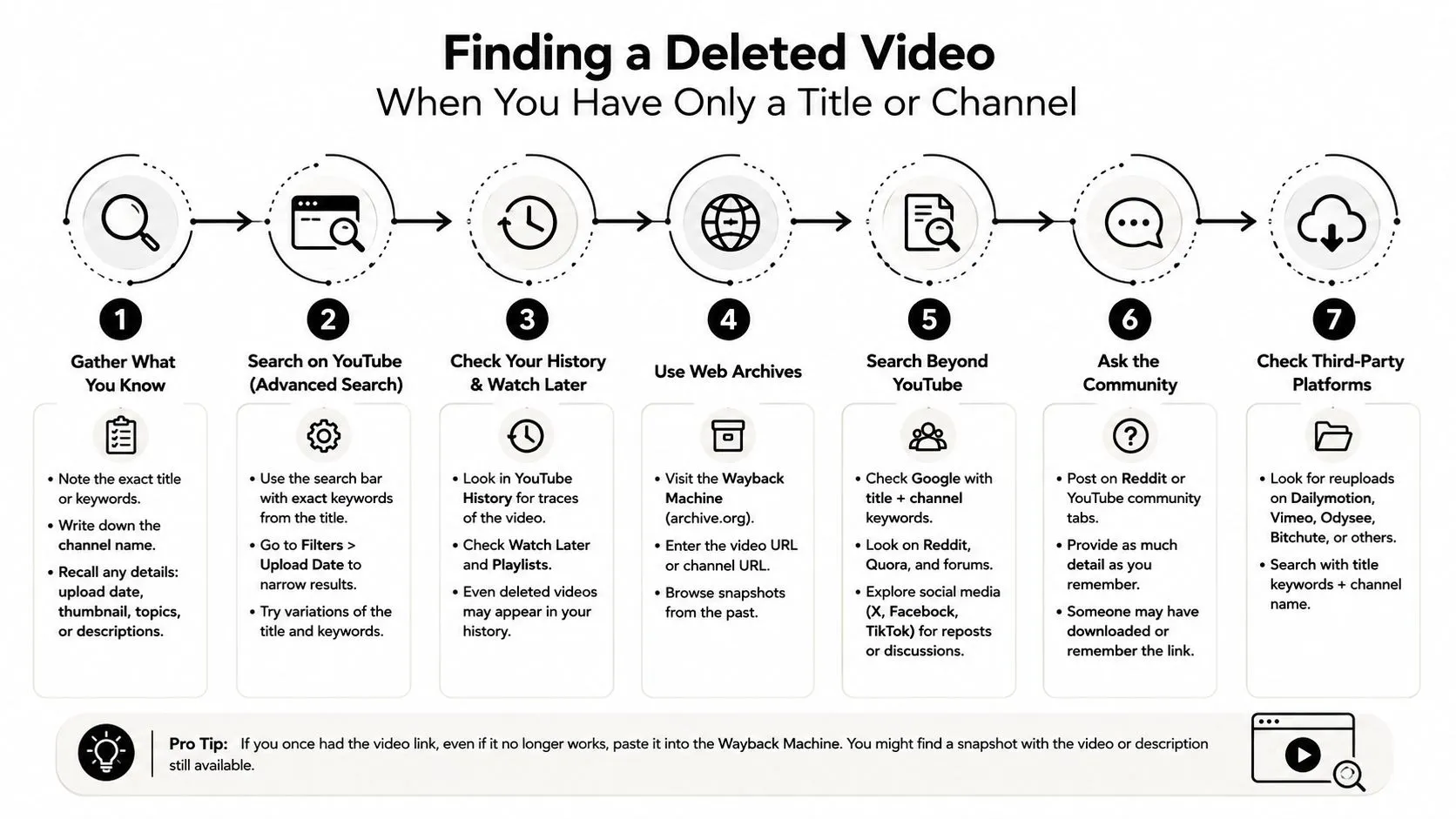
Keep every candidate URL in one document. Test each in the Wayback Machine, record the capture date, compare the title and thumbnail, and check whether a player or media file is present. Dead channels, incomplete captures, unrelated videos, and reuploads under different titles are normal. A matching phrase identifies a lead, not the video itself.
Metadata Recovery Versus Watchable Video Recovery
A matching archive page does not mean you recovered the video. It may retain the title, description, upload date, thumbnail, comments, view count, or subtitles while holding no playable media. The archive preserved the public record, not necessarily the underlying video stream.
Use three tiers to report the result accurately:
| Tier | What You Get | Likelihood | Verification Method |
|---|---|---|---|
| Full recovery | An identified page plus a playable file from an archive or mirror | Uncertain and dependent on prior media capture | Open the archived video item or verified mirror and confirm playback |
| Metadata only | Title, description, thumbnail, dates, subtitles, or related page details | More attainable than file recovery | Compare the captured page with known channel and upload clues |
| Trace only | A snippet, embed code, forum mention, or third-party reference | Common when archives captured surrounding pages | Follow the reference to recover the original video ID or another lead |
A full recovery needs more than a visible player frame. Open the Archive.org item or mirror, start playback from the beginning, and confirm that the content matches the title, channel, and thumbnail. A redirect to YouTube or a missing-media error means the result should be downgraded.
Metadata recovery still has practical value. Researchers may need the original description, journalists may need evidence that an upload existed, and creators may use a thumbnail or subtitle file when rebuilding a publication. The original URL and earlier crawl coverage often determine what can be found, while a page snapshot may contain useful information without the media payload.
Record the distinction in your notes: title found, thumbnail matched, subtitles available, or file played. A metadata record is not a restored video, and calling it one creates false expectations for viewers, rights holders, and your future self.
Restoring Deleted YouTube Videos as the Original Creator
Creators should start with owner-controlled options, not public archives. Public archives can document what happened, but YouTube-side restoration and your own backups offer the best chance of returning the original upload with its account relationship, settings, and associated assets.
Check the account before searching elsewhere
Open YouTube Studio and review any deletion, trash, copyright, or policy notices. If the platform presents a restore option, follow that process while the account still retains the relevant record. Keep the video ID, original URL, upload date, title, and notification emails together. Those identifiers help Creator Support distinguish the upload from similarly named copies.
Search Google Drive, Google Photos, Gmail, local folders, external drives, and editing software’s project directories. Look for the exported video as well as raw footage, captions, thumbnail files, descriptions, and project timelines. A backup without the project file may restore the upload, but it won’t necessarily let you correct audio, replace a copyrighted segment, or create a new version.
If you believe YouTube removed the video incorrectly, contact YouTube Creator Support with proof of ownership and the original identifiers. Explain whether the issue involves a mistaken policy decision, a copyright strike, or an account action. Don’t assume an archive copy will solve an active rights dispute. It may help document the original upload, but it doesn’t override platform or copyright decisions.
Ask the audience, then use archives
Post a focused request in your community. Ask viewers for an original download, screen recording, local copy, or link to a legitimate mirror. Include the exact title, channel, approximate upload period, thumbnail, and any known video ID. A viewer’s copy may be lower quality, but it can preserve material that public crawlers never captured.
Use public archives after checking those routes. Archive results may contain gaps in quality, missing audio, incomplete streams, or metadata without media. Before reposting a recovered file, confirm that you hold the necessary rights. The guide to private and unlisted YouTube videos is useful when the upload wasn’t deleted but changed visibility. People who aren’t the copyright holder should link to the legitimate source or ask permission rather than re-uploading the file.
Backup Habits That Make Archives Unnecessary
The most dependable deleted YouTube videos archive is the one you maintain before publishing. Public crawlers can miss a page, capture only metadata, or preserve a file in a format you can’t use. A private backup gives you control over restoration, re-editing, subtitles, thumbnails, and rights documentation.
Use a 3-2-1 backup rule as a practical baseline. Keep three copies of each finished upload, store them on two different types of media, and keep one copy offsite, such as in cloud storage or at another physical location. The exact storage products matter less than separation. A laptop and an external drive kept beside it can fail together.
Preserve more than the exported MP4
Create a labeled folder for every upload containing:
- Finished video: Keep the final export that matches the published version.
- Project assets: Save raw footage, audio, graphics, edit timelines, and fonts where licensing permits.
- Captions and text: Store subtitle files, descriptions, chapters, pinned comments, and script drafts.
- Visual assets: Preserve the thumbnail, alternate designs, channel branding, and source images.
- Identity records: Log the watch URL, video ID, title, channel, publish date, visibility, and rights notes.
Automate the handoff from production storage to long-term storage. After publishing, copy the finished package into a clearly named Drive, S3, or equivalent folder. Keep a spreadsheet or Notion database as the searchable index. A video file is much easier to recover when its title, URL, ID, and publication details sit beside it instead of inside someone’s memory.
Test the archive, don’t just create it
Schedule a recurring integrity check. Open a sample of stored files, play them through, compare them with the saved metadata, and confirm that captions and thumbnails are present. Replace failed drives and repair incomplete cloud syncs when you find them.
Write a short runbook for another person. It should explain where files live, how folders are named, who owns the accounts, how to restore an upload, and where rights documentation is stored. When a creator leaves a team or a device fails, the runbook prevents the archive from becoming another inaccessible cache.
A public archive remains useful for historical verification, deleted-channel research, and locating copies you didn’t create. It shouldn’t be the only place your work exists. Preserve the file, preserve the metadata, and verify both before you need them.
If you want to reduce future thumbnail and publishing gaps, visit Thumbo AI to generate YouTube thumbnails in under a minute, whether you are publishing something new or rebuilding an upload you had to recover. Keep the finished thumbnail in the archive folder alongside the export, before a missing upload turns a simple recovery task into a forensic search.