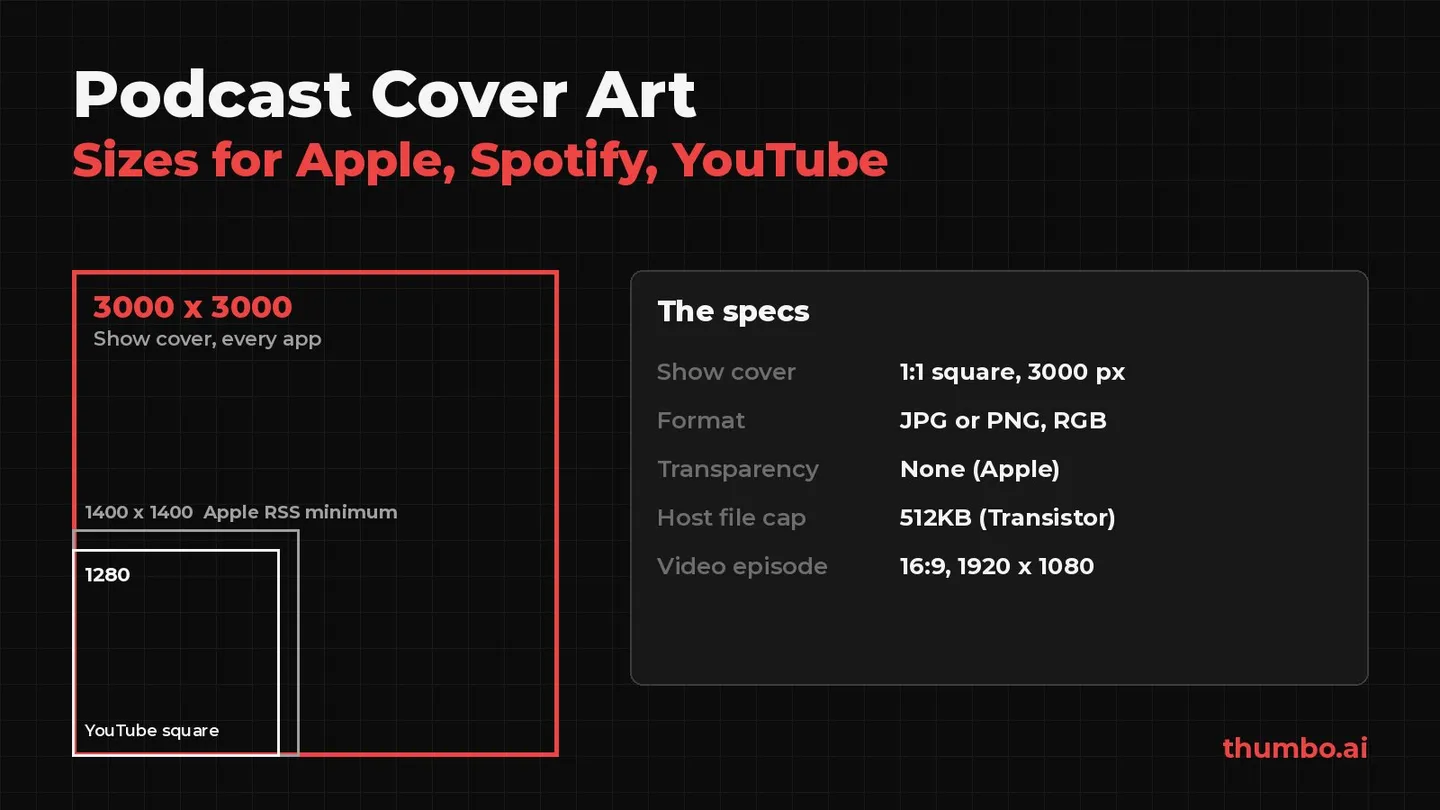
Podcast cover art is a square image, 3000 x 3000 pixels, saved as a JPG or PNG with a solid background and no transparency. That one file meets Apple Podcasts, which asks for 3000 x 3000 and accepts 1400 x 1400 to 3000 x 3000 through an RSS feed (Apple Podcasts for Creators), Spotify, whose podcast delivery spec asks for a “fully squared (1:1) aspect ratio” in the highest resolution available (Spotify), and YouTube, which needs a square podcast thumbnail and recommends 1280 x 1280 (YouTube Help).
Most guides mix three jobs into one number: the show cover, the optional episode art, and the 16:9 thumbnail a video podcast needs. They also repeat limits that belong to a host or a music store, not the podcast app. This guide takes each spec from the platform’s own page, separates the three kinds of artwork and lists what gets art rejected.
Table of Contents
- Podcast Cover Art Specs at a Glance
- Cover Art Requirements by Platform
- Show Cover vs Episode Art vs Video Thumbnail
- Why Podcast Art Specs Disagree
- What Gets Podcast Cover Art Rejected
- Designing Cover Art That Reads at Small Sizes
- Video Podcasts: The 16:9 Thumbnail
- How to Make Podcast Cover Art Step by Step
- Common Podcast Cover Art Mistakes
- Podcast Cover Art Action Plan
- FAQ
Podcast Cover Art Specs at a Glance
| Spec | Use this | Why |
|---|---|---|
| Shape | 1:1 square | Apple, Spotify and YouTube all require a square show image |
| Size | 3000 x 3000 px | Apple’s stated size and the top of its 1400-3000 RSS range |
| File type | JPG or PNG | Apple accepts PNG or JPG; Spotify accepts TIFF, PNG or JPEG |
| Transparency | None | Apple: no transparency and no alpha channel |
| Color | RGB | Transistor, Libsyn and Megaphone all ask for RGB |
| File size | Under 512 KB if your host asks for it | Transistor’s listed maximum; Apple’s current spec page lists no file size |
| Video thumbnail | 16:9, 1920 x 1080 | Spotify’s suggested size for video episode thumbnails |
If you remember one line: one 3000 x 3000 JPG for the show, one 16:9 image per video episode.
Cover Art Requirements by Platform
Every row below comes from the platform’s or host’s own page, read on October 13, 2026.
| Platform | Size | Formats | Other rules |
|---|---|---|---|
| Apple Podcasts | 3000 x 3000 (1400 x 1400 to 3000 x 3000 via RSS) | PNG or JPG | No transparency, no alpha channel |
| Spotify | Square 1:1, highest resolution available | TIFF, PNG or JPEG | Episode art falls back to the show image |
| YouTube podcast | Square, 1280 x 1280 recommended | Image upload in Studio | 10 MB from a phone, 50 MB from a computer |
| Transistor | 3000 x 3000 (minimum 1400 x 1400) | JPEG or PNG | RGB, 72 dpi, max 512KB |
| Megaphone | 1400 x 1400 to 3000 x 3000 | JPEG or PNG | RGB only, 72 dpi |
Apple Podcasts
Apple only needs one piece of art to publish a show: the Show Cover. Its spec page lists the size as “3000 x 3000 pixels” and adds that, when the cover is submitted through an RSS feed, Apple Podcasts accepts artwork “ranging from 1400 x 1400 to 3000 x 3000 pixels. The largest size is preferred.” The file can be PNG or JPG, and Apple is explicit that Show Covers “cannot contain transparency and should not contain an alpha channel”, so export with a solid background.
Apple lists the Show Cover’s placement as “Everywhere”. The rest of Apple’s artwork guide, such as Episode Art and Chapter Art, is optional for a standard show.
Spotify
Spotify’s podcast rules live in its podcast delivery specification (version 1.10), linked from the Spotify for Creators help center. The images section is short: “Podcast images need to have a fully squared (1:1) aspect ratio. Preferably they should always be delivered in the highest resolution available to allow for all Spotify screen sizes.” Accepted formats, “in order of preference”, are TIFF, PNG or JPEG. There is no pixel minimum or maximum in the podcast spec, so a 3000 x 3000 square is a safe answer.
If your show is hosted on Spotify, Spotify for Creators lets you change the art on the web under Settings, then Update show art, and in the mobile app under Podcast, then Edit Details. Changes “typically reflect within 24 hours”. If another host publishes your feed, the art comes from that host.
Episode art on Spotify works the same way as on Apple: episodes use the show art by default, custom episode art can only be set on Spotify for Creators web, and once added it cannot be removed completely. To go back, upload the show art to that episode again.
YouTube
YouTube treats a podcast as a playlist of full episodes, and every podcast needs a square image. The Create a podcast in YouTube Studio page asks for a “Square podcast thumbnail” when the podcast is created and says: “We recommend 1280x1280 pixels for your square podcast thumbnail.” The general custom thumbnails page adds the file limits: “10 MB for podcasts” when uploading from a phone and 50 MB from a computer, and “For podcast playlists, upload a thumbnail with an aspect ratio of 1:1 instead of 16:9.”
Only playlists with full episodes should get podcast features, not clips or season playlists, and a vague title such as “Full Episodes” gets replaced by the channel name in the YouTube Music app.
Podcast Hosts: Transistor, Libsyn and Megaphone
Most shows never upload art to Apple or Spotify directly. The art goes to a host, which places it in the RSS feed that every app reads. Hosts add their own limits:
- Transistor: 3000 x 3000 (minimum 1400 x 1400), 72 dpi, JPEG or PNG, RGB, and a “Maximum file size: 512KB”. Its help page, updated October 10, 2026, notes that the file size is the usual problem and suggests going down to 1500 x 1500 if compression alone does not get there (Transistor Help).
- Libsyn: a March 2021 post lists 1400 x 1400 to 3000 x 3000, “Under 500kb in file size”, 72 dpi, JPEG or PNG and RGB, presented as Apple’s specs, and separately a 1920 x 1080 widescreen image used when Libsyn turns audio into a video for YouTube or Facebook (Libsyn).
- Megaphone: “perfectly square”, between 1400 x 1400 and 3000 x 3000, JPEG or PNG, 72 dpi, “RGB colorspace only” (Megaphone Help Center).
A detailed 3000 x 3000 image can be several megabytes. The free image compressor has a 500 KB preset that fits under Transistor’s 512KB cap: it lowers JPG quality step by step, only shrinks the dimensions if quality alone cannot reach the target, tells you when it did, and runs in the browser without uploading the file.
Show Cover vs Episode Art vs Video Thumbnail
These three images do different jobs.
| Image | Shape and size | Required? | Text on it? |
|---|---|---|---|
| Show cover | Square, 3000 x 3000 | Yes, on every platform | Yes: the show title, clear and prominent |
| Episode art | Square, 3000 x 3000 on Apple | No | Apple advises no logo or text |
| YouTube podcast thumbnail | Square, 1280 x 1280 recommended | Yes, for a YouTube podcast | Same art as the show cover works |
| Video episode thumbnail | 16:9, 1920 x 1080 suggested on Spotify | Only for video episodes | Usually a face and a short hook |
Episode art is where Apple’s advice surprises people. Its Episode Art page says: “Avoid using your podcast logo or any text in the artwork. The episode title, podcast title, and other episode information will be displayed beneath the Episode Art in the user interface.” It appears on Now Playing, the Lock Screen, Control Center, Home and the show and episode pages. If you skip it, Apple shows the Show Cover, and it also falls back to show art “when multiple shows are presented together”. Not every app shows episode art at all, as Spotify’s help center points out, so treat it as a bonus, not a substitute for a strong show cover.
Why Podcast Art Specs Disagree
Search for podcast cover art size and you will find 640, 1280, 1400, 1500 and 3000 quoted as the minimum, plus file caps of 500 KB and 512 KB. Most of the confusion has three sources:
- Music rules quoted as podcast rules. The “Between 640px - 10000px wide and tall” range comes from Spotify for Artists, the cover rules for music releases (Spotify for Artists). Spotify’s podcast delivery spec gives no pixel range at all, only a square and the highest resolution available.
- A recommendation read as a minimum. YouTube “recommends” 1280 x 1280 for the square podcast thumbnail. Some guides list it as YouTube’s minimum, which the help page does not say.
- Host pages read as app limits. The 500 KB and 512 KB caps come from host pages, even when a host credits Apple. Apple’s current Show Cover page lists size, format and transparency, but no file size.
The way out: a 3000 x 3000 square, JPG or PNG, RGB, solid background, compressed under 512 KB if your host asks, fits every rule in this guide.
What Gets Podcast Cover Art Rejected
Apple’s Artwork Policies say Apple Podcasts “may reject or remove artwork that does not adhere to our policies”. The rules, in short:
| Problem | Apple’s rule | Fix |
|---|---|---|
| Images you do not own | Only include images you have the rights to use | Use your own photos or licensed art |
| Stock photos with watermarks | Secure commercial licensing, watermark free | Buy the license, use the clean file |
| Apple logos, names or devices | No Apple Inc., Apple Podcasts or iTunes logos, terms or hardware | Leave platform branding off the art |
| Explicit or harmful content | No profanity, violence, illegal drugs or self-harm | Keep the cover clean even for explicit shows |
| Art for content not on Apple | Depict the show you intend to publish | Show what listeners will actually hear |
| Blurry or pixelated art | Poor quality images “may be rejected” | Export from a full-size source |
| Transparent background | Show Covers “cannot contain transparency” | Flatten onto a solid color |
The Show Cover page repeats the Apple logo rule: “Your artwork may be rejected if it includes any visual representations of Apple.” That includes the common “Listen on Apple Podcasts” badge, which belongs on a website, not on the cover.
Designing Cover Art That Reads at Small Sizes
A cover is exported at 3000 px, but listeners mostly see it as a small tile in a search result, a library grid or a lock screen. Apple’s best practices for the Show Cover point at the same few rules:
- Make the title the hero. Apple: “Make your podcast title clear and prominent” and “limit additional text or logos”. A show name plus, at most, a host name is enough.
- Prioritize contrast. Text that does not contrast with the background “may be difficult to read”. Heavy, wide typefaces survive small sizes; the guide to the best fonts for YouTube thumbnails covers which ones hold up, and the same logic applies to covers.
- Avoid pure black or white backgrounds. Apple suggests “a slightly different color value so your Show Cover doesn’t blend into the app background”, since apps run in both light and dark mode.
- Respect the safe area. Apple’s Show Cover template marks where design elements “won’t be cropped or obstructed by user interface elements, like the play button, labels, or subscription offerings.” Keep the title inside it.
- Check it small. Shrink a copy to phone-tile size. If the title becomes unreadable, cut words or make them bigger.
Video Podcasts: The 16:9 Thumbnail
A video podcast needs a second kind of image. On YouTube every episode is a video, and a video thumbnail is 16:9: the custom thumbnails page recommends 3840 x 2160 with a minimum width of 640 pixels. Spotify’s video thumbnail rules ask for a horizontal 16:9 image with a “Suggested resolution of 1920 x 1080”, and note that thumbnails are only displayed for videos, while “Audio episodes feature your episode or show artwork instead.” If you do not upload one, Spotify offers frames from the beginning, middle and end of the video.
The square cover and the 16:9 thumbnail need different designs. The cover sells the show and stays the same for years. The episode thumbnail sells one conversation, so it changes every week: usually the guest’s face, a reaction and one short claim from the episode. The podcast thumbnail maker breaks down the layouts video podcasts use, from the pull-quote to the host reaction split, and Thumbo’s AI thumbnail generator builds 16:9 YouTube thumbnails from an episode topic and a style, with the host’s face kept consistent from episode to episode. It makes 16:9 thumbnails, not the square show cover, so the cover itself still comes from your own design file. The YouTube thumbnail best practices guide covers what makes those episode thumbnails get clicked.
To reuse art across formats, the free YouTube thumbnail resizer converts in both directions in the browser. The Square / album cover preset exports 3000 x 3000, and Fit (blurred edges) keeps a whole 16:9 frame visible on a blurred square background. The Full HD preset exports the 1920 x 1080 that Spotify suggests, and YouTube thumbnail exports 1280 x 720. A 16:9 image enlarged into a 3000 px square looks softer than art made square from the start, so design the show cover square and use the resizer for spin-offs.
How to Make Podcast Cover Art Step by Step
- Set up the canvas. A 3000 x 3000 px RGB document, with Apple’s safe area visible if you use its template.
- Pick one focal point and set the title. A host photo, an object or a bold shape, plus the show name in a heavy typeface inside the safe area.
- Choose the background. A color that contrasts with the title and is not pure black or pure white.
- Check the rules. No Apple or platform logos, no listening badges, no images you do not have rights to.
- Export. JPG or PNG, 3000 x 3000, RGB, flattened with no transparency, compressed to the 500 KB preset if your host caps files at 512 KB.
- Upload once. Add the art in your host’s dashboard so it lands in the RSS feed. Spotify-hosted shows upload it in Spotify for Creators.
- Add the YouTube square. In YouTube Studio, add the same square as the podcast thumbnail, under 10 MB from a phone.
- Plan the video thumbnails. For video episodes, design a 16:9 template you can update every week.
Common Podcast Cover Art Mistakes
| Mistake | What happens | Fix |
|---|---|---|
| Uploading a rectangle | Spotify and Apple require a square; YouTube asks for 1:1 | Crop to 1:1 before uploading |
| PNG with a transparent background | Apple: covers cannot contain transparency | Flatten onto a solid color |
| Art smaller than 1400 x 1400 | Below Apple’s RSS range and every host here | Export at 3000 x 3000 |
| 3 MB file on a 512KB host | Above Transistor’s cap | Compress to the 500 KB preset |
| ”Listen on Apple Podcasts” badge on the cover | Apple may reject art with Apple logos | Move badges to your website |
| Long subtitle and three logos | Unreadable at tile size | Title only, maybe the host name |
| Episode title on Apple episode art | Duplicates the text Apple prints beneath it | Keep episode art text-free |
| Using the square cover as a video thumbnail | Does not fill the 16:9 frame | Make a 16:9 thumbnail per episode |
Podcast Cover Art Action Plan
- Design a 3000 x 3000 RGB square with one focal point and the show title as the hero.
- Keep the title inside the safe area and off pure black or white.
- Strip Apple logos, badges and any image you do not hold rights to.
- Export a flattened JPG and compress it if your host caps the file size.
- Upload it to your host, and add the same square as the YouTube podcast thumbnail.
- Skip text on Apple episode art, or skip episode art entirely.
- For video episodes, build a 16:9 thumbnail template at 1920 x 1080 or larger.
For music releases on the same feed or channel, the album cover dimensions guide lists the store rules, which differ from podcast rules in a few important places.
FAQ
What size is podcast cover art?
3000 x 3000 pixels, square, as a JPG or PNG. Apple Podcasts asks for 3000 x 3000 and accepts 1400 x 1400 to 3000 x 3000 through an RSS feed, Spotify wants a 1:1 square in the highest resolution available, and YouTube recommends 1280 x 1280 for its square podcast thumbnail.
What is the minimum size for podcast artwork?
1400 x 1400 pixels on Apple (through RSS), Transistor and Megaphone. Spotify’s podcast spec and YouTube’s podcast page state no minimum. Starting at 3000 x 3000 avoids the question.
Does Spotify have different cover art requirements than Apple?
Spotify’s podcast spec asks for a square in the highest resolution available, in TIFF, PNG or JPEG, with no pixel range. The 640 to 10000 pixel range often quoted comes from Spotify for Artists, which covers music, not podcasts.
What file size should podcast cover art be?
Apple’s current Show Cover spec does not list a file size, but host pages do: Transistor lists a 512KB maximum, and a 2021 Libsyn post says under 500kb, which it attributed to Apple at the time. YouTube allows 10 MB for podcast thumbnails from a phone and 50 MB from a computer. Compress to under 512 KB if your host requires it.
Can podcast cover art have a transparent background?
No. Apple says Show Covers cannot contain transparency and should not contain an alpha channel. Flatten the design onto a solid background before exporting as JPG or PNG.
Should a video podcast use the square cover as its YouTube thumbnail?
Only for the podcast playlist. YouTube asks for a 1:1 thumbnail for podcast playlists, but each episode is a video and gets a 16:9 thumbnail, recommended at 3840 x 2160. Spotify suggests 1920 x 1080 for video episode thumbnails.