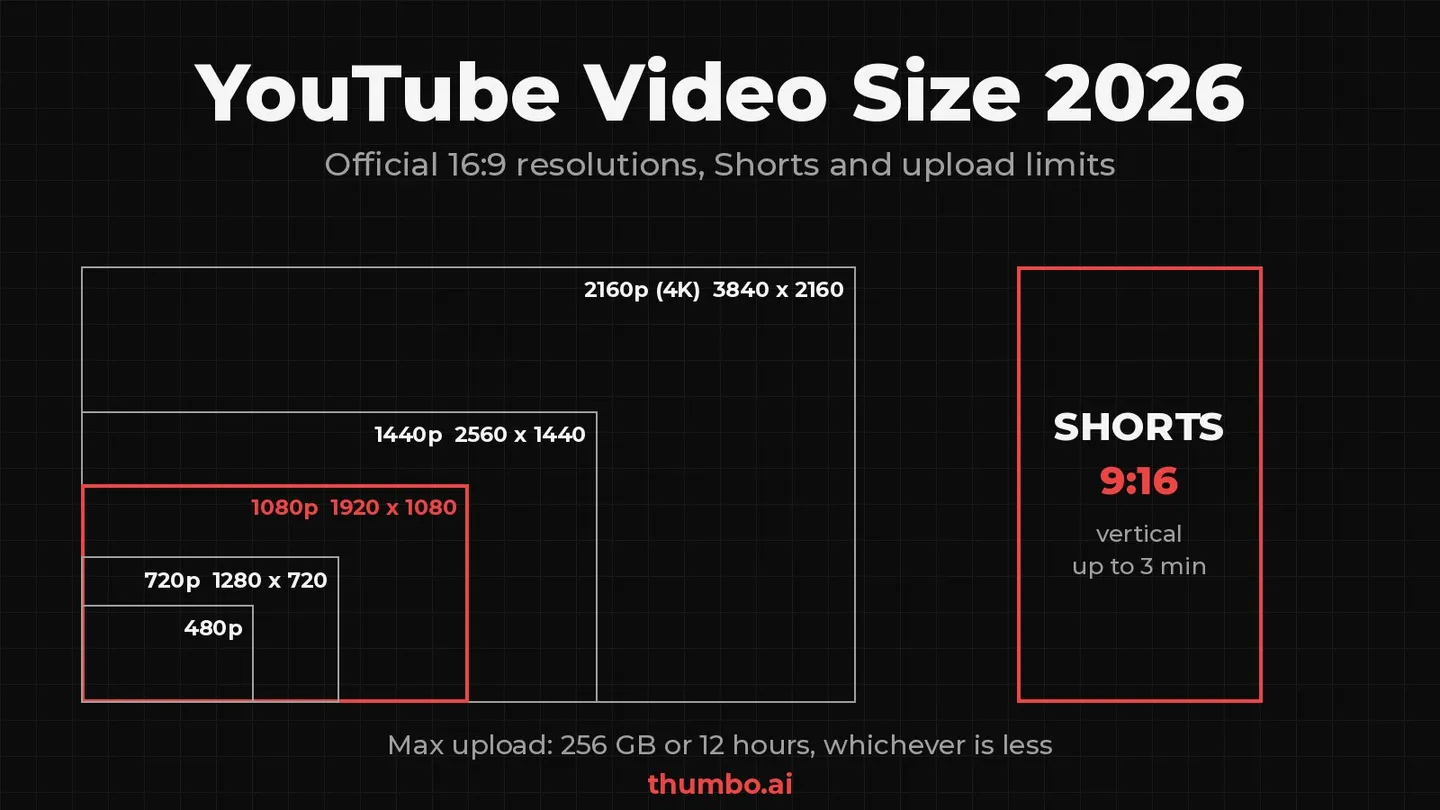
The standard YouTube video size is 1920 x 1080 pixels (1080p) at a 16:9 aspect ratio, and YouTube lists eight 16:9 resolutions it recommends encoding at, from 426 x 240 up to 7680 x 4320 (8K) (YouTube Help). Shorts are vertical (9:16) or square and can run up to 3 minutes. The largest file you can upload is 256 GB or 12 hours, whichever is less.
Those three numbers answer most questions, but “size” means three different things on YouTube: the frame (width and height in pixels), the file (megabytes or gigabytes), and the thumbnail, which has its own spec. Most guides blend them together and quote outdated limits, such as the old 2 MB thumbnail ceiling or a 60 second Shorts cap. This guide separates them and uses only YouTube’s own help pages, checked in October 2026.
Table of Contents
- YouTube Video Size: Quick Answer
- Official YouTube Video Resolutions
- YouTube Aspect Ratio: 16:9, Vertical and Square
- YouTube Shorts Video Size
- Maximum File Size and Video Length
- How Big Your Video File Will Be
- Recommended Export Settings for YouTube
- YouTube Thumbnail Width and Height
- Which Video Size to Choose
- Common Video Size Mistakes
- YouTube Video Size Action Plan
- FAQ
YouTube Video Size: Quick Answer
| What you need | Official spec | Source |
|---|---|---|
| Standard long-form frame | 16:9, encoded at one of 8 resolutions; 1920 x 1080 (1080p) is the usual choice | Video resolution and aspect ratios |
| Highest resolution | 7680 x 4320 (8K) | Same page |
| Shorts frame | Square or vertical, up to 3 minutes | Upload YouTube Shorts |
| Maximum upload | 256 GB or 12 hours, whichever is less | Upload videos longer than 15 minutes |
| Default length limit | 15 minutes until the account is verified | Same page |
| Recommended container and codec | MP4, H.264, AAC-LC or Opus audio | Recommended upload encoding settings |
| Video thumbnail | 3840 x 2160, 16:9, minimum width 640 px | Add custom thumbnails |
| Shorts thumbnail | 2160 x 3840, 9:16, minimum height 640 px | Same page |
If you only remember one rule: export at the resolution you recorded and edited in, keep the 16:9 shape for long-form, and never add black bars. YouTube’s player resizes itself to your video, so the shape matters more than any single pixel count.
Official YouTube Video Resolutions
For the default 16:9 aspect ratio, YouTube recommends encoding at these resolutions. The bitrates come from YouTube’s recommended upload encoding settings for SDR video (YouTube Help); YouTube says no bitrate limit is required and offers them as a reference.
| Name | Width x height | Video bitrate, 24/25/30 fps | Video bitrate, 48/50/60 fps |
|---|---|---|---|
| 4320p (8K) | 7680 x 4320 | 80-160 Mbps | 120-240 Mbps |
| 2160p (4K) | 3840 x 2160 | 35-45 Mbps | 53-68 Mbps |
| 1440p (2K) | 2560 x 1440 | 16 Mbps | 24 Mbps |
| 1080p (HD) | 1920 x 1080 | 8 Mbps | 12 Mbps |
| 720p (HD) | 1280 x 720 | 5 Mbps | 7.5 Mbps |
| 480p (SD) | 854 x 480 | 2.5 Mbps | 4 Mbps |
| 360p (SD) | 640 x 360 | 1 Mbps | 1.5 Mbps |
| 240p (SD) | 426 x 240 | not listed | not listed |
A few things the table hides:
- Each step up is a big jump in pixels. 1920 x 1080 is 2,073,600 pixels. 3840 x 2160 is 8,294,400, exactly four times as many, and 7680 x 4320 is sixteen times 1080p. That is why 4K files are so much heavier.
- HDR needs more bitrate. YouTube’s HDR table asks for 10 Mbps at 1080p and 44-56 Mbps at 4K (standard frame rate), and it does not support HDR at 480p or 360p.
- Odd sizes between 4K and 8K are a dead end. YouTube notes that in 2022 it started removing playback support for resolutions between 4K and 8K, so a 5K export may not play back at 5K. Export at 3840 x 2160 or 7680 x 4320 instead.
- 240p is the bottom of the ladder. YouTube lists it but gives no bitrate for it, and there is no reason to export a new video that small.
For most channels, 1080p is the practical default and 4K is worth it only when the footage was shot in 4K. Upscaling a 1080p edit to 4K makes the file four times bigger without adding real detail.
YouTube Aspect Ratio: 16:9, Vertical and Square
YouTube’s help page is clear on the shape: “The standard aspect ratio for YouTube on a computer is 16:9.” If your video uses a different aspect ratio, “the player will automatically change to the ideal size to match your video and the viewer’s device” (YouTube Help).
In practice that gives three shapes worth producing:
| Aspect ratio | Typical size | Use it for |
|---|---|---|
| 16:9 horizontal | 1920 x 1080 or 3840 x 2160 | Long-form videos, tutorials, podcasts filmed as video |
| 9:16 vertical | 1080 x 1920 (1080p turned on its side) | Shorts |
| 1:1 square | 1080 x 1080 | Shorts and clips that must also work in square feeds |
The vertical and square sizes are not in YouTube’s resolution list, which only covers 16:9. They are the same pixel budgets rotated or cropped: 1080 x 1920 is 1080p turned 90 degrees, which is why phones and editors default to it.
Why black bars hurt
The one aspect ratio rule YouTube spells out is about padding: “For best results, avoid adding padding or black bars directly to your video. Padding interferes with YouTube’s ability to change the player dynamically to your video size and the viewer’s device.”
If you burn black bars into a 4:3 or vertical clip to make it 16:9, viewers get a small picture inside a frame on every device. Upload the clip at its native shape and let YouTube add the padding where it is needed. On computer browsers YouTube may add padding around 9:16 videos itself, white by default and dark gray in Dark theme.
YouTube Shorts Video Size
For a Short, YouTube asks for a video file “up to 3 minutes” with “a square or vertical aspect ratio” (YouTube Help). The common export is 1080 x 1920 at 9:16. It has the same pixel count as 1080p, so YouTube’s 1080p bitrates (8 Mbps at 30 fps, 12 Mbps at 60 fps) are a sensible guide.
Two outdated claims still circulate. The first is the 60 second limit: Shorts can now run up to 3 minutes. The second is that a horizontal video can be a Short: YouTube’s upload page only lists square or vertical. For a full breakdown of safe zones, captions and length, see the YouTube Shorts format guide.
Shorts thumbnails follow the video
YouTube now recommends a separate size for Shorts thumbnails: 2160 x 3840 pixels at 9:16, with a minimum height of 640 pixels (YouTube Help). Custom Shorts thumbnails are added in YouTube Studio on a computer, and the account must be verified.
The trap is using a 16:9 image on a vertical video. YouTube says vertical videos with 16:9 custom thumbnails “will be replaced by an auto-generated 4:5 thumbnail on the home, explore, and subscription pages.” Your design survives only on the watch feed, watch history and non-mobile surfaces. The step-by-step is in how to add a thumbnail to YouTube Shorts.
Maximum File Size and Video Length
YouTube’s limit has two parts: “The maximum file size you can upload is 256 GB or 12 hours, whichever is less” (YouTube Help). YouTube also notes it changed the limits in the past, so some older videos run longer than 12 hours.
Before you hit either number, there is a lower default: “By default, you can upload videos that are up to 15 minutes long. Verified accounts can upload videos longer than 15 minutes.” Verification takes a phone number at youtube.com/verify. YouTube also asks you to use an up-to-date browser for files larger than 20 GB.
If a file is larger than 256 GB, YouTube’s advice is to compress it in a video editor and use the H.264 codec “to compress your video file size while maintaining the video quality.”
Which limit you will actually hit
“Whichever is less” decides which cap matters, and it depends on bitrate. Twelve hours is 43,200 seconds. A 256 GB file spread over 43,200 seconds works out to about 47 Mbps (256,000 MB x 8 / 43,200).
- Below about 47 Mbps, which covers 1080p, 1440p and 4K at 24 to 30 fps (35-45 Mbps), the 12 hour limit binds first. A 12 hour 4K file at 45 Mbps is about 243 GB.
- Above about 47 Mbps, such as 4K at 60 fps (53-68 Mbps), any 8K file, or an intermediate codec like ProRes, the 256 GB limit arrives before 12 hours.
For a normal 10 to 30 minute upload, neither limit is close. The 15 minute default for unverified accounts is the one that catches new creators.
How Big Your Video File Will Be
File size is bitrate multiplied by length. The formula is: megabytes = megabits per second x seconds / 8. Using YouTube’s recommended SDR bitrates for a 10 minute video (600 seconds):
| Resolution and frame rate | Recommended bitrate | 10 minute file, video only |
|---|---|---|
| 720p, 30 fps | 5 Mbps | about 375 MB |
| 1080p, 30 fps | 8 Mbps | about 600 MB |
| 1080p, 60 fps | 12 Mbps | about 900 MB |
| 1440p, 30 fps | 16 Mbps | about 1.2 GB |
| 4K, 30 fps | 35-45 Mbps | about 2.6-3.4 GB |
| 4K, 60 fps | 53-68 Mbps | about 4.0-5.1 GB |
Audio adds little on top: YouTube recommends 384 kbps for stereo, which is about 29 MB for 10 minutes. The numbers are decimal (1 GB = 1,000 MB) and real exports vary because YouTube recommends variable bitrate, but the table is close enough to plan storage and upload time.
The practical lesson: if a 10 minute 1080p export comes out at 5 GB, the encoder is using a far higher bitrate than YouTube recommends. Lowering it toward 8 to 12 Mbps cuts the file to a fraction of that size and the upload time with it.
Recommended Export Settings for YouTube
YouTube publishes a full encoding spec (YouTube Help). The parts that matter in a normal editor export dialog:
- Container: MP4, with the moov atom at the front of the file (often labeled “Fast Start” or “web optimized”) and no edit lists.
- Video codec: H.264, High Profile, progressive scan (no interlacing), 2 consecutive B frames, closed GOP of half the frame rate, CABAC.
- Bitrate: variable bitrate, using the table above as a guide.
- Chroma subsampling: 4:2:0.
- Frame rate: the same frame rate you recorded in. Common rates are 24, 25, 30, 48, 50 and 60 fps. Interlaced footage should be deinterlaced first, for example 1080i60 to 1080p30.
- Audio: AAC-LC or Opus, stereo or stereo plus 5.1, 48 kHz sample rate.
- Color space: BT.709 for SDR uploads.
Many editors ship a “YouTube 1080p” or “YouTube 4K” preset that already matches this. Check two settings by hand: that the frame rate matches your footage and that the bitrate is not set to a fixed, oversized value.
Supported file formats
If you get an “invalid file format” error, YouTube’s troubleshooter lists the formats it accepts: .MOV, .MPEG-1, .MPEG-2, .MPEG4, .MP4, .MPG, .AVI, .WMV, .MPEGPS, .FLV, 3GPP, WebM, DNxHR, ProRes, CineForm and HEVC (H.265) (YouTube Help). Audio-only files like MP3 or WAV cannot be uploaded as a video.
YouTube Thumbnail Width and Height
The thumbnail is a separate file with its own spec. YouTube recommends custom thumbnails at 3840 x 2160 pixels for videos with a minimum width of 640 pixels, in JPG or PNG, at 16:9 (YouTube Help). The upload limit depends on the device:
| Upload from | Video thumbnail | Shorts thumbnail | Podcast thumbnail |
|---|---|---|---|
| Mobile app | 2 MB | not available (desktop only) | 10 MB |
| Desktop | 50 MB | 50 MB | 50 MB |
Podcast playlists take a 1:1 square thumbnail instead of 16:9.
The familiar 1280 x 720 size is still useful as a floor. That canvas has 921,600 pixels, and YouTube’s API documentation shows why the number sticks around: the largest thumbnail rendition YouTube serves back, “maxres”, is 1,280 pixels wide and 720 pixels tall. Many guides have not caught up with the 4K recommendation; this thumbnail size guide, for example, still lists 1280 x 720 as the recommended size and 2 MB as the maximum file size.
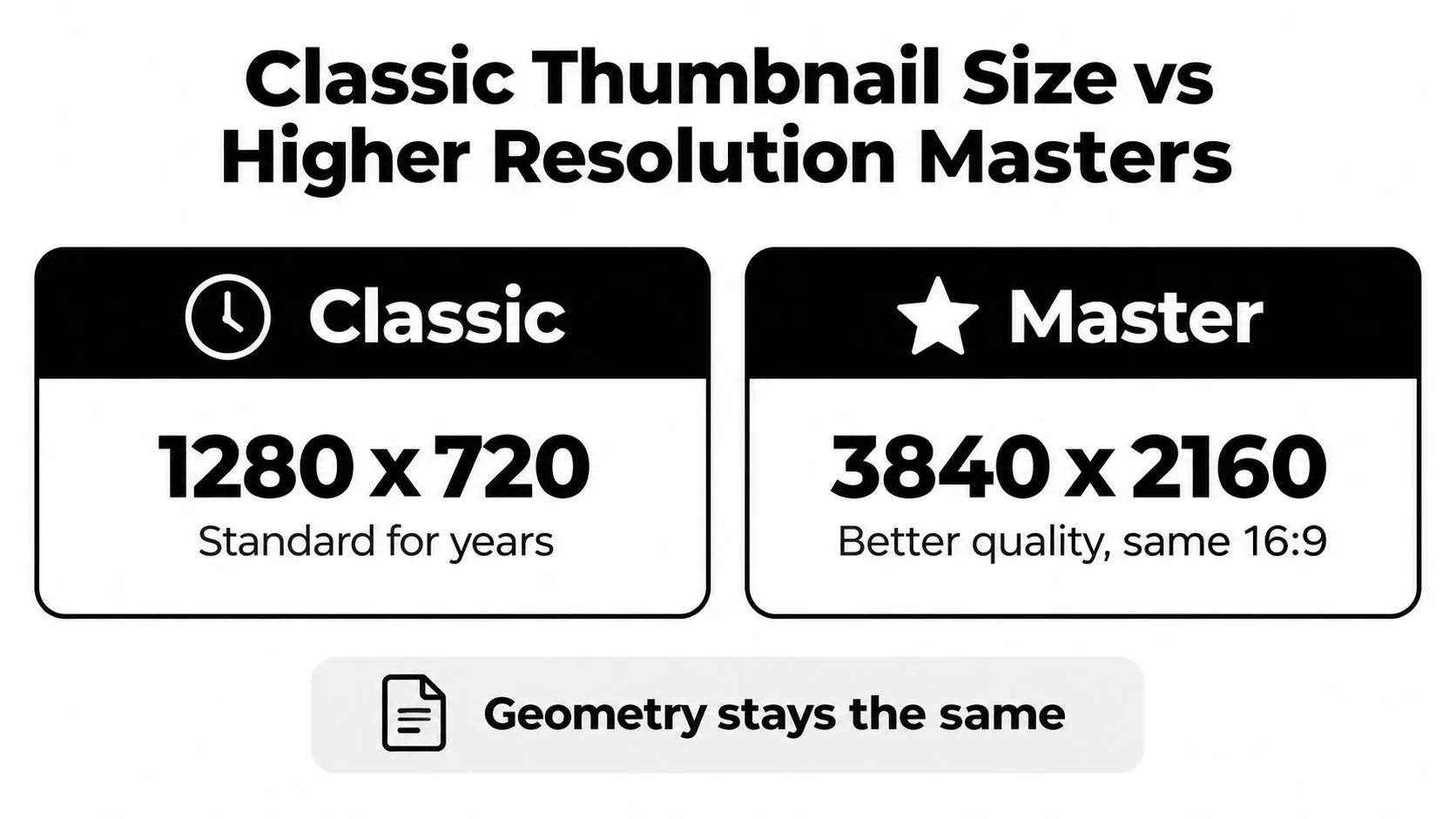
Both sizes share the same 16:9 geometry. Going from 1280 x 720 to 3840 x 2160 triples the width and height and multiplies the pixel count by nine, which leaves room for cropping and fine lettering but does not fix weak contrast or a crowded layout. The YouTube thumbnail size guide covers safe areas and how the image is cropped on each surface.
Exporting for the 2 MB mobile cap
A 4K PNG master can easily exceed 2 MB, which the mobile app rejects. Keep the master, then export a JPG for phone uploads:
- Resize to 16:9 if the source is another shape, with the YouTube thumbnail resizer. It crops or fits to 1280 x 720, 1920 x 1080 or 1080 x 1920 in the browser.
- If the file is still too heavy, run it through compress image to 2 MB, which also works in the browser without uploading the image anywhere.
- Check the result at phone size. If the headline turns into a gray smudge, the problem is the design, not the pixel count.
If you do not have a thumbnail yet, Thumbo generates 16:9 thumbnails and native 9:16 Shorts covers from a topic or a pasted YouTube link, and its downloads are JPEG files under 2 MB, so they clear the mobile limit as they are.
The thumbnail must also follow YouTube’s thumbnail policy, which forbids, among other things, a thumbnail that misleads viewers into thinking they will see something that is not in the video.
Which Video Size to Choose
| Your situation | Export at | Why |
|---|---|---|
| Phone or camera footage shot in 1080p | 1920 x 1080, same frame rate | Matches the source; 4K would only add file size |
| Footage shot in 4K | 3840 x 2160 | Keeps the detail you captured |
| Screen recording on a 1440p monitor | 2560 x 1440 | Sharper text than 1080p for tutorials |
| Vertical clip for Shorts | 1080 x 1920, 9:16, under 3 minutes | Fills the Shorts player |
| Old 4:3 footage | Its native size, no bars | YouTube adds padding itself |
| Slow upload connection | 1080p at about 8 Mbps | Roughly 600 MB per 10 minutes |
The rule behind every row: match the source, keep the shape native, and choose the lowest bitrate in YouTube’s range that still looks clean in your editor.
Common Video Size Mistakes
Burning in black bars. It shrinks the picture on every device. YouTube explicitly recommends against it.
Upscaling to 4K. A 1080p edit exported at 3840 x 2160 is four times the pixels and several times the file size, with no new detail.
Exporting at an in-between size. Sizes between 4K and 8K may not play back at full resolution. Stick to the eight listed sizes.
Changing the frame rate on export. YouTube asks for the frame rate you recorded in. Converting 30 fps footage to 60 fps duplicates frames and raises the recommended 1080p bitrate from 8 to 12 Mbps for nothing.
Uploading interlaced video. Deinterlace first (1080i60 becomes 1080p30), otherwise motion shows combing artifacts.
Using a video frame as the thumbnail spec. The video frame and the thumbnail are different files: a 1920 x 1080 video is fine, but YouTube wants the thumbnail at 3840 x 2160.
Putting a 16:9 thumbnail on a Short. On the home, explore and subscription pages YouTube swaps it for an auto-generated 4:5 crop.
Forgetting to verify the account. Without verification, uploads stop at 15 minutes regardless of file size.
YouTube Video Size Action Plan
- Check your source. Note the resolution and frame rate your camera, phone or screen recorder actually used.
- Pick the matching size from YouTube’s list: 1920 x 1080 for most channels, 3840 x 2160 only for true 4K footage, 1080 x 1920 for Shorts.
- Set the export: MP4, H.264, same frame rate, variable bitrate near YouTube’s recommendation (8 Mbps for 1080p30), AAC audio at 48 kHz.
- Estimate the file: bitrate x seconds / 8. If the export is far larger, lower the bitrate.
- Verify your account once, so videos longer than 15 minutes upload.
- Make the thumbnail separately: 3840 x 2160 for videos, 2160 x 3840 for Shorts, plus a JPG under 2 MB if you upload from your phone.
- Upload and check the processed video on a phone and a computer before you share the link.
FAQ
What is the best video size for YouTube?
1920 x 1080 at 16:9 is the best default for most channels: it is YouTube’s 1080p HD size and needs only about 8 Mbps at 30 fps. Use 3840 x 2160 if you shot in 4K, and 1080 x 1920 vertical for Shorts.
What is the YouTube video size in pixels for Shorts?
YouTube asks for a square or vertical video up to 3 minutes. The standard vertical export is 1080 x 1920 pixels at 9:16. The Shorts thumbnail is a separate image at 2160 x 3840 pixels.
What is the maximum video file size on YouTube?
256 GB or 12 hours, whichever is less. Unverified accounts are limited to 15 minutes per video until they verify with a phone number.
Does YouTube accept 4:3 or square videos?
Yes. The player adapts to the video’s shape, so 4:3 and 1:1 videos play without you adding anything. Do not add black bars yourself; YouTube says padding interferes with resizing the player to the viewer’s device.
Is the YouTube thumbnail the same size as the video?
No. The video can be any of the listed resolutions, while YouTube recommends the thumbnail at 3840 x 2160 (minimum width 640 pixels) for videos and 2160 x 3840 for Shorts. Thumbnails uploaded from the mobile app must stay under 2 MB; desktop allows 50 MB.
Should I upload in 4K if I filmed in 1080p?
No. Upscaling adds file size and upload time without adding detail. Upload 1080p footage at 1920 x 1080 and spend the effort on sound, lighting and the thumbnail instead.