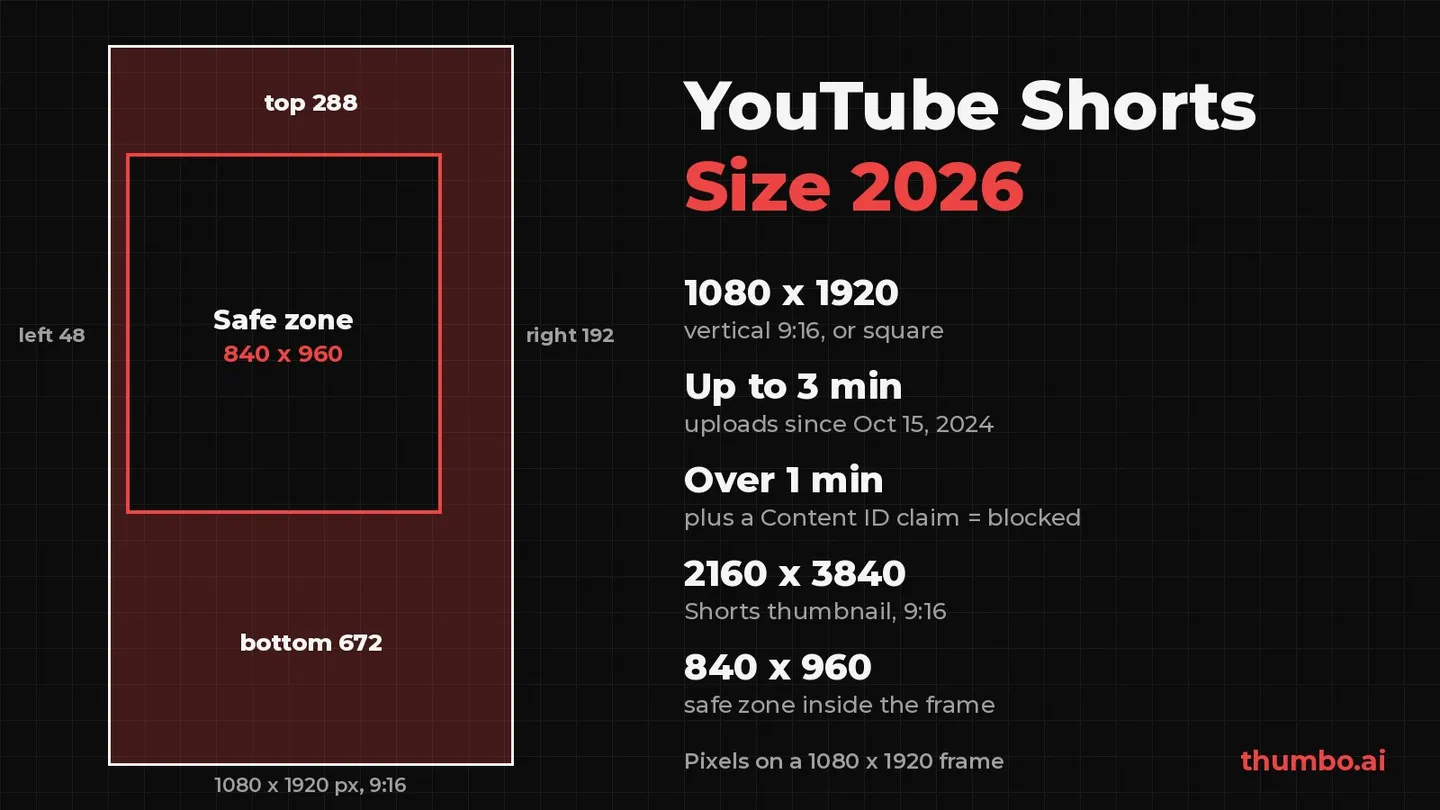
The YouTube Shorts size is 1080 x 1920 pixels at a 9:16 vertical aspect ratio. YouTube treats any square or vertical video up to 3 minutes long as a Short (YouTube Help), so a 1080 x 1080 square works too, while anything wider than square is a regular video. Inside the frame, keep text and faces in an 840 x 960 pixel safe zone: 288 px from the top, 672 px from the bottom, 48 px from the left and 192 px from the right, the margins in the safe zone template Google publishes for vertical YouTube video ads.
Many guides that rank for this question still repeat a 60 second cap or a 2 GB file limit. This one uses only YouTube and Google help pages checked in October 2026, and covers a rule most of them skip: a Short longer than one minute with an active Content ID claim is blocked worldwide.
Table of Contents
- YouTube Shorts Size: Quick Answer
- Why Shorts Have Their Own Size Rules
- Shorts Dimensions and Aspect Ratio
- Resolution and Export Settings
- YouTube Shorts Length: Up to 3 Minutes
- YouTube Shorts Safe Zone in Pixels
- YouTube Shorts Thumbnail Size
- Captions and the First Frame
- Turning Horizontal Footage into a 9:16 Short
- Common Shorts Size Mistakes
- YouTube Shorts Size Action Plan
- FAQ
YouTube Shorts Size: Quick Answer
| What you need | Spec | Source |
|---|---|---|
| Frame size | 1080 x 1920 px, 9:16 vertical | Google’s YouTube video specs |
| Shapes that count as a Short | Square or vertical | Upload YouTube Shorts |
| Length | Up to 3 minutes, for uploads on or after October 15, 2024 | Understand three-minute YouTube Shorts |
| Copyright rule | Over 1 minute with an active Content ID claim: blocked globally | Same page |
| Safe zone | 840 x 960 px; margins 288 top, 672 bottom, 48 left, 192 right | Google safe zone template (same specs page) |
| Bitrate guide | 8 Mbps at 24 to 30 fps, 12 Mbps at 48 to 60 fps | Recommended upload encoding settings |
| File format | MP4, H.264 video, AAC-LC audio | Same page |
| Shorts thumbnail | 2160 x 3840 px, 9:16, minimum height 640 px | Add custom thumbnails |
If you only remember one line: export 1080 x 1920, stay at or under 3 minutes (under 1 minute if any music or clip could be claimed), and keep every word and face inside the 840 x 960 safe zone.
Why Shorts Have Their Own Size Rules
Shorts started as a beta in India on Sept. 14, 2020, reached the United States on Mar. 18, 2021, and rolled out to more than 100 countries on July 12, 2021, according to Search Engine Journal’s YouTube Shorts guide. In June 2025, YouTube announced that Shorts had crossed 200 billion daily views, as collected in this YouTube Shorts statistics roundup.
At that scale, the shape and length of the file decide where a video ends up. A short horizontal clip is not a Short, and a vertical video that runs past the limit is a regular upload. “Size” for Shorts therefore means three things:
- The frame: pixels and aspect ratio.
- The length: seconds, with a copyright rule attached to the second minute.
- The layout: which parts of the frame the player’s buttons and text cover.
The thumbnail is a fourth, separate spec. The sections below take them in that order.
Shorts Dimensions and Aspect Ratio
YouTube’s upload page asks for a video file “up to 3 minutes” with “a square or vertical aspect ratio” (YouTube Help). It does not name a pixel size. Google’s video specs for YouTube ads fill that gap: they recommend 1080 x 1920 px for vertical and 1080 x 1080 px for square Full HD video, and accept 720 x 1280 px as the vertical minimum for HD (Google Help).
| Shape | Size | Use it for |
|---|---|---|
| 9:16 vertical | 1080 x 1920 | The default Short; fills a phone screen |
| 1:1 square | 1080 x 1080 | Clips that also need to work in square feeds; still a Short |
| 16:9 horizontal | 1920 x 1080 | Not a Short; long-form videos only |
Vertical or square
Both shapes qualify, but they are not equal on a phone. A 1080 x 1920 frame has 2,073,600 pixels, exactly as many as a 1920 x 1080 long-form video, and it fills the whole screen. A 1080 x 1080 square has 1,166,400 pixels, about 56% of that, and leaves empty space above and below the picture in a vertical player.
Choose square only when the same file must also run somewhere that prefers square. Otherwise 9:16 gives the subject more room and the viewer less to ignore.
Never add black bars
YouTube’s resolution page is direct about padding: “For best results, avoid adding padding or black bars directly to your video. Padding interferes with YouTube’s ability to change the player dynamically to your video size and the viewer’s device” (YouTube Help).
A horizontal clip padded into a 9:16 canvas is technically vertical, but the picture becomes a thin strip in the middle of the screen. Reframe the footage instead (see the section on horizontal footage below). On computer browsers, YouTube may add its own padding around 9:16 videos, white by default and dark gray in Dark theme, so there is no reason to bake it in.
Resolution and Export Settings
YouTube does not publish separate encoding settings for Shorts; its general recommended upload encoding settings apply. Because 1080 x 1920 has the same pixel count as 1080p, the 1080p row of that page is the right guide:
- Container: MP4.
- Video codec: H.264.
- Audio codec: AAC-LC (Opus is also listed).
- Bitrate: variable bitrate, about 8 Mbps at 24, 25 or 30 fps and 12 Mbps at 48, 50 or 60 fps. YouTube says no bitrate limit is required and offers these as recommendations.
- Frame rate: “Content should be encoded and uploaded in the same frame rate it was recorded.”
Most editors have a vertical 1080p preset that matches this. Check two things by hand: the canvas really is 1080 x 1920 (not 1920 x 1080 with a rotated preview), and the frame rate matches the footage.
How big a Shorts file is
File size is bitrate multiplied by length: megabytes = megabits per second x seconds / 8. At YouTube’s recommended 1080p bitrates:
| Short length | Bitrate | File size, video only |
|---|---|---|
| 30 seconds | 8 Mbps | about 30 MB |
| 60 seconds | 8 Mbps | about 60 MB |
| 3 minutes | 8 Mbps | about 180 MB |
| 3 minutes | 12 Mbps (60 fps) | about 270 MB |
Even the longest Short at 60 fps is a few hundred megabytes. YouTube’s general upload limit is “256 GB or 12 hours, whichever is less” (YouTube Help), and none of the Shorts help pages checked for this guide list a separate, smaller file cap. File size is not what holds a Short back; shape and length are.
YouTube Shorts Length: Up to 3 Minutes
The 60 second limit is gone. YouTube’s help page states that for standard channels, “Any videos uploaded on or after this date with a square or vertical aspect ratio up to three minutes in length will be categorized as Shorts on YouTube”, with the date being October 15, 2024 (YouTube Help). Videos uploaded before that date “will remain the same, as a long-form video”. Official Artist Channels moved later: the same rule applies to their uploads on or after December 8, 2025.
Three minute Shorts can be uploaded both through the YouTube app and through YouTube Studio. The Shorts help pages list no minimum length, and the “15 to 60 seconds” range in some guides is out of date at both ends.
The one minute Content ID rule
The second minute comes with a copyright condition. YouTube’s wording: “Any Short that is over one minute in duration with an active copyright claim of any type, including manual claims, will be blocked globally on YouTube. The video will not be playable or recommended on YouTube, and will not be eligible for monetization.”
Two details soften it. There are no penalties to the channel, and once the claim is resolved (by removing the claimed content or winning a dispute), the Short becomes viewable and eligible for monetization again. YouTube also notes “There are no changes in limitations for Shorts that are less than one minute in length.”
The practical rule: if a Short uses any music, clip or audio you do not own, keep it at 60 seconds or less, or be sure the material will not be claimed.
Music in a 3 minute Short
For standard channels, YouTube says: “You can use most songs for up to 90 seconds in a 3 minute Short. However, some tracks may be limited to 60 or 30 seconds.” Royalty-free tracks from the YouTube Audio Library do not receive a Content ID claim, which makes them the safe choice for anything that runs past a minute.
How long a Short should be
Permission is not a target. In HubSpot’s 2024 Video Marketing Report, as cited in the same statistics roundup, 42% of video marketers named 21 to 30 seconds as the ideal short-form length and 32% named 31 to 60 seconds, so about three in four (74%) put it at a minute or less. That is a survey of stated preferences, not a measurement of your audience, but it matches the copyright rule above: a minute or less is the lower-risk default.
Use the longer limit when the idea needs it: a tutorial with several steps, a before-and-after that takes time to show, a story with a real payoff. Draft the shortest complete version first, then add seconds only when they add information.
YouTube Shorts Safe Zone in Pixels
On a phone, the Shorts player lays text and buttons over the video. Anything placed under them is hard to read or hidden. Google publishes a pixel template for this on its video specs page under “Universal safe zones for video ads on YouTube”, with a downloadable transparent PNG for vertical video (Google Help). Measured on that 1080 x 1920 template, the clear window runs from x 48 to 887 and from y 288 to 1247, which gives these margins:
| Edge | Keep clear | Share of the frame |
|---|---|---|
| Top | 288 px | 15% of the height |
| Bottom | 672 px | 35% of the height |
| Left | 48 px | 4.4% of the width |
| Right | 192 px | 17.8% of the width |
| Safe zone | 840 x 960 px | about 39% of the frame’s area |
Two caveats. The template is built for ads, and Google itself notes that “Overlays, call-to-actions, and buttons may appear in different places depending on the format, campaign type, and screen.” YouTube’s Shorts help pages do not publish a separate pixel template for organic Shorts. Treat these numbers as a conservative layout guide that keeps you clear of the heaviest overlays, not as an exact map of every screen.
What the safe zone means for your layout
- The safe zone is not centered. Its middle sits at x 468, y 768, which is 72 px left of and 192 px above the frame’s center (540, 960). Text centered in the editor sits too low; nudge headlines up.
- The bottom 35% is the danger zone. 672 px is more than a third of the frame. The lower-third caption position borrowed from horizontal video lands right in it. Place captions so their bottom edge stays above y 1248.
- Keep faces off the right edge. The 192 px right margin is four times the left one. Frame the speaker slightly left of center rather than right.
- Backgrounds can still fill the frame. Only the elements a viewer must read or recognize need to be inside the window. Color, scenery and motion can run edge to edge.
The cover image of this article draws the template to scale. A quick check before publishing: export a frame, lay the transparent PNG from Google’s page over it, and look for any word that touches the shaded area.
YouTube Shorts Thumbnail Size
The thumbnail is a separate image with its own spec. YouTube recommends custom thumbnails at “3840 x 2160 pixels for videos and 2160 x 3840 for Shorts, with a minimum width of 640 pixels for videos and a minimum height of 640 pixels for Shorts”, and for Shorts, “try to upload a thumbnail with an aspect ratio of 9:16” (YouTube Help). From a computer, Shorts thumbnails can be up to 50 MB.
The upload path is narrow: “Custom thumbnails for Shorts are currently only available to add in YouTube Studio on a computer”, and the account must be verified. The full walkthrough is in how to add a thumbnail to YouTube Shorts.
One note on that page catches people who reuse a long-form design: “Vertical videos with 16:9 custom thumbnails will be replaced by an auto-generated 4:5 thumbnail on the home, explore, and subscription pages.” A 16:9 image survives only on the watch feed, watch history and non-mobile surfaces, so always design the Shorts cover at 9:16.
If you have an image in another shape, the YouTube thumbnail resizer has a 1080 x 1920 “Shorts / vertical” preset and a Fit mode that fills the empty space with blurred edges instead of black bars. 1080 x 1920 is half of YouTube’s recommended size in each direction but well above the 640 px minimum height. For design ideas by niche, see the YouTube Shorts thumbnail maker page and the Shorts thumbnail design guide.
To skip the design work, Thumbo generates native 9:16 Shorts covers, as well as 16:9 thumbnails, from a topic or a pasted YouTube link.
Captions and the First Frame
A Short is often watched without sound, and the first frame is what a scrolling viewer sees before deciding to stay. Both live inside the safe zone.
- Captions: short lines, high contrast, inside the 840 x 960 window. Two lines of large text read better than four lines of small text. A heavy, simple typeface survives phone screens and compression; the YouTube thumbnail fonts tool previews bold options side by side.
- First frame: start on the subject, not a title card, a countdown or a speaker settling into position. If a face matters, make it large enough that the expression reads at phone size.
- Phone check: watch the export on a phone with the sound off. If a caption or face disappears behind the player’s text or buttons, move it up or left.
For the full production workflow, from idea to publishing, see how to create a YouTube Short.
Turning Horizontal Footage into a 9:16 Short
Most Shorts cut from long-form videos start as 16:9. The right move is to reframe, not to shrink the whole frame into the middle of a vertical canvas.
- Create a 1080 x 1920 sequence in your editor.
- Scale the 16:9 clip to fill the height and slide it so the subject stays inside the safe zone.
- Re-frame per shot. If two people sit at opposite ends of a wide shot, cut between them instead of trying to fit both.
- Keep captions and text as separate layers on the vertical canvas, not burned into the horizontal source.
Mind the source resolution. A full-height 9:16 slice of a 1920 x 1080 frame is only about 608 x 1080 pixels (1080 x 9 / 16 = 607.5), so filling a 1080 x 1920 canvas means enlarging it about 1.78 times, which softens detail. The same slice of a 3840 x 2160 (4K) frame is 1215 x 2160 pixels, wider than 1080, so it scales down with no enlargement. If you plan to cut Shorts from long-form footage, recording in 4K, or shooting vertical takes on set, pays off.
Common Shorts Size Mistakes
Exporting 1920 x 1080 and expecting a Short. A horizontal file is a regular video, however short it is.
Letterboxing. Black bars around a horizontal clip make a vertical file with a small picture. YouTube recommends against padding.
Captions in the bottom third. The bottom 672 px are the most crowded part of the player. Move captions up.
Running past one minute with claimed music. A Short over 60 seconds with an active Content ID claim is blocked globally.
Trusting the 60 second cap. Uploads since October 15, 2024 can run up to 3 minutes; tutorials that need 90 seconds no longer have to be cut down.
A 16:9 thumbnail on a Short. YouTube replaces it with an automatic 4:5 crop on the home, explore and subscription pages.
Changing the frame rate on export. YouTube asks for the frame rate you recorded in. Converting 30 fps to 60 fps raises the recommended bitrate from 8 to 12 Mbps and adds nothing.
YouTube Shorts Size Action Plan
- Set the canvas to 1080 x 1920 (or 1080 x 1080 if the clip must also work as a square).
- Lay Google’s safe zone template over the timeline, or mark guides at 288 px from the top, 672 px from the bottom, 48 px from the left and 192 px from the right.
- Reframe horizontal footage shot by shot; never letterbox.
- Cut the shortest complete version. Keep it at 60 seconds or less if it contains any music or footage you do not own.
- Export MP4, H.264, AAC audio, at the recorded frame rate and about 8 Mbps (12 Mbps at 60 fps).
- Watch it on a phone with the sound off and fix anything that touches the player’s overlays.
- Make a 9:16 thumbnail at 2160 x 3840 and add it in YouTube Studio on a computer.
FAQ
What size is a YouTube Short?
1080 x 1920 pixels at a 9:16 aspect ratio is the standard. YouTube accepts any square or vertical video up to 3 minutes as a Short, so 1080 x 1080 square also works.
Can a YouTube Short be horizontal?
No. YouTube’s upload page lists only square or vertical aspect ratios for Shorts. A 16:9 video is a regular video, even if it is 20 seconds long. Reframe it to 9:16 instead of adding black bars.
How long can a YouTube Short be?
Up to 3 minutes for videos uploaded on or after October 15, 2024. Videos uploaded before that date stay long-form. A Short over one minute with an active Content ID claim is blocked globally, so keep claimed music under the one minute mark.
What is the safe zone for YouTube Shorts?
On a 1080 x 1920 frame, Google’s vertical template keeps 288 px clear at the top, 672 px at the bottom, 48 px on the left and 192 px on the right. That leaves an 840 x 960 pixel window for text, faces and logos. The template is built for video ads, so treat it as a conservative guide.
What size is a YouTube Shorts thumbnail?
YouTube recommends 2160 x 3840 pixels at 9:16, with a minimum height of 640 pixels. Shorts thumbnails are added in YouTube Studio on a computer, from a verified account, and can be up to 50 MB.
Is there a file size limit for YouTube Shorts?
Not a separate one in YouTube’s help pages. The general upload limit is 256 GB or 12 hours, whichever is less, and a 3 minute Short at YouTube’s recommended 1080p bitrate is only about 180 MB.