Most advice about how does the YouTube algorithm work starts with the wrong assumption: that one invisible system decides everything. That’s the myth that wastes creators’ time, because YouTube doesn’t rank a video the same way everywhere. Home, Suggested, Search, and Shorts each use distinct recommendation systems, and YouTube describes a machine-learning setup that predicts whether a specific viewer will enjoy a specific video at that moment, learning every day from over 80 billion signals, while industry analyses put more than 70% of watch time on algorithmic recommendations rather than search or subscriptions (source).
That means a video isn’t “good for the algorithm” in the abstract. It’s good for a particular surface, a particular viewer, and a particular moment. Think of YouTube like a mall with separate stores, each with its own buyer profile, staff, and merchandising style. A thumbnail that gets people to click on the Home feed may do little in Search, where intent matters more, and a Shorts clip that gets swiped up fast may never behave like a long tutorial.
Practical rule: stop asking whether a video works for “the algorithm.” Ask which surface you want, then build for that surface on purpose.
Table of Contents
- The Myth of a Single YouTube Algorithm
- How YouTube Finds and Ranks Your Video
- The Ranking Signals That Actually Matter
- Why Your Video Succeeds on One Surface but Fails on Another
- How Personalization Shapes Every Viewer Experience
- Common Algorithm Myths That Waste Your Time
- Actionable Optimization Strategies for Creators
The Myth of a Single YouTube Algorithm
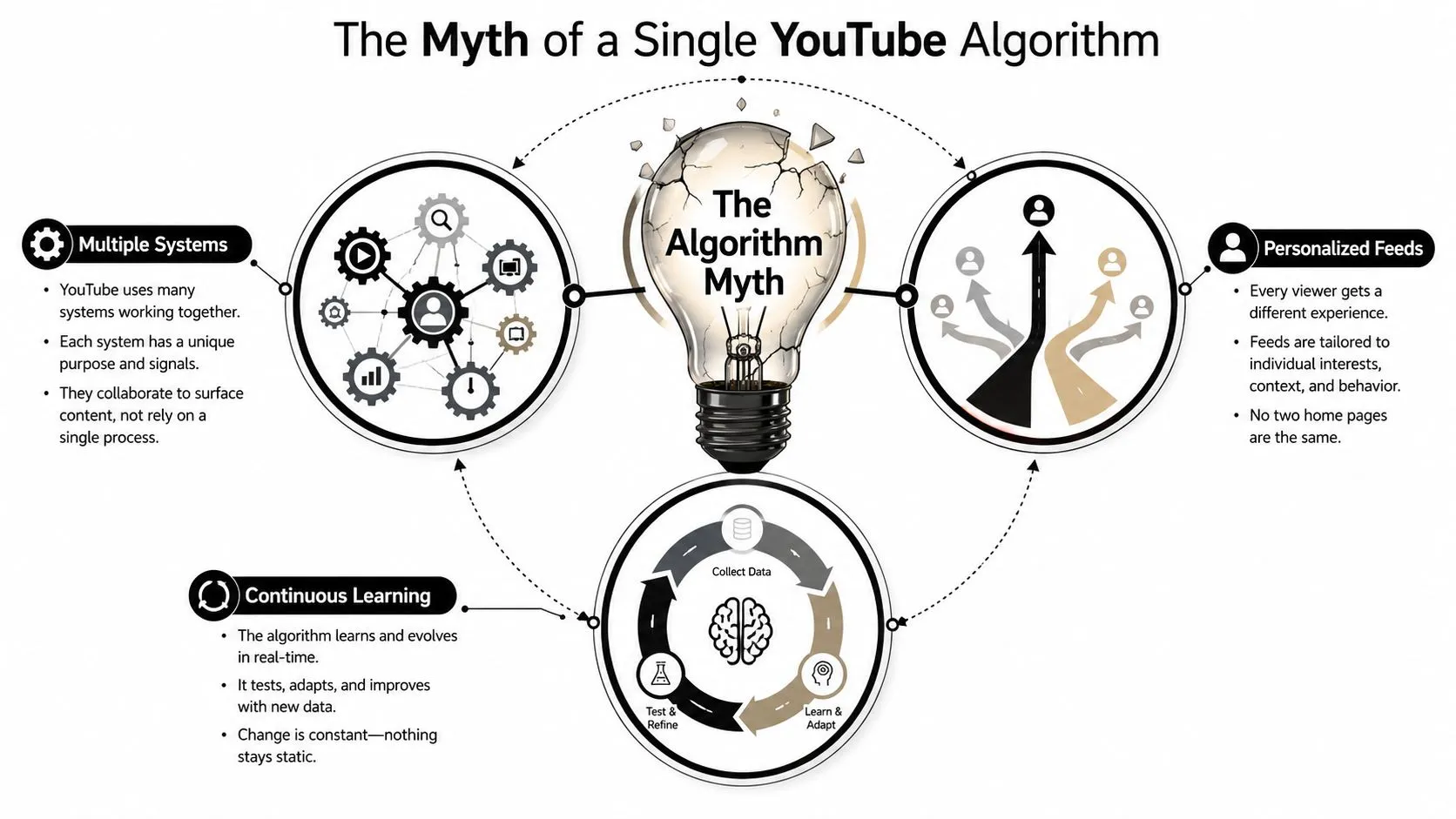
The phrase “the YouTube algorithm” sounds tidy, but it hides a complex system. YouTube doesn’t run one universal ranking rule that treats every video the same. It uses different ranking systems for different surfaces, including Home, Suggested Videos, Search, and Shorts, which is why one upload can take off in one place and disappear in another (source).
Why the single-algorithm story keeps spreading
Creators repeat the single-algorithm story because it’s easy to say and easier to blame. If a video underperforms, it feels simpler to say “the algorithm didn’t like it” than to ask which surface rejected it, which viewer group bounced, or which part of the package missed the mark. But that mindset flattens a complex system into a fake one-size-fits-all explanation.
The better mental model is a set of local specialists. Home behaves like a personal magazine rack. Suggested acts more like a “what next” engine beside the current video. Search behaves like a query-response system where the viewer’s intent comes first. Shorts is its own swipe-based environment, so it rewards different behavior than long-form content.
You can’t optimize the same way for a browsing feed and a search box. Those are different jobs, so they need different inputs.
Why this matters for creators
Once you accept the multi-surface reality, your decisions get sharper. A broad curiosity title may help a video win attention on Home, while a precise keyword phrase can matter more in Search. A strong series thumbnail can support Suggested distribution, but a clean topic match matters more when someone is actively looking for an answer.
This is also why creator “best practices” often conflict. One person says thumbnails are everything. Another says titles matter most. Both can be right, depending on the surface. YouTube isn’t judging your video once. It’s judging it differently wherever it appears, and that’s the point most advice skips.
If you want a surface-specific example of a discovery environment with its own logic, look at how Shorts are handled as a separate format. The lesson is the same across the platform. Don’t build for a mythical single feed. Build for the exact feed where you want to win.
How YouTube Finds and Ranks Your Video
YouTube doesn’t search its entire catalog every time someone opens the app. It uses a two-stage pipeline. First comes candidate generation, which narrows an enormous library to a small group of plausible videos. Then comes ranking, which orders those candidates for the individual viewer based on predicted enjoyment (source).
The bouncer and the VIP host
Think of candidate generation as the nightclub bouncer. If your video doesn’t look relevant enough, it never gets past the door. Candidate generation uses patterns like co-visitation, meaning videos often watched by the same people can be grouped together. This is how YouTube decides what even deserves a shot.
Ranking is the VIP host inside the club. Once your video qualifies, the system scores it for the person in front of the screen. That score depends on what YouTube thinks that viewer is likely to enjoy right now, not just what the whole platform liked yesterday. The same video can be a strong candidate for one viewer and a weak one for another.
The practical consequence is simple. A video has two hurdles. It must first be discoverable by topic or behavior pattern, and then it must outperform other candidate videos for the specific viewer. If you only think about watch time after upload, you miss the first gate entirely.
What creators should infer from the pipeline
This is why metadata still matters. Titles, descriptions, spoken words, and on-screen context help YouTube understand what bucket your video belongs in before the ranking stage ever starts. If the topic is muddy, your video may never enter the right candidate pool in the first place.
It’s also why early audience signals matter so much. YouTube isn’t waiting for a video to “go viral” in a vacuum. It tests the video with a limited audience, reads the response, and decides whether the content deserves broader distribution. If the early match is weak, the video can stall before it earns a larger test.
For a practical look at tightening your packaging and early performance, this guide to getting more views fits the same logic. The core idea is that the door matters before the table does. If the wrong viewers see the video first, even a good video can underperform.
The Ranking Signals That Actually Matter
YouTube’s ranking logic isn’t built around raw popularity alone. It uses signals that help predict whether a viewer will keep watching, feel satisfied, and stay on the platform. Independent industry summaries of YouTube’s public guidance consistently point to CTR, audience retention, likes, comments, shares, and direct feedback like surveys or Not Interested actions as the practical signals creators should watch (source).
The signals tell different stories
Click-through rate, or CTR, tells YouTube whether the packaging worked. If a viewer saw the thumbnail and title and clicked, the system learned the promise looked worth testing. But a high CTR by itself can be misleading. A thumbnail can overpromise, and then retention drops fast.
Audience retention tells a different story. If viewers leave early, the content didn’t match the promise or the opening didn’t hold attention. A strong opening matters because YouTube tests videos with small groups first and expands distribution when early performance is strong. In plain terms, the platform wants proof that the first viewers stayed happy before it broadens the audience.
How the other signals fit together
Likes, comments, and shares are not equal in every context. A like is cheap and fast. A comment takes more effort, so it often signals deeper engagement. Shares can show that a viewer found the video worth passing along, but they’re still only part of the picture. Direct satisfaction feedback, including survey responses and Not Interested clicks, tells the system whether the recommendation was a good match.
Useful diagnosis: high CTR plus weak retention usually means the thumbnail or title won the click, but the video didn’t pay it off.
Session behavior matters too. If your video leads people into another video, that’s different from a video that gets a click and then ends the session. You don’t need to obsess over one metric in isolation. You need to read the pattern. A tutorial that gets fewer clicks but keeps viewers watching all the way through can outperform a flashy video that loses them in the first minute.
If you want a practical benchmark for packaging, this breakdown of what counts as a good YouTube CTR is useful because it keeps the focus where it belongs, on whether the click leads to useful watch behavior. The takeaway is not “chase one metric.” It’s “build a package that earns attention and a video that deserves it.”
Why Your Video Succeeds on One Surface but Fails on Another
A video can thrive on Home and do nothing in Search, or rank in Search and barely move on Suggested. That isn’t a contradiction. It’s the result of surface-specific ranking. Home and Suggested lean heavily on predicted enjoyment and viewer satisfaction patterns, while Search leans much harder on query relevance and intent matching (source).
Home and Suggested reward discovery behavior
Home is where curiosity often wins. A compelling thumbnail, a clean promise, and a topic that matches a viewer’s recent interests can all help. Suggested is different in a subtle way. It sits beside or after another video, so YouTube is looking for the next logical click in a session.
That means an appealing series format can work beautifully there. If a viewer just watched one topic, YouTube wants to keep the session going with something closely related. A broad, curiosity-driven title may work well on Browse surfaces, but if the video doesn’t connect to what the current viewer just watched, Suggested can pass it over.
Search rewards intent first
Search is less forgiving of vague packaging. When someone types a query, they’re already telling you what they want. A video that answers that intent clearly has an advantage, even if the thumbnail isn’t the flashiest thing on the page. Strong keyword alignment matters more here because the user is asking a direct question or looking for a specific outcome.
| Surface | Primary Signals | Content Types That Excel | Key Optimization Focus |
|---|---|---|---|
| Home | Predicted enjoyment, CTR, retention | Broad interest videos, commentary, high-concept uploads | Strong thumbnail-title package |
| Suggested | Session relevance, topic adjacency, retention | Series, follow-up videos, related content | Make the next click obvious |
| Search | Query relevance, intent matching, satisfaction | Tutorials, how-tos, problem-solving videos | Exact topic clarity |
| Shorts | Swipe behavior, replay patterns, shares | Fast hooks, punchy clips, discovery teasers | Immediate payoff |
The clearest example is a tutorial versus a curiosity video. A tutorial optimized for search intent may never explode in Suggested if it feels too closed-off or too purely informational for browse behavior. A curiosity video can do the opposite, picking up on Home while never being specific enough to win in Search.
If you’re publishing Shorts, keep the same surface logic in mind and match the format to the feed. The mistake is trying to make every upload serve every environment. Different surfaces reward different promises.
How Personalization Shapes Every Viewer Experience
YouTube doesn’t build one feed and show it to everyone. It builds a real-time profile of each viewer and adjusts recommendations based on watch history, interest affinity, device, and time of day (source). That’s why the same video can rank differently for different people, or even for the same person at another moment.
The viewer, not the channel, is the center of the system
A lot of creator intuition goes wrong here. People often ask why a channel size didn’t “deserve” a recommendation. YouTube doesn’t optimize for deserving. It optimizes for predicted enjoyment in the current context. If someone has spent the last hour watching cooking videos, the next recommendation should reflect that recent behavior, not the uploader’s subscriber count.
Context matters in smaller ways too. Someone watching on a phone during a quick break may respond differently than the same person watching on a TV at night. YouTube is reading those cues in real time. That makes the system feel unpredictable from the creator side, but predictable from the viewer side.
What this means for channel strategy
Creators should think in terms of viewer clusters, not just topics. A travel vlog and a budget-travel explainer might share an audience, but they don’t satisfy the same moment. One serves discovery, the other serves intent. That’s why playlists and end screens matter. They help shape the next step in a session, which feeds back into future personalization.
Your job isn’t to chase every viewer. It’s to become the obvious next video for one clearly defined viewer state.
This also explains why consistency helps. When your content repeatedly serves a recognizable viewer pattern, YouTube learns who to test it on. That doesn’t mean you can’t evolve. It means your audience signals get clearer when your topic lane stays readable.
Creators who understand personalization stop treating each upload like a standalone gamble. They start thinking about what their ideal viewer watched before, what they’re likely to watch next, and what moment they’re in right now.
Common Algorithm Myths That Waste Your Time
A lot of creator advice sounds confident and turns out to be almost useless. The problem isn’t that people are lazy, it’s that they optimize for folklore instead of signals. YouTube’s system is viewer-focused, so advice that doesn’t improve viewer satisfaction usually doesn’t move much.
What keeps getting repeated
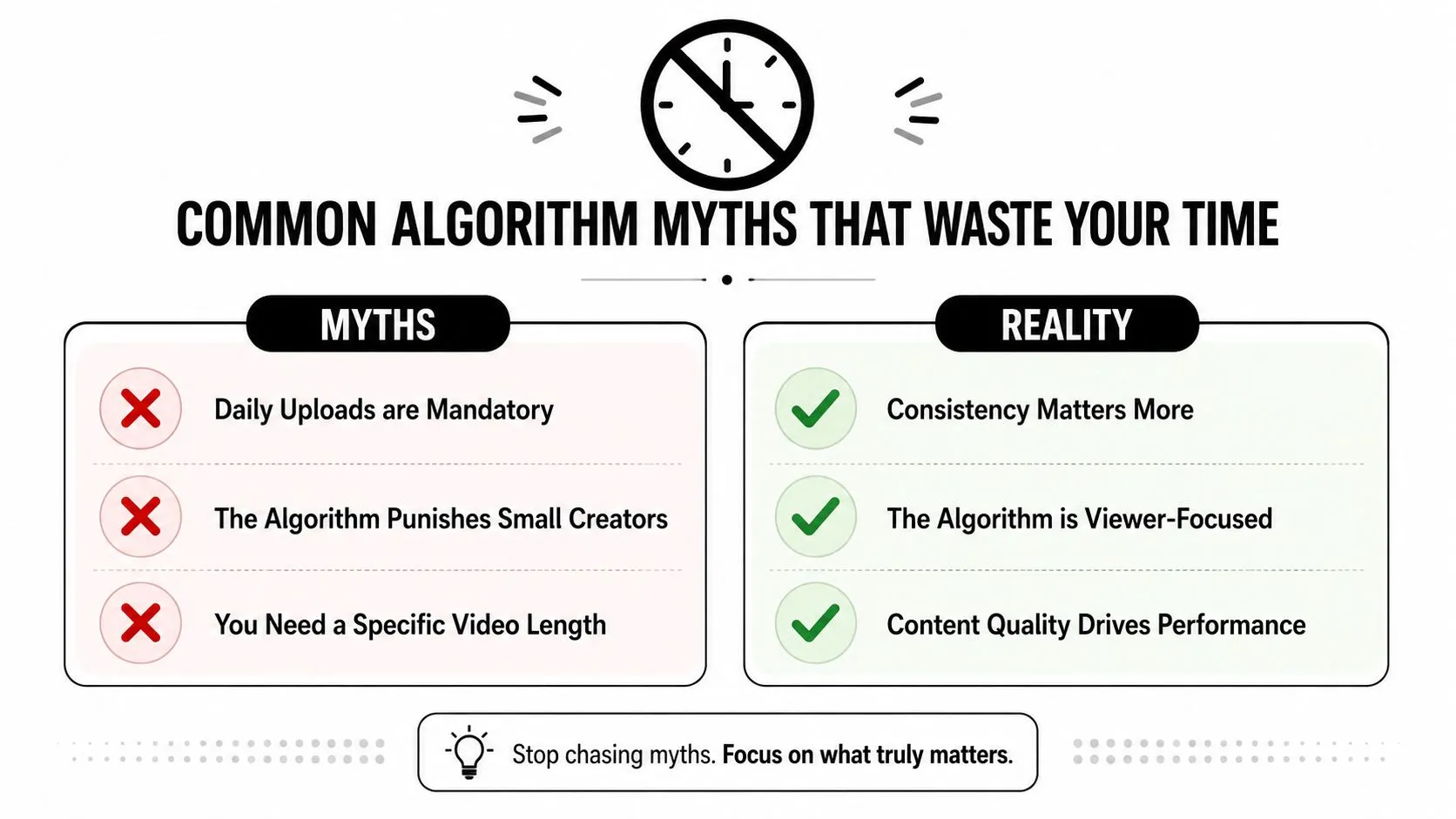
One myth says you need to upload daily. Another says the algorithm punishes small channels. A third insists tags are the most important metadata (you can see what tags any video uses with the free YouTube tag extractor). None of those ideas should steer your channel strategy as strongly as the viewer-facing signals already discussed.
Upload cadence matters less than whether each upload gives YouTube a clear, satisfying response from the right audience. Small channels are not locked out by definition, because YouTube tests videos based on performance signals, not just channel size. Tags can help with discovery and clarity, but they’re not the centerpiece of the system.
What actually deserves your attention
Thumbnail and title changes after publish don’t magically reset a video’s reach. They can, however, improve the first click if the video is still being tested. That’s not superstition, it’s iteration. If the packaging is weak, the system is reading a weak response from viewers.
Longer videos also don’t automatically win. A longer upload only helps if the idea needs the time and the retention stays strong. A tighter video that delivers the promise cleanly can outperform a padded one because it respects the viewer’s time and keeps them engaged.
Reality check: the algorithm doesn’t reward effort you can’t see. It rewards the viewer response your upload creates.
The best way to avoid these myths is to keep asking one question. What would make a real viewer stay, click again, or feel satisfied enough to keep watching? If a tactic doesn’t improve that answer, it’s probably busywork.
Actionable Optimization Strategies for Creators
A practical YouTube strategy starts before upload and continues after the first data comes in. The decisions that matter most are usually made in topic selection, packaging, the first seconds of the video, and the next click path. If you get those right, you give the algorithm better signals to work with.
Build for the surface first
Choose the surface before you choose the angle. If you want Home or Suggested, lean into clear packaging, curiosity, and a strong visual promise. If you want Search, make the topic explicit and answer-driven. If you want Shorts, design for immediate recognition and fast payoff.
Use your title and thumbnail as a matched pair. They should make one promise, not three. The viewer should understand the topic before clicking and the payoff should feel honest once they’re in. If those two pieces fight each other, retention suffers.
Protect the opening and the session
The first seconds matter because they either confirm the promise or expose the mismatch. Open with the point, not the backstory. If the viewer needs a tutorial, show the outcome quickly. If they clicked for commentary, get to the take fast.
Then think about the next step. End screens, playlists, and cards are not decoration. They shape session behavior, which helps YouTube understand what kind of viewing experience your channel creates. A video that naturally leads to the next relevant video is easier for the system to place in future recommendations.
Review the data with a narrow lens
After publish, check the early response in YouTube Studio. Look for whether the packaging earned the click, whether viewers stayed through the opening, and whether the video led to more viewing. If the click is weak, revisit the title and thumbnail. If the click is strong but the drop-off is sharp, fix the opening.
For creators who want an efficient way to iterate on packaging, Thumbo AI is one option for generating YouTube thumbnails with a CTR focus. It fits naturally into this workflow because you can regenerate a thumbnail quickly once the data tells you the packaging missed.
Keep your content calendar honest. Don’t schedule videos just to fill slots. Schedule them around topics your audience already proves they’ll click, watch, and continue. That’s how you align with how YouTube evaluates content, instead of chasing a universal formula that doesn’t exist.
If you want to make better thumbnails and improve the click side of your YouTube strategy, visit Thumbo AI and use it to generate clearer packaging for your next upload. It’s built for creators who want their titles and thumbnails to match the way YouTube surfaces videos across Home, Suggested, Search, and Shorts.