If your video gets shown but nobody clicks, YouTube has no reason to keep testing it. And if people click but leave fast, YouTube learns the promise wasn’t worth the watch. That’s the whole game.
The clearest way to think about how to get your YouTube videos more views is as a two-step system. First, win the click with a stronger thumbnail and title. Then prove the click was worth it with tighter retention. Everything else matters, but it matters downstream of those two events.
Creators get stuck when they treat growth like a bag of random tactics. More tags. Better camera. Post at a different hour. Add a few Shorts. Those can help, but they don’t fix the core feedback loop. Views rise when your packaging earns the first decision and your content earns the second.
Table of Contents
- Winning the Click with High-Impact Thumbnails and Titles
- Mastering the First 30 Seconds for Audience Retention
- Optimizing for Discovery with YouTube SEO
- Systematizing Content with Schedules and Playlists
- Driving External Traffic and Collaborating for Growth
- Iterating with Analytics and Quick Experiments
Winning the Click with High-Impact Thumbnails and Titles
CTR is the gatekeeper. YouTube’s own benchmark says half of all channels and videos land somewhere between 2 and 10% CTR. Videos stuck below 2% usually struggle to gain organic traction, while strong performers sit in the 4 to 10% range. And when a thumbnail underperforms, redesigning it and running YouTube’s Test & Compare feature against the original is the fastest way to find out whether packaging was the problem.
That tells you where to focus first. Not on polishing your outro. Not on tweaking tags for the fifth time (if you do want to see what tags a video uses, try the free YouTube tag extractor). The first job is getting the click.
Treat the thumbnail like an ad
Most creators design thumbnails like posters. Strong channels design them like ads.
A thumbnail doesn’t need to explain the whole video. It needs to trigger a decision. That usually comes from contrast, emotion, tension, or a visible result. If the viewer can understand the image in a split second and feel a reason to know more, you’re close.
Practical rule: If the thumbnail needs a sentence to explain itself, it’s too complicated.
Three things tend to work better than almost anything else:
- Clear focal point: One subject, one object, or one visual conflict. If the eye has to hunt, the click rate drops.
- High contrast: Bright against dark, warm against cool, large shape against empty space. Feed environments are crowded.
- Emotional readability: A face can work, but only if the expression is obvious at a glance. Neutral faces often waste space.
If you want a faster workflow for generating concepts before design refinement, this guide to an AI thumbnail maker for YouTube creators is a useful reference point.
Build the title and thumbnail as one promise
The title should not repeat the thumbnail. It should complete it.
Bad packaging says the same thing twice:
- Thumbnail text: “YouTube Growth Tips”
- Title: “10 YouTube Growth Tips for More Views”
Better packaging creates an information gap:
- Thumbnail: shocked face plus a flatline graph
- Title: “Why My Videos Stopped Growing After 10K Subscribers”
The viewer sees tension in the image and resolution in the title. That pairing creates curiosity without becoming vague clickbait.
Use these title patterns when you need sharper hooks:
| Format | What it does | Example |
|---|---|---|
| Problem reveal | Names a painful blocker | “Why Good Videos Still Die on YouTube” |
| Outcome promise | Makes the reward explicit | “How to Fix a Low-View Channel Without Posting More” |
| Contrarian angle | Challenges common advice | “Why Better Editing Won’t Save a Bad YouTube Video” |
| Specific curiosity | Opens a loop the viewer wants closed | “The Thumbnail Change That Saved This Upload” |
A practical packaging checklist
Before publishing, run this screen:
- Can the thumbnail be understood instantly: Shrink it mentally to mobile size. If key details vanish, simplify.
- Does the title create forward motion: “How to,” “why,” “what happened,” and “I tried” formats often work because they imply a story or payoff.
- Is there one dominant promise: More than one idea usually weakens the click.
- Does the packaging target the right viewer: Broad packaging gets broad clicks. It also attracts the wrong audience, which hurts retention later.
- Would you test a second version: The best creators don’t assume the first concept is right. They compare.
YouTube itself and industry guidance both point to thumbnails and titles as the most effective lever for improving CTR, with curiosity-driven and emotional packaging doing the heavy lifting, as outlined in Hootsuite’s explanation of how the YouTube algorithm responds to clicks.
Mastering the First 30 Seconds for Audience Retention
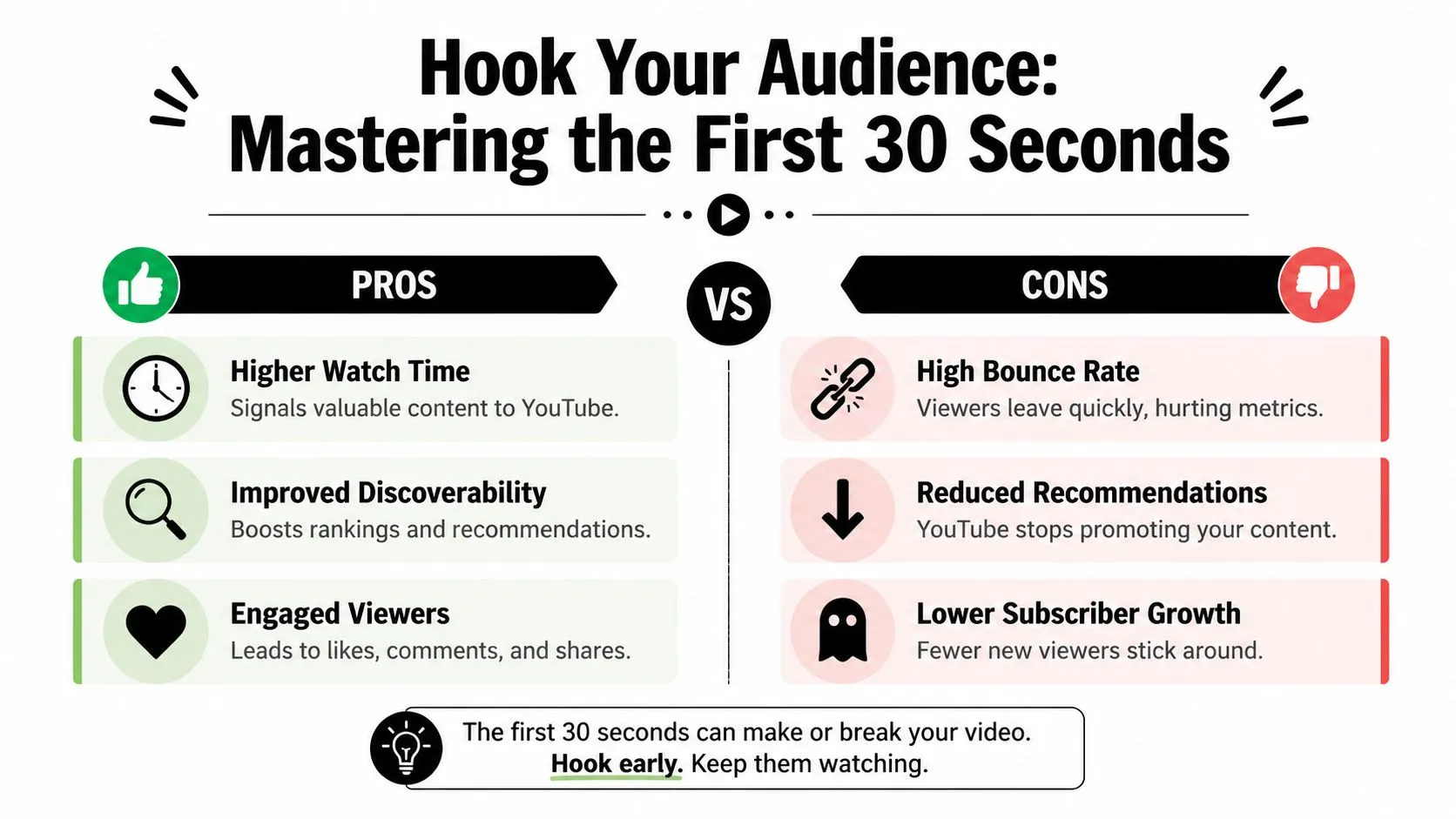
A click only buys you a moment. The opening decides whether YouTube keeps distributing the video.
The most important retention window is the start. If viewers bail in the first 30 seconds, YouTube reads those clicks as unsatisfied and slows distribution. Click and retention work as one system: as this breakdown of the algorithm’s appeal equation puts it, a great video nobody clicks on never gets a chance to prove itself, and a great thumbnail can’t save a video that loses people right after the click.
What the opening is really doing
The first 30 seconds has one job. It must confirm that the thumbnail and title were honest, then move fast enough that the viewer doesn’t feel trapped in setup.
That means the opening should do two things in sequence:
- Hook at 0:00 to 0:05
- Deliver immediate value at 0:05 to 0:30
If your intro starts with “Hey guys, welcome back,” you’re spending the highest-value seconds on habit instead of persuasion. Most viewers don’t care who you are yet. They care whether they clicked on the right video.
A useful side skill here is learning how fast short-form pacing trains audience expectation. If you publish both formats, this guide on how to create a YouTube Short that holds attention helps sharpen that instinct.
Four hook formats that hold attention
Different channels need different openings. The structure matters more than the style.
1. The result-first hook
Show the outcome before the explanation.
Example:
“This thumbnail change revived a video that was stalling, and the reason it worked has nothing to do with better editing.”
This works because the viewer sees there’s a concrete payoff coming.
2. The urgent question
Ask the exact question your audience is already carrying.
Example:
“Why do some videos get impressions but never break out? Usually it’s not the content. It’s what happens before anyone watches.”
Use this when the topic is analytical or diagnostic.
3. The visual surprise
Open on a frame that interrupts scrolling behavior. A dramatic before-and-after, an odd object, a dashboard anomaly, a bold on-screen statement.
Then explain it fast:
“That drop happened after I changed only one thing, and most creators would blame the wrong metric.”
4. The emotional ramp
Start with tension, then tighten it.
Example:
“I thought this video was strong. Good topic, clean edit, solid script. Then the audience graph collapsed in the first few seconds.”
This works well for educational or commentary content because it creates narrative momentum without wasting time.
What weak openings do wrong
Most poor intros fail in familiar ways:
- They delay the payoff: Long branded intros, disclaimers, and scene-setting kill momentum.
- They repeat the title without adding value: The viewer already read the title. Give them the next layer.
- They front-load biography: Credentials matter after trust starts forming, not before.
- They mismatch the promise: If the title sells one thing and the opening starts somewhere else, viewers leave.
The fastest way to lose retention is to make viewers feel they were sold one video and given another.
If your retention graph drops sharply early, rewatch your first half minute with one question in mind: did the video validate the click immediately, or did it ask the viewer for patience?
Optimizing for Discovery with YouTube SEO
SEO on YouTube isn’t a metadata game by itself. It’s a relevance system. You’re trying to help YouTube understand who the video is for, what problem it solves, and when to surface it.
That starts before you write the title. It starts with search behavior.
Use search behavior, not brainstorming
Many creators title videos around what they want to say. Better channels title around what viewers already type.
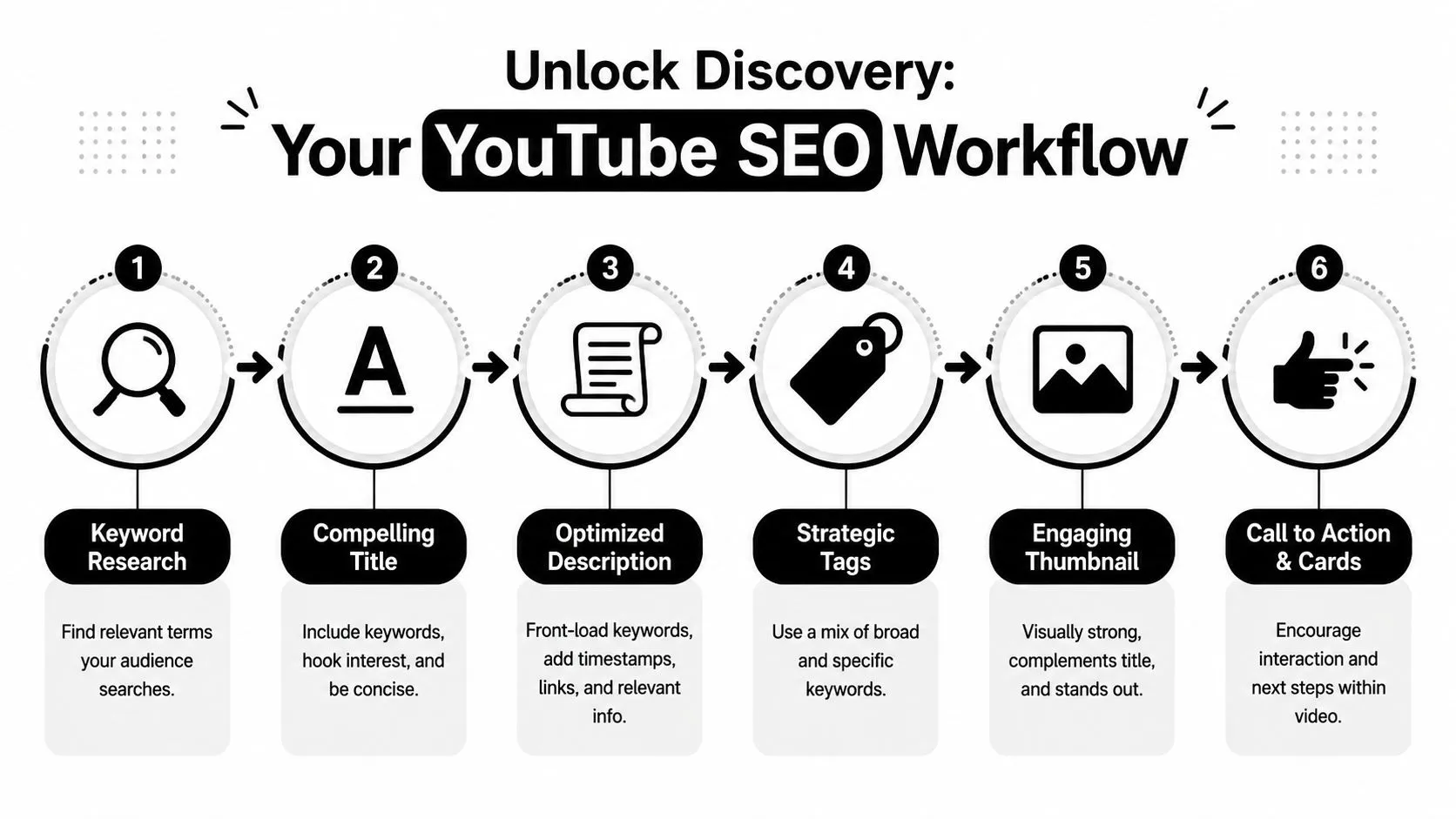
A practical workflow looks like this:
- Start in YouTube search: Type the root phrase and watch autocomplete suggestions.
- Check adjacent wording: “How to,” “for beginners,” “mistakes,” “review,” “vs,” and “why” often reveal intent.
- Use Google Trends for direction: Not for exact forecasting, but for comparing phrase variations.
- Match the content type to the query: A search-driven tutorial needs a clearer title than a commentary piece.
If a user searches “how to get your YouTube videos more views,” don’t hide the topic behind a clever phrase that sacrifices clarity. Search content often benefits from being direct.
Place keywords where they help humans too
Metadata matters most when it improves comprehension.
Audience retention and average view duration are the signals YouTube keeps rewarding, and timestamps and chapters support both by letting viewers preview the video and jump to the section they came for. A viewer who lands exactly where they wanted is far less likely to bounce than one scrubbing blindly through an unlabeled timeline.
That’s why the description should do more than stuff terms into a paragraph.
Use this structure:
| Placement | What to do | Why it matters |
|---|---|---|
| Title | Put the core keyword near the front if it fits naturally | Helps relevance and immediate comprehension |
| First lines of description | Summarize the video in plain language | Gives YouTube and viewers quick context |
| Timestamps and chapters | Break the video into meaningful sections | Improves navigation and supports retention |
| Tags | Add close variants and topic signals | Useful as support, not as the main lever |
A simple SEO workflow that holds up
The best YouTube SEO process is boring in the right way. It’s repeatable.
- Pick a topic with visible demand.
- Phrase the title around the search intent.
- Write a description that explains the value clearly.
- Add timestamps only when sections are distinct.
- Keep the thumbnail aligned with the search promise. Don’t bait broad curiosity if the video solves a narrow problem.
- Watch which search-led videos keep getting views over time, then build adjacent topics.
Search traffic is often where useful videos earn a long shelf life. Recommendation traffic is where they scale.
A lot of creators treat SEO and retention as separate disciplines. They aren’t. Good SEO gets the right viewer into the room. Good structure gives that viewer a reason to stay.
Systematizing Content with Schedules and Playlists
A strong channel isn’t just a collection of isolated uploads. It’s a viewing environment. The more predictable that environment feels, the easier it is for viewers to build habits around it.
That’s why schedules matter. Not because the algorithm rewards discipline in a moral sense, but because consistent publishing trains both your production system and your audience expectations.
Consistency builds viewer habits
The best upload schedule is the one you can maintain without quality collapse.
Creators often overcommit, then rush packaging, weaken openings, and burn out. A smaller schedule with tighter execution usually outperforms an ambitious calendar full of mediocre videos. Weekly can work. Biweekly can work. Series-based drops can work. The key is that viewers learn what to expect from you and your team learns how to repeat what works.
Use a schedule that protects these three things:
- Idea quality: Enough time to choose topics with genuine demand.
- Packaging quality: Enough time to develop multiple thumbnail-title concepts.
- Editing discipline: Enough time to trim dead space instead of publishing a bloated cut.
If your output is irregular because every upload starts from zero, build templates. Topic frameworks. Script skeletons. Checklists for title ideas. Thumbnail review criteria. Consistency starts in the workflow, not on the calendar.
Playlists increase session depth
Playlists are underestimated because many creators use them as folders. They’re more useful as pathways.
A good playlist doesn’t just organize videos by topic. It creates the next obvious watch. That matters because YouTube favors content that extends sessions and keeps viewers moving through relevant videos.
Compare the two approaches:
| Weak playlist | Strong playlist |
|---|---|
| “Uploads 2026” | “How to Grow a YouTube Channel From Scratch” |
| Mixed formats and unrelated topics | One problem, one progression |
| No sequence logic | Videos arranged in the right viewing order |
| Passive archive | Active binge path |
Series-based playlists often work best because they reduce decision fatigue. Topic-based playlists can work too, especially for tutorials and educational channels, but only if each video naturally leads to the next.
Don’t ask the viewer to figure out what to watch next. Decide for them.
A practical setup is simple. Add every new video to one primary playlist and one secondary playlist. Then review your end screens and descriptions so they point into that same content lane. A viewer who finishes one video should see a clean path into the next one, not a random assortment of uploads.
Driving External Traffic and Collaborating for Growth
YouTube doesn’t only learn from what happens on YouTube. Early traffic from the right people can help a video collect the first wave of engagement and viewing signals it needs to earn more internal distribution.
The mistake is pushing links everywhere and calling that promotion. That usually sends weak traffic, annoys communities, and creates bad first-session behavior.
Send context, not naked links
External promotion works when the platform-native post is useful by itself.
If you’re posting on X, LinkedIn, Reddit, a newsletter, or a niche community, give people a reason to care before you ask for the click. That means pulling out one insight, one strong quote, one surprising frame, or one specific lesson from the video. The link is secondary.
Use this sequence:
- Lead with a takeaway: Share the most useful point from the video in text.
- Match the platform tone: A Reddit post needs context. A newsletter needs framing. X needs compression.
- Send qualified traffic: The goal isn’t random clicks. It’s interested viewers who are likely to watch.
- Avoid spam behavior: Don’t paste the same message everywhere. Communities can smell automation instantly.
A creator with a business audience might post a short written breakdown on LinkedIn and invite readers to watch the full walkthrough. A gaming creator might cut a single moment from the episode and post it natively on another platform with a line that sets up the full video. Different methods, same principle. Deliver value first.
How to pitch collaborations people accept
Collabs work because they borrow trust, not because they generate novelty on their own.
The best collaborations happen between creators with audience overlap and format compatibility. Subscriber count matters less than content fit. If two channels serve similar viewers at adjacent stages of the same journey, the collab has a real chance of producing qualified traffic.
A strong pitch is short and specific:
I think our audiences overlap on [topic]. I’ve got an idea for a video where we each bring a different angle. My side would cover [angle], your side would cover [angle], and both videos could point viewers to the other for the full picture. If that sounds interesting, I can send a tighter outline.
That works because it respects the other creator’s time and shows you’ve thought about their audience, not just your own.
Good collaboration formats include:
- Debates or contrasting approaches
- Expert reaction videos
- Channel swaps on one shared topic
- Part one and part two structures across both channels
Bad collaboration ideas are easy to spot. They’re vague, self-serving, or built around audience mismatch. If the overlap isn’t real, the traffic won’t stick.
Iterating with Analytics and Quick Experiments
Creators who grow consistently do one thing better than stalled channels. They diagnose the exact point where YouTube stopped trusting a video to travel further.
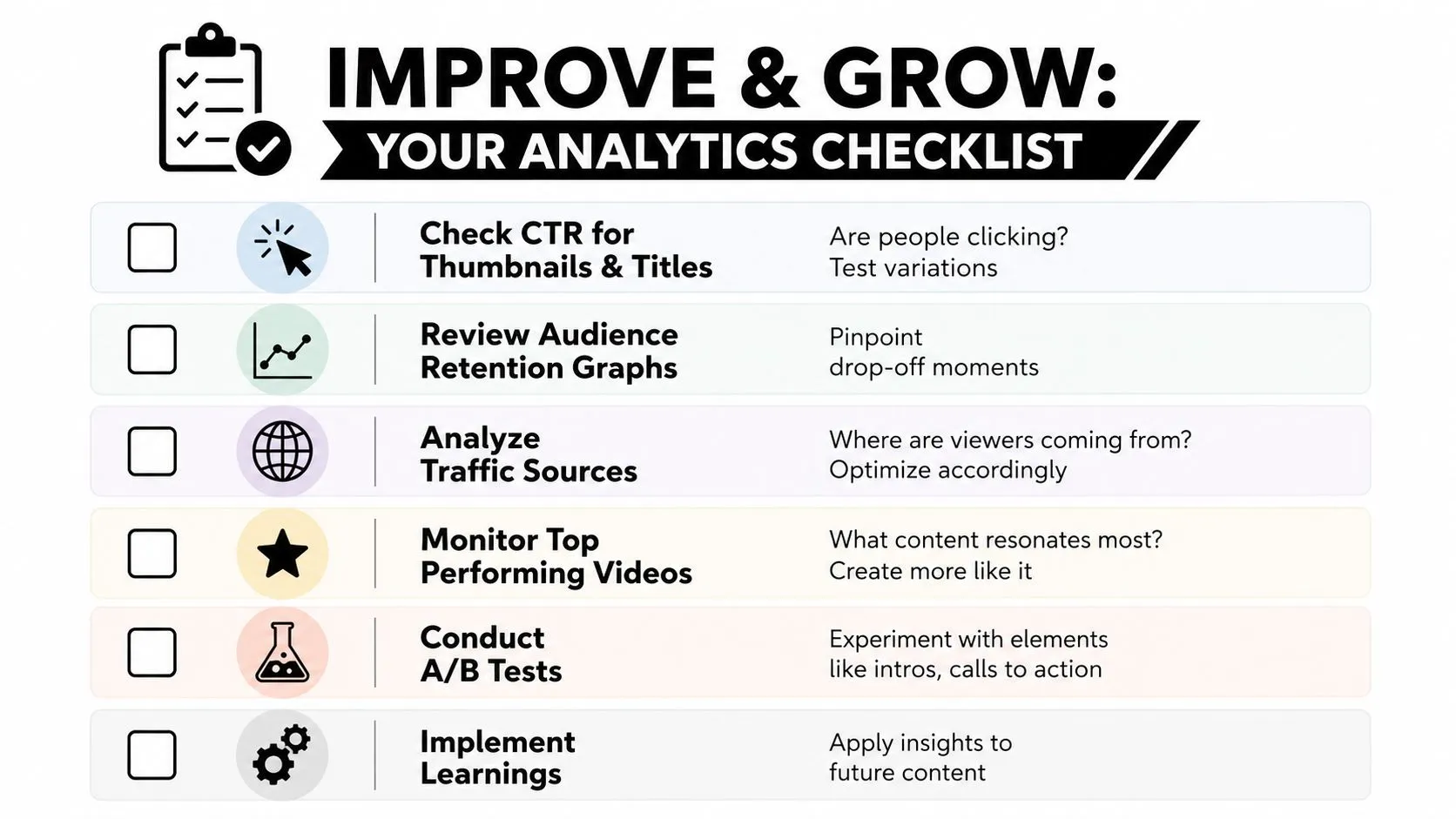
That matters because YouTube growth is a two-step system. First, the platform tests whether people will click. Then it tests whether the video justified that click. If CTR is weak, distribution usually slows early. If CTR is strong but retention collapses, the video often gets a short burst and then fades. Read analytics through that sequence and the next move becomes clearer.
Read the reports in the right order
Start with impressions and CTR.
If YouTube is giving a video chances but viewers are not clicking, fix packaging before touching anything else. A better intro will not solve a thumbnail-title problem. Creators regularly rewrite scripts for videos that actually needed a clearer promise on the homepage.
Then check the first 30 seconds on the retention graph. If people click and leave fast, the packaging did its job and the video did not. Usually the cause is one of three things: the intro takes too long, the opening scene does not match the title promise, or the viewer cannot tell what they will get by staying.
After that, check traffic sources. Browse, search, suggested, and external traffic behave differently for a reason. A search-led video can survive with narrower packaging if the intent is strong. A browse-led video usually needs a sharper curiosity gap and a faster payoff. External traffic can inflate early views while hurting average retention if the audience fit is loose.
Patterns across several uploads matter more than one outlier.
Three videos with the same thumbnail structure and the same retention shape usually point to a repeatable system. One breakout can be luck, timing, or topic demand. A cluster of similar wins is a format.
For creators tying view growth to revenue quality, understanding what RPM means on YouTube helps connect stronger traffic and stronger retention to the money each thousand views produces.
Quick experiments worth running this week
Run small tests with a clear reason behind each one.
-
Replace one weak thumbnail on a video that still gets impressions
This tests the click side of the system. Pick a video with a solid topic and underwhelming CTR, then publish a thumbnail with one clear subject, higher contrast, and a more obvious value cue. -
Rewrite one title to clarify the promise
Clever titles often lose to specific ones. If a viewer cannot predict the payoff, CTR drops. Make the outcome, conflict, or curiosity point easier to parse in one glance. -
Cut 10 to 20 seconds from your next intro
This tests whether slow setup is hurting early retention. Remove greetings, logo stings, and context the viewer can infer later. -
Match the opening shot to the thumbnail-title promise
If the thumbnail shows the result, the opening should acknowledge that result fast. That alignment often reduces the early drop because the viewer feels they clicked on the right video. -
Change end screens based on topic fit, not upload date
Sending viewers to the newest video is often a weak handoff. Send them to the closest next watch. Better session continuation gives YouTube a stronger reason to keep recommending your catalog. -
Build the next video from a proven winner
If a topic, structure, and packaging style already attracted the right audience, make the next variation while that signal is still fresh. Do not copy the surface. Repeat the mechanism.
The goal is not endless tweaking. The goal is to isolate causes.
A useful test changes one variable, waits for enough impressions to judge directionally, and records what happened. Over time, those notes become a playbook for your channel. You stop guessing whether a video failed on the click or failed after the click. That is the shift that turns analytics from a scoreboard into a production system.