
A good YouTube click-through rate generally falls between 4% and 10%, with 4% to 6% as the practical middle ground and anything above 7% considered strong performance. That’s the benchmark most creators should start with, but it’s not the whole story.
Most advice gets this wrong because it treats CTR like a single grade on a report card. In reality, CTR is a diagnostic signal, and the number only makes sense when you know where the impressions came from, how many impressions you’ve collected, and whether the video kept the viewers who clicked.
Table of Contents
- Why a Single CTR Number Is Misleading
- YouTube CTR Benchmarks by Traffic Source
- How to Find and Read CTR in YouTube Analytics
- The Factors That Actually Move Your CTR
- Proven Strategies to Improve Thumbnails and Titles
- Common CTR Mistakes That Hurt Your Channel
- Your CTR Optimization Decision Framework
Why a Single CTR Number Is Misleading
The benchmark obsession creates bad decisions
A lot of creators open Analytics, see one number, and immediately ask whether it’s good or bad. That instinct causes more harm than the number itself. CTR is not a universal pass/fail score, because the same video can earn very different click behavior depending on the traffic source, audience familiarity, and how broadly YouTube has pushed it. One industry guide recommends waiting for at least 1,000 to 2,000 impressions before reading too much into the result, because tiny samples swing hard and can make a video look stronger or weaker than it really is, and it also notes that the mix of browse, search, and suggested traffic changes the expected outcome (ytgrowth.io).
The useful question is not, “Is my CTR good?” It’s, “Good for what traffic, from what audience, at what stage of the video’s life?” A clip can look average on the surface and still be doing its job in search. Another can look impressive on a small subscriber audience and then collapse once YouTube opens it to colder viewers.
Practical rule: never make a thumbnail decision off one blended CTR number if the traffic mix is changing underneath it.
Higher clicks can be the wrong kind of clicks
The hidden trap is that a higher CTR can hurt your channel if it attracts viewers who weren’t a fit for the content. YouTube’s own ranking system cares about what happens after the click, not just the click itself. A thumbnail that promises drama, novelty, or a wildly different outcome may raise CTR and still underperform if viewers leave quickly because the video doesn’t match the promise.
That’s why CTR only becomes meaningful when you pair it with retention. A thumbnail that gets fewer clicks but brings the right audience can help the video travel farther than a flashy version that pulls in the wrong crowd. The better mental model is simple, CTR is packaging quality, not channel health by itself.
You can see this in creator workflows all the time. When a channel over-optimizes for curiosity, the views can spike, then flatten because the audience mismatch shows up in watch behavior. The thumbnail did its job, but it did the wrong job for the channel’s long-term growth.
YouTube CTR Benchmarks by Traffic Source
Search and browse don’t play the same game
The quickest way to misread CTR is to mash every impression into one average. Search traffic arrives with intent, so click behavior is usually stronger, with benchmarks often landing in the 8% to 15% range (instantviews.net). Browse/Home feed impressions work differently, with typical ranges around 3% to 7%, and some benchmarks putting it at 2% to 6% (ytgrowth.io), because viewers are being interrupted rather than actively hunting for a topic.
That gap is not noise. Search viewers already know what they want, so the title has to match query language and the thumbnail mainly has to confirm relevance. Browse viewers are scanning recommendations, so the thumbnail has to do more of the persuasive work. In browse, visual clarity matters more because the viewer is choosing between competing options in a feed.
Read search as intent conversion and browse as attention capture. If search CTR is healthy but browse CTR is weak, the thumbnail is usually the bottleneck. If browse is strong and search lags, the title is often not speaking the same language as the query.
Use source-specific context, not a blended average
Here’s the part many guides miss. A video can show a 3% CTR overall and still be healthy if most of its impressions come from broad browse traffic. The same video can show 12% CTR in search and still be mediocre if it barely reaches anyone. The right comparison is always the traffic source producing the impressions.
| Traffic Source | Typical CTR Range | What Drives Clicks |
|---|---|---|
| Search | 8% to 15% | Query match, title relevance, clear promise |
| Browse/Home feed | 3% to 7% or 2% to 6% | Thumbnail strength, visual contrast, curiosity |
| Blended channel average | 4% to 10% | Mix of source intent and audience familiarity |
The platform-wide average sits around 4% to 5%, and 4% to 10% is commonly treated as good, with above 6% strong and above 10% exceptional. That is useful as a rough frame, but it is not the number to make a thumbnail call on. Start with source, then ask whether the click pattern matches the traffic intent.
A higher CTR can still be the wrong outcome if it comes from the wrong audience. When a thumbnail over-promises, YouTube may give the video clicks, but the mismatch shows up in watch behavior and the recommendation system backs off. That is why CTR by source is the cleaner read. It shows whether the packaging is attracting the viewers you want, not just more viewers in general.
How to Find and Read CTR in YouTube Analytics
The path inside Studio
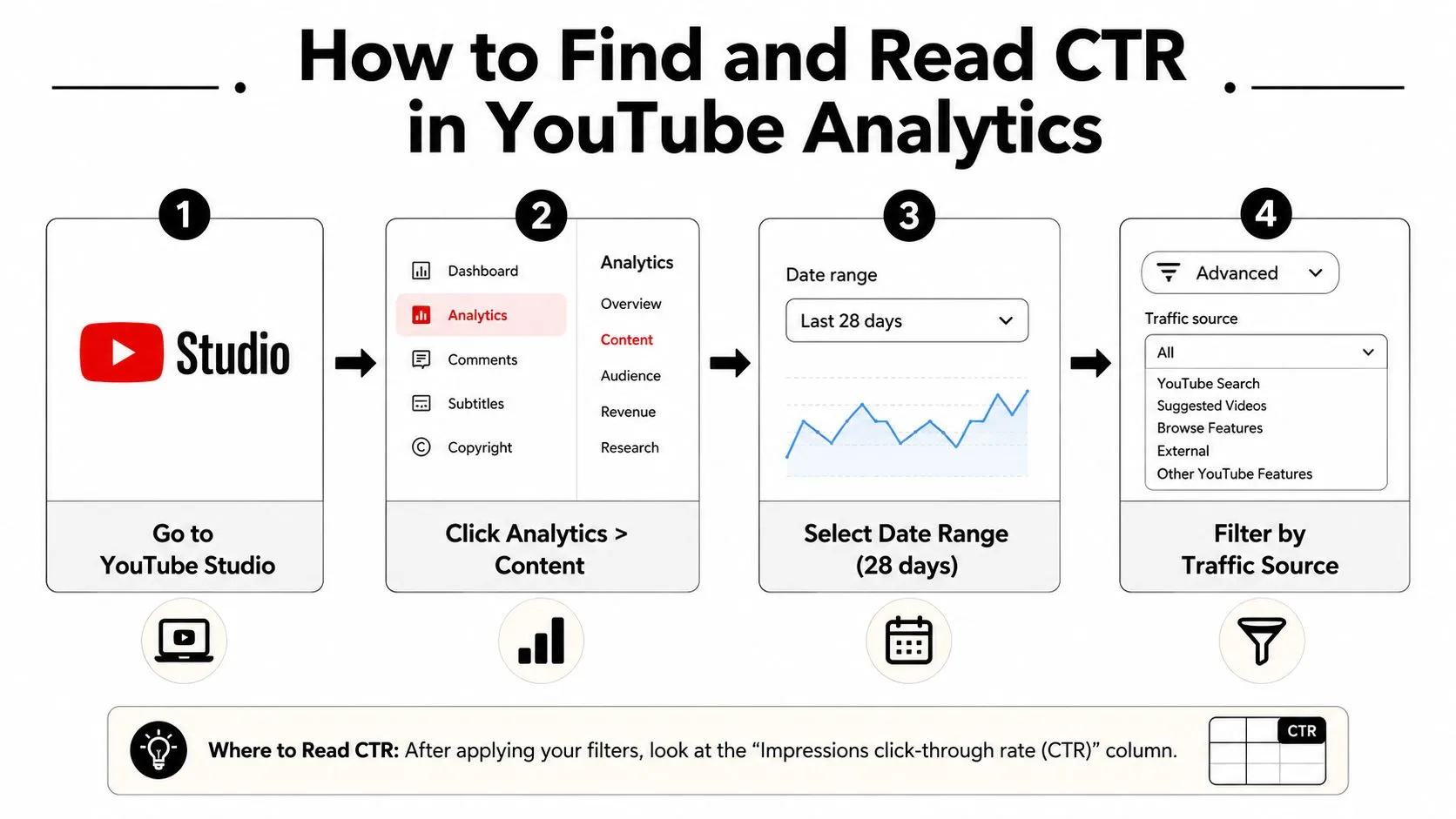
Open YouTube Studio, then go to Analytics, then the Content section. From there, check the impressions click-through rate for the video or date range you care about. If you’re reading performance properly, don’t stop at the channel average. Drill into a single video and compare it against the channel trend so you can see whether packaging or distribution is the issue.
The date range matters. A new upload runs hot in its first 48 hours, because the earliest impressions go to subscribers and recent viewers who are already primed to click, and it settles to a lower steady state as the algorithm widens the audience. The testing rule that follows from that is to change one variable at a time and let each variation run for at least 48 hours before drawing a conclusion (humbleandbrag.com). Combine that with the 1,000 to 2,000 impression threshold above and the noise has settled enough for a real read.
Read CTR beside retention, not in isolation
CTR only tells you who clicked. It doesn’t tell you whether they stayed. A thumbnail-title pair can win the click and still lose the video if the content under-delivers. That’s why the read is CTR relative to retention, not CTR alone.
YouTube’s built-in Test & Compare feature matters here because it moves the decision away from gut feel and toward watch-time share optimization. That’s a meaningful shift. If two thumbnails produce similar clicks but one brings viewers who stay longer, that version is usually the better long-term choice even if the raw CTR number isn’t the highest.
A clean workflow looks like this:
- Check sample size first so you’re not reacting to a tiny impression pool.
- Filter by traffic source to see whether the problem is search, browse, or suggested.
- Compare CTR to retention so you know whether clicks are helping or hurting.
- Test one variable at a time so you can identify what changed.
The fastest Analytics mistake is changing the thumbnail because the blended number looks weak, while the source-specific data was already telling you the title was the problem.
The Factors That Actually Move Your CTR
Topic sets the ceiling before design even starts
CTR doesn’t begin with the thumbnail, it begins with the topic. Some topics are naturally more clickable because the audience is actively looking for them, while others rely on creator loyalty or curiosity. That means your topic choice sets a ceiling on how far packaging can take you.
Audience size matters too. Larger audiences tend to make blended CTR look lower because impressions spread beyond the core fans who already know the creator. Smaller, tighter audiences often click at a higher rate because the channel is speaking to a clearer expectation. That’s why a modest number on a large reach video can be more valuable than a flashy number on a tiny sample.
The first 48 hours also create a feedback loop. A new video posts its highest CTR early, while impressions are still going to subscribers and recent viewers, then settles to a lower steady state as the algorithm serves it to broader audiences. That shift changes the audience mix and moves CTR without any change to the thumbnail itself (humbleandbrag.com).
Thumbnail, title, and context work as a system
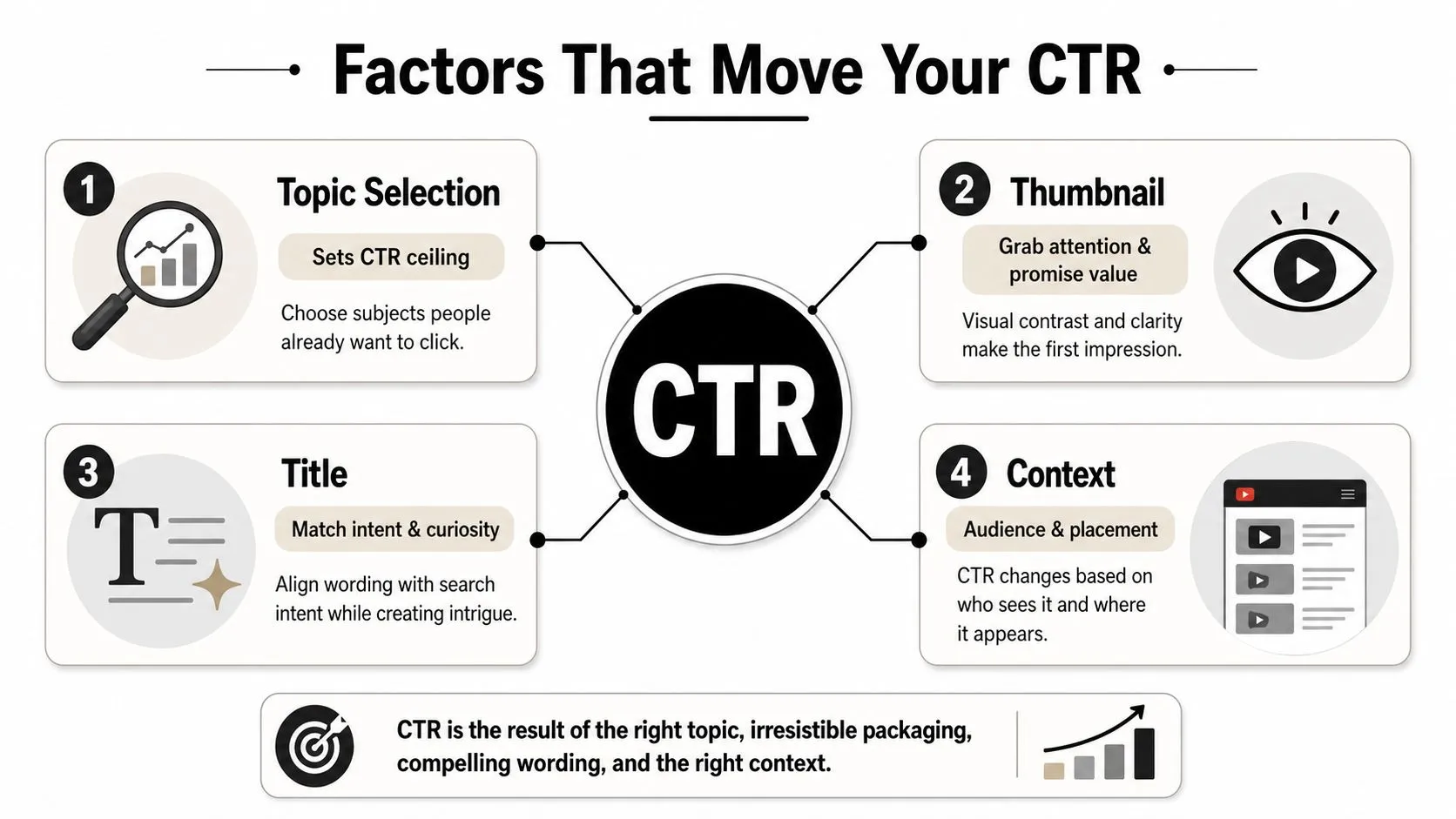
The strongest thumbnail can still fail if the title is mismatched. For search traffic, title-keyword alignment is often the bottleneck. For browse traffic, the thumbnail has to shoulder more persuasion because the viewer isn’t already searching for the topic.
That’s why it helps to think in terms of four variables, not one metric:
- Topic selection sets the demand ceiling.
- Thumbnail handles visual interruption and curiosity.
- Title confirms intent and adds context.
- Placement context changes the expected click behavior.
Good design principles matter here too. If you want a more practical foundation for visual hierarchy and layout thinking, the graphic-design breakdown at Thumbo AI’s design guide is a useful companion to this framework.
Proven Strategies to Improve Thumbnails and Titles
Build thumbnails for small screens first
The thumbnail has one job, stop the scroll. On a phone, that means contrast, simplicity, and instant readability. A strong thumbnail usually has a single focal point, clear separation between subject and background, and a composition that still makes sense when it’s shrunk down. Faces help when they’re relevant, but only if the expression matches the promise of the video.
Text can help, but only when it adds something the title doesn’t already say. If the title and thumbnail repeat each other, you waste space. If the text is too small or decorative, it becomes visual noise.
Write titles that add context, not filler
The best titles don’t just describe the topic. They create a reason to click. In practice, that usually means front-loading the useful keyword or problem, then adding a curiosity hook or outcome that the thumbnail doesn’t fully explain. Search viewers reward precision. Browse viewers reward clarity plus intrigue.
A weak title says the obvious thing in a generic way. A stronger title gives the viewer a sharper expectation. The distinction matters because YouTube surfaces your video in different places, and each surface asks the title to do a slightly different job.
Useful test: if the title still works after removing the thumbnail, it’s probably too vague. If the thumbnail still works after removing the title, it’s probably too empty.
Use tools to iterate faster, not louder
AI thumbnail tools can help you test more ideas before you publish, as long as they’re used for iteration instead of autopilot. One option is Thumbo AI’s thumbnail maker, which generates thumbnail concepts from a video idea or a few photos and can match the look of covers already working on a channel, and the AI thumbnail maker guide walks through building a testing loop around that. That kind of workflow is useful because the question is rarely “Can I make a thumbnail?” It’s “Can I make three credible versions and compare them quickly?”
The practical advantage is speed. Faster iteration makes it easier to compare contrast, face placement, text load, and title pairing before the video goes live. That matters more than chasing a clever concept that never gets tested.
Common CTR Mistakes That Hurt Your Channel
The clickbait trap feels good until retention hits
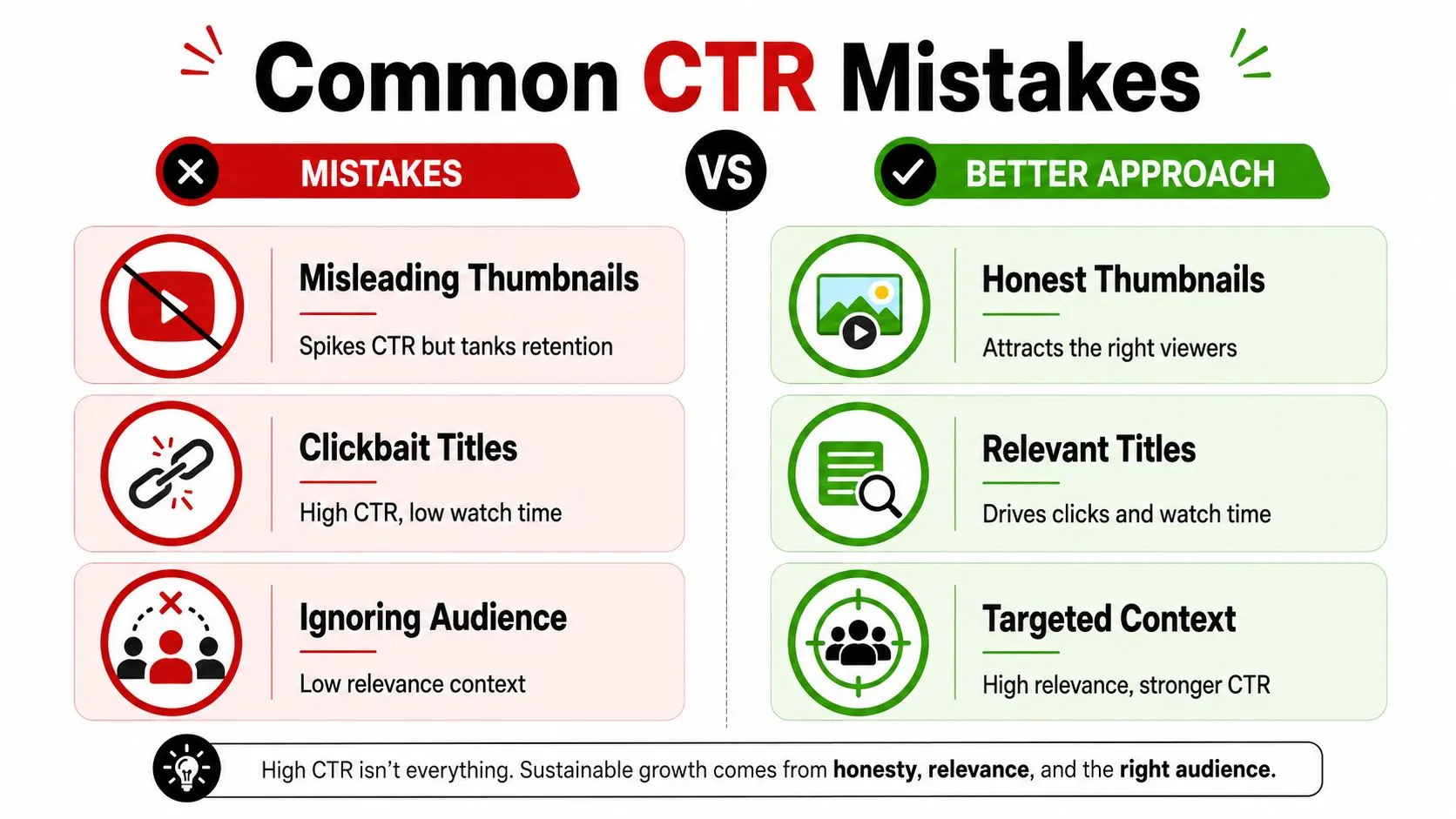
This pattern repeats constantly. A creator spots a weak CTR, rewrites the thumbnail to look more dramatic, and gets a short-term bump. Then average view duration drops because the audience clicked for a different video than the one they got. The channel didn’t gain momentum. It just traded one problem for another.
Misleading thumbnails are especially damaging because they create a mismatch between expectation and delivery. YouTube notices that mismatch through viewer behavior, and the recommendation system pulls back. The result is a shallow win on clicks and a deeper loss on distribution.
Chasing a tiny sample creates fake winners
Another common mistake is changing the thumbnail too early. A video with a small impression count can swing wildly, and that swing often has nothing to do with quality. If you keep swapping assets every time the number blips, you never gather enough data to know what worked.
Copying a big creator without their context backfires
A top creator’s thumbnail style can look irresistible and still fail for a smaller channel. Their audience already knows the face, the format, and the promise. Yours may not. That means a copy of the style can miss the signal, which is audience familiarity, not just visual polish.
The fix is more boring and more effective. Study what your own viewers click, keep the promise honest, and only change one thing at a time. That’s how you learn whether the issue is topic, title, thumbnail, or traffic context.
Your CTR Optimization Decision Framework
Use the same sequence every upload
Start with sample size. If you don’t have enough impressions, the number is too noisy to trust. Then segment by traffic source, because a blended average hides the problem. Next, compare CTR against retention so you can see whether the clicks are producing useful viewers or just curious drop-offs.
If one source underperforms, fix the bottleneck that matches the source. Search weakness usually points to title and keyword alignment. Browse weakness usually points to the thumbnail. When both are weak, the topic may be the issue.
Keep the goal tied to the video’s job
A modest CTR isn’t always a problem. Search-driven evergreen videos, community updates, and returning-audience posts can serve a strategic purpose even when they don’t produce the flashiest number. What matters is whether the video is doing the work you wanted it to do.
If you want a practical next step, use the upload checklist below as your default:
- Verify sample size before judging the result.
- Split CTR by source so you’re not mixing different audiences.
- Check retention together with clicks to avoid false wins.
- Test one variable and keep the rest stable.
For a broader view of how packaging affects reach, the guide on getting more YouTube views with better packaging fits neatly with this framework.
Thumbo AI helps creators generate YouTube thumbnails from a video idea or a few photos, match the style of covers already working on a channel, and keep the same face across every upload. If you’re trying to improve clicks without drifting into misleading packaging, Thumbo AI gives you a faster way to put three credible thumbnail options side by side before the video goes live.