Is vidIQ worth it? For a creator who gets a real share of views from YouTube search and uses the keyword, competitor and AI tools every week, the Boost plan at $19 a month (or $199 a year) can earn its price. For a channel that grows mostly through the Home feed and suggested videos, or that only needs one feature, the free plan plus YouTube Studio’s own tools usually cover enough.
All vidIQ facts below come from vidIQ’s own pages, read on November 8, 2026: the pricing page, and the Help Center articles “Features & Credits by Plan” (updated November 5, 2026), “Running Out of AI Credits? Your Options for Getting More” (October 8, 2026), “Why was I charged without notification?” (July 21, 2026) and “How to cancel my paid vidIQ Subscription?”. YouTube facts come from YouTube Help, linked inline. Prices and credits change, so check the current versions on the day you buy.
Updated November 8, 2026: adds vidIQ MCP, which spends the same AI credits as the web app on every plan, and the order in which plan and add-on credits are used.
Table of Contents
- The Short Answer
- What vidIQ Costs in 2026
- What the Free Plan Really Gives You
- What AI Credits Buy
- Where vidIQ Is Strong
- What YouTube Studio Now Does for Free
- The Traffic Source Test: Should You Pay?
- Billing Terms to Know Before You Subscribe
- Where Thumbnails Fit
- vidIQ Plans Side by Side
- Action Plan: Decide in 14 Days
- FAQ
The Short Answer
| Your situation | Is vidIQ worth it? |
|---|---|
| A real share of your views comes from YouTube search, and you research keywords before every upload | Often yes: Boost unlocks unlimited keyword and outlier results |
| You track many competitor channels and want outliers in one place | Often yes: Boost tracks up to 20 competitors, MAX up to 50 |
| You want an AI coach, scripts or clipping and will use them weekly | Possibly: check the credit math below first |
| Most views come from Home and suggested videos | Usually no: keyword tools move the smallest part of your traffic |
| You mainly want help with thumbnails | Usually no: a tool built for thumbnails is a more direct fix |
| You are just starting and post less than weekly | Start with the free plan and YouTube Studio |
What vidIQ Costs in 2026
vidIQ’s pricing page lists four options:
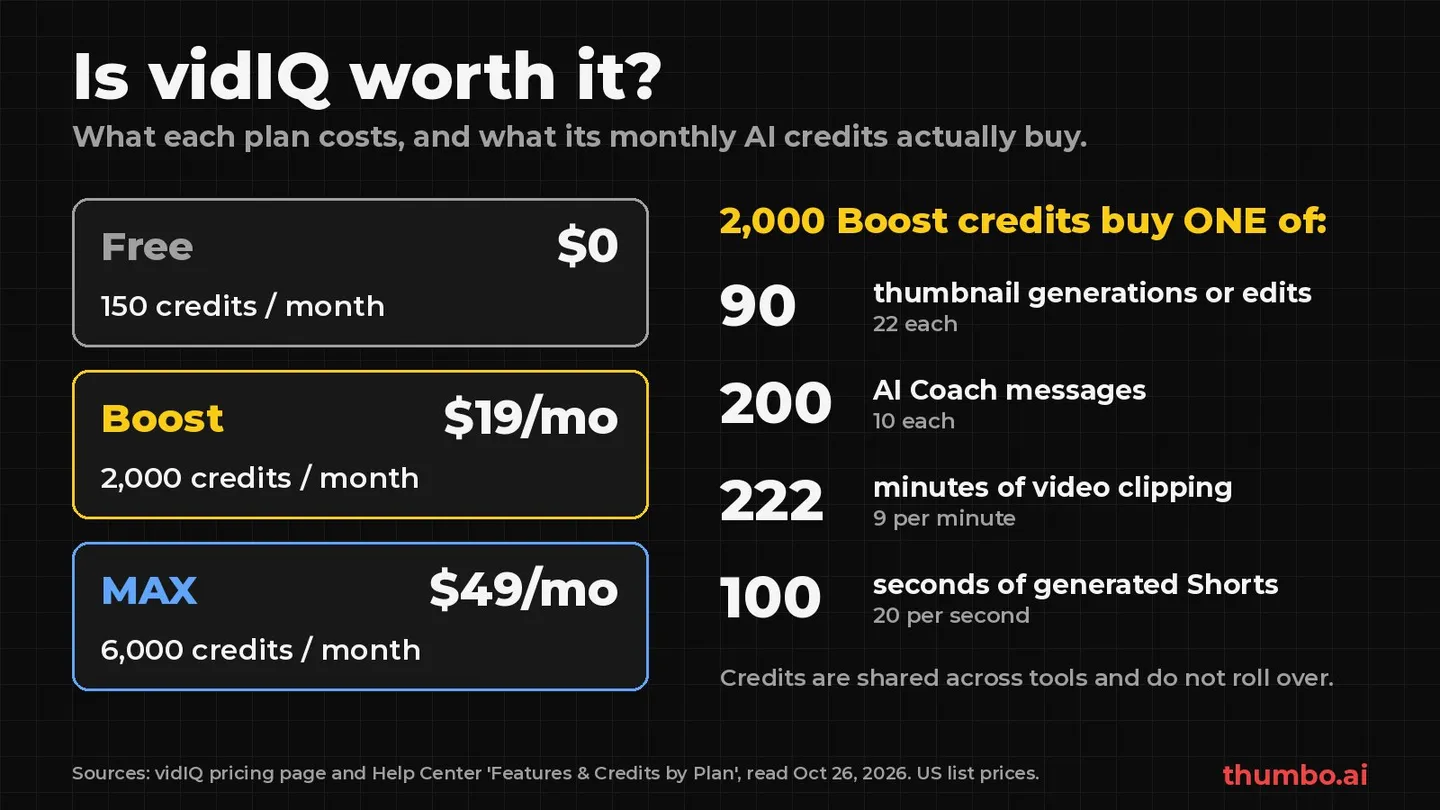
- Free: $0, with 150 AI credits every month.
- Boost: $19 a month, or $199 a year (shown as $16.58 a month), with 2,000 AI credits a month for one channel. Two- and three-channel versions include 2,500 and 3,000 credits.
- MAX: $49 a month, or $468 a year (shown as $39 a month), with 6,000 AI credits a month for one channel, or 8,000 and 10,000 on two and three channels.
- Enterprise: for brands, agencies and networks, with team roles and cross-channel reporting; no public price.
vidIQ also sells a Coaching plan that combines Boost access with one-on-one coaching; its Help Center lists 6,000 monthly credits for it. The prices are “one-channel US list prices,” “local pricing may vary,” and the final price “is shown at checkout.”
Monthly vs annual billing
| Plan | Monthly billing, 12 months | Annual billing | Saving |
|---|---|---|---|
| Boost (1 channel) | $228 | $199 | $29 (about 13%) |
| MAX (1 channel) | $588 | $468 | $120 (about 20%) |
Since vidIQ does not refund unused days, paying monthly for the first two or three months is the safer test.
What the Free Plan Really Gives You
The free plan is a genuine test drive, not a demo. According to “Features & Credits by Plan,” it includes Keyword Research with 3 results per search (unlimited on paid plans), Outliers with 8 results per search, tracking for up to 3 competitors, 3 Personalized Daily Ideas a day, and 150 AI credits a month, which vidIQ MCP also draws from. The browser extension’s Optimize Score, Video Scorecard, Real-Time Stats, Views Per Hour and Outlier Score are all included on Free.
What Free leaves out: Best Time to Post, Subscriber Analysis, Controversial Keywords and title and description translations are paid only, Compare Thumbnail in Search is limited to 3 uses for the lifetime of the account, and CSV Export stops at 10 videos.
If the 3-result keyword cap frustrates you within two weeks, Boost would get used. If you rarely open the extension, it would not.
What AI Credits Buy
vidIQ runs its AI tools on one shared monthly balance. In vidIQ’s words, “credits are shared across supported AI tools, so using credits in one place reduces the amount available for the vidIQ AI tools.” Each action has a fixed price:
| AI tool | Unit | Credits |
|---|---|---|
| AI Coach, Regular/Fast | Per message | 10 |
| AI Coach, Deep Thinking | Per message | 25 |
| AI Coach, Max Mode (MAX and Coaching only) | Per message | 35 |
| Thumbnails | Per generation, regeneration or edit | 22 |
| Script Writer | Per minute of script length | 1 |
| Clipping | Per minute of input video | 9 |
| Shorts Generator | Per second of output video | 20 |
| Title Generator | Per generation (up to 3 titles) | 3 |
| Description Generator | Per description | 1 |
Credit math per plan
Dividing each plan’s allowance by the costs above shows what a month buys if all the credits go to one tool:
| If you spend everything on… | Free (150) | Boost (2,000) | MAX (6,000) |
|---|---|---|---|
| Regular AI Coach messages | 15 | 200 | 600 |
| Deep Thinking messages | 6 | 80 | 240 |
| Thumbnail generations or edits | 6 | 90 | 272 |
| Clipping, minutes of input video | 16 | 222 (about 3.7 hours) | 666 (about 11 hours) |
| Shorts Generator, seconds of output | 7 | 100 | 300 |
In practice the balance is split. A Boost user who sends 60 regular coach messages (600 credits) and makes 30 thumbnail versions (660 credits) has 740 credits left. Clipping and the Shorts Generator are the expensive tools: 100 seconds of generated Shorts uses a whole Boost month.
vidIQ MCP uses the same credits
vidIQ MCP lets an AI assistant such as ChatGPT or Claude call vidIQ tools for you. The pricing page says it “is available on every plan, including Free,” and that tool calls use the AI credits included in your plan. “Features & Credits by Plan” adds that “there is no separate MCP allowance.” Typical MCP prices from that article:
| MCP call | Credits |
|---|---|
| Balance check, connected channels, competitor list and other basic lookups | 0 |
| Research and analytics (keyword research, outliers, channel and video stats, transcripts) | 5 per call |
| Title and thumbnail scoring, title ideas | 5 per call |
| Thumbnail generation or edit | 22 |
vidIQ warns that “one question to your AI can trigger several tool calls,” and that “every generation is charged, including retries and new versions.” If research calls were the only thing you used, Free’s 150 credits would cover 30 of them a month and Boost’s 2,000 would cover 400.
How credits refresh and top up
- No rollover. Plan credits refresh monthly on your sign-up or upgrade date, and “unused credits do not roll over.”
- Plan credits go first. Purchased top-ups and bonus credits sit in a separate add-on balance that is “not reset on your billing date,” and they “are only used once your plan credits for the month run out.”
- Per account, not per channel. On a two- or three-channel plan the allowance is “one shared balance for all your connected channels.”
- Top-ups only on MAX and Coaching. “Top-Up Credits are not available on the Free plan,” and on Boost the options are to upgrade or wait for the next refresh. Top-ups are also unavailable for plans billed through the Apple App Store or Google Play, and not offered in every region yet.
- Upgrades apply at once. Upgrades “typically reset your billing cycle and apply your new monthly credit allowance right away.”
Where vidIQ Is Strong
- Keyword and outlier research in one place, unlimited on paid plans, plus Keyword Inspector inside YouTube through the extension.
- Competitor tracking at scale: up to 20 channels on Boost and 50 on MAX.
- On-page signals while you browse YouTube: Views Per Hour, Outlier Score and the Video Scorecard, even on Free.
- Channel audit and CSV export without limits on paid plans, useful for reporting to a client or a team.
- A wide AI toolkit under one login, from coach to scripts to clipping.
For a search-driven creator who wants these signals daily, Boost is a fair price. If the choice is between the two big extension suites, the TubeBuddy vs vidIQ comparison goes feature by feature.
What YouTube Studio Now Does for Free
Before paying, check how much of the job YouTube already covers.
Trends tab for research. The Trends tab in YouTube Analytics shows “the top searches based on your audience and your saves over the last 28 days,” breakout videos from similar channels, an audience interest level for any topic, and content gaps where “viewers can’t find enough quality search results on YouTube” (YouTube Help). Some insights “are limited to certain countries, languages, and devices.”
Ask Studio for ideas and analytics questions. YouTube describes Ask Studio as “an AI creative partner built directly into YouTube Studio to help you brainstorm video ideas, get channel insights, and analyze your performance” (YouTube Help). It runs only in a computer browser, is not available to Official Artist Channels, Made for Kids channels or creators under 18, and YouTube warns that “quality and accuracy of responses may vary.” It can also review a pasted script or an unpublished video and give suggestions “based on creative best practices and historical retention data.”
Test & compare for titles and thumbnails. Creators can “test and compare up to 3 different titles and thumbnails,” and the version “with the highest watch time will be shown to all viewers” (YouTube Help). It works on computers only, needs advanced features, does not cover Shorts, and a test “should be completed within two weeks.”
Thumbnail suggestions in the upload flow. Under “Thumbnail,” YouTube Studio offers “Get suggestions to generate a thumbnail” next to Upload file, and Ask Studio can suggest thumbnails from the video’s transcript and themes (YouTube Help). That is a free baseline to compare any paid thumbnail tool against.
Tags matter less than tools suggest. YouTube’s help page on tags says the title, thumbnail and description “are more important pieces of metadata for your video’s discovery,” and that outside of commonly misspelled topics “tags play a minimal role.” To see what a competing video uses, the free YouTube tag extractor lists any video’s tags from its link.
What Studio lacks is unlimited cross-channel keyword data, competitor tracking at scale and the extension’s in-page scores: that is what you would pay for. The job-by-job comparison is in the guide to vidIQ alternatives.
The Traffic Source Test: Should You Pay?
vidIQ’s strongest features help you rank in YouTube search. Whether that matters depends on how viewers find your videos, and YouTube shows you this for free.
In YouTube Studio, open a video’s Analytics and go to the Reach tab. The “How viewers find this video” card splits traffic into sources such as YouTube search (“traffic from YouTube search results”), Browse features (“the Home, subscriptions, Watch Later, Trending/Explore, and other browsing features”) and Suggested videos (YouTube Help). The “YouTube search terms” report lists what people searched to find you.
On your last ten long-form videos, note the YouTube search share, check whether the search terms match topics you chose on purpose, and see which source carried your best video. Then:
- Search is a large and growing share, and the terms match your topics: keyword research is working, and better keyword data is likely worth paying for.
- Search is small and Browse plus Suggested dominate: the levers that matter are the title, the thumbnail and how long people watch. The guide to how the YouTube algorithm works covers what drives that traffic.
- Search terms are mostly your channel name: viewers already know you. Spend on making each video more clickable rather than on discovery data.
Billing Terms to Know Before You Subscribe
From vidIQ’s Help Center:
- Plans renew automatically “each billing cycle, keeping your benefits uninterrupted, until canceled.” A promo price renews “at the full rate” once the promo ends.
- No refunds for unused days. vidIQ says: “we do not offer refunds or credits for unused days within an existing plan.” After cancelling you keep access until the end of the billing cycle, then the account reverts to the free plan.
- Upgrades carry credit. When you upgrade, “the remainder of your unused time will be applied as a credit to the purchase of a new plan.”
- Cancelling takes the full wizard. For card or PayPal, cancel under Account Settings, Manage Plan, Cancel Subscription, and “you will need to go through the entire downgrade process in order to fully cancel your plan.” App Store and Google Play plans are cancelled there.
The rule that follows: if you are unsure, pay monthly, set a reminder before the renewal date, and switch to annual only once you know you use it.
Where Thumbnails Fit
vidIQ includes an AI thumbnail generator. Every generation, regeneration or edit costs 22 credits from the shared balance, so Free covers 6 thumbnail actions a month and Boost about 90 if nothing else uses the credits. How it works and its stated limits are in the guide to the vidIQ thumbnail generator.
If Browse and Suggested carry your channel, the thumbnail is one of the few things you fully control on that traffic, and the question becomes which tool makes the best thumbnail for your channel.
Thumbo is a thumbnail-only tool:
- Persona: upload 1-3 photos once (even one is enough) and Thumbo reuses them so you look the same across thumbnails.
- Style matching: paste a YouTube video or channel link to copy its look, upload a reference image, or start from 50+ Style Packs.
- Plain-language edits: type what to change, such as “make my face bigger,” and every version is kept so you can go back.
- Faceless channels: a faceless mode makes thumbnails with no people in them.
- Try before paying: a new account gets 6 free credits once, with no card. Free results carry a watermark and cannot be downloaded until you buy a pack.
- Simple pricing, pay once: one-time credit packs, 10 credits for $5.99, 30 for $14.99, 100 for $34.99. 1 credit = 1 thumbnail or 1 edit. No subscription, and credits never expire.
Count alone does not settle this: on paper, Boost buys more thumbnail actions per dollar if its credits go to nothing else. What matters is whether the result looks like your channel and wins clicks. Make versions in both, check them at real size with the free thumbnail previewer, and let Test & compare pick the winner on watch time.
vidIQ Plans Side by Side
| Free | Boost (1 channel) | MAX (1 channel) | |
|---|---|---|---|
| Price | $0 | $19/month or $199/year | $49/month or $468/year |
| AI credits per month | 150 | 2,000 | 6,000 |
| Keyword Research | 3 results/search | Unlimited | Unlimited |
| Outliers | 8 results/search | Unlimited | Unlimited |
| Competitors tracked | Up to 3 | Up to 20 | Up to 50 |
| Personalized Daily Ideas | 3/day | 50/day | 50/day |
| Best Time to Post, Subscriber Analysis | No | Yes | Yes |
| AI Coach Max Mode | No | No | Yes |
| vidIQ MCP | Yes, uses credits | Yes, uses credits | Yes, uses credits |
| Credit top-ups | No | No | Yes, where available |
Sources: vidIQ pricing page and “Features & Credits by Plan,” read November 8, 2026.
Action Plan: Decide in 14 Days
- Day 1: run the traffic source test on your last ten long-form videos, then install vidIQ on the free plan.
- Days 2 to 7: research each upload in YouTube’s Trends tab and in vidIQ Free. Note every time a free limit stops you.
- Day 8: if you hit the free limits three or more times and search is a meaningful share of your views, start Boost on monthly billing.
- Days 8 to 14: on your next long-form upload, run Test & compare with two or three genuinely different thumbnails, each at least 1280 x 720.
- Day 14: keep paying only for the tools that changed a decision or a number. Switch to annual billing only after two or three months of steady use.
FAQ
Is vidIQ worth it for small channels?
Start with the free plan: keyword research with 3 results per search, outliers, 3 tracked competitors, daily ideas, the extension’s scorecards and 150 AI credits a month. If most views come from Browse and Suggested rather than YouTube search, keyword tools touch the smallest part of your traffic.
How much does vidIQ cost per month?
According to vidIQ’s pricing page, Boost is $19 a month or $199 a year, and MAX is $49 a month or $468 a year, as one-channel US list prices. The free plan is $0. Local pricing may vary, and the final price is shown at checkout.
What is the difference between vidIQ Boost and MAX?
MAX triples the monthly AI credits (6,000 vs 2,000 for one channel), tracks up to 50 competitors instead of 20, adds AI Coach Max Mode, and allows credit top-ups. Keyword research, outliers and daily ideas are the same on both.
Do vidIQ credits roll over?
No. Plan credits refresh monthly and unused credits do not roll over. Purchased top-ups and bonus credits sit in a separate add-on balance that does not reset, and they are used only after the monthly plan credits run out. Credits spent through vidIQ MCP come out of the same balance.
Can I get a refund from vidIQ?
vidIQ’s Help Center says it does not offer refunds or credits for unused days within an existing plan. If you cancel, you keep paid access until the end of the billing cycle, and then the account reverts to the free plan.
Is vidIQ worth it just for thumbnails?
Usually not. Each thumbnail generation, regeneration or edit costs 22 credits from a balance shared with all the other AI tools. If thumbnails are your main need, compare a dedicated thumbnail tool and judge the results, not the credit count.