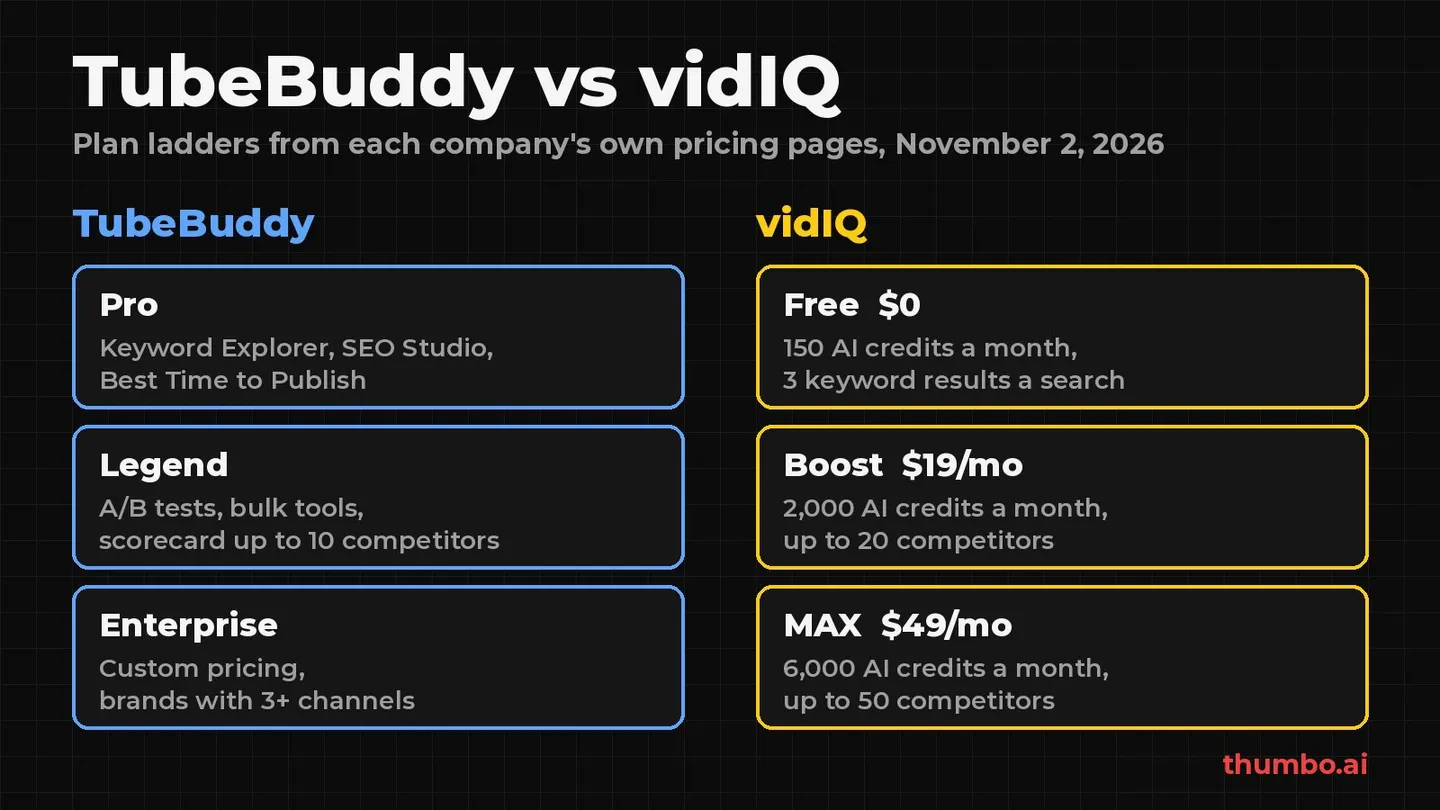
TubeBuddy vs vidIQ comes down to how you work. TubeBuddy is a toolkit that lives inside YouTube Studio and leans on workflow: SEO checks, bulk editing, scheduling and its own A/B tests. vidIQ is a research and AI suite built around keyword and outlier data, competitor tracking and a shared balance of AI credits. Both cover keyword research, and both include a thumbnail tool.
This guide compares them feature by feature, using only what each company says on its own pages, and ends with a 14-day test you can run on your own channel before paying for either.
All facts below were read on November 2, 2026: TubeBuddy’s pricing page and its A/B Testing and Thumbnail Generator tool pages; vidIQ’s pricing page and its Help Center articles “Features & Credits by Plan” and “Why was I charged without notification?”. YouTube facts come from YouTube Help, linked inline. Plans change often, so check the current versions on the day you buy.
Table of Contents
- TubeBuddy vs vidIQ: The Short Answer
- Two Different Approaches
- Plans and Pricing in 2026
- Keyword Research and SEO
- Competitor Tracking and Video Ideas
- A/B Testing Titles and Thumbnails
- Thumbnail Tools Compared
- Productivity and Bulk Tools
- TubeBuddy vs vidIQ Side by Side
- Action Plan: A 14-Day Test
- FAQ
TubeBuddy vs vidIQ: The Short Answer
| If you mainly want… | Lean toward | Why |
|---|---|---|
| Keyword and outlier research every week | vidIQ | Unlimited keyword and outlier results on Boost and MAX |
| Tracking many competitor channels | vidIQ | Up to 20 competitors on Boost, 50 on MAX; TubeBuddy’s scorecard is capped at 10 on Legend |
| Bulk edits, scheduling and channel housekeeping | TubeBuddy | Bulk find and replace, scheduled publish and video updates on Legend |
| A/B tests that can measure click-through rate | TubeBuddy Legend | Tests CTR, engagement and watch time; YouTube’s free tool picks on watch time |
| AI coaching, scripts and clipping | vidIQ | AI tools priced in credits from one monthly balance |
| A risk-free first month | TubeBuddy | It “currently offers a 30-day refund policy”; vidIQ does not refund unused days |
| Better thumbnails | Neither as a main reason | Both treat thumbnails as one tool among many |
Neither tool is strictly better. The right pick is the one whose strongest features match the two or three jobs you do every week.
Two Different Approaches
TubeBuddy calls itself “The Premier YouTube Channel Management Toolkit.” Its plan grid is grouped into SEO, Content Strategy, Video + Thumbnail and Productivity, and most tools work inside YouTube through its browser extension.
vidIQ splits access into two systems. AI Credits are “a shared monthly balance that powers resource-intensive AI tools like the AI Coach, Thumbnails, Clipping, Script Writer, and more,” while Plan-Based Access sets limits such as “number of search results, tracked competitors” for everything else. Its extension adds Views Per Hour, Outlier Score and a Video Scorecard next to the videos you browse.
Put simply: TubeBuddy helps you manage and optimize the channel you have; vidIQ helps you research what to make next and gives you AI tools to make it.
Plans and Pricing in 2026
TubeBuddy plans
TubeBuddy’s pricing page lists three paid plans: Pro (“Smart tools to help new creators build momentum”), Legend (“Everything you need to scale your content and monetize”) and Enterprise (custom pricing, “for brands with 3+ channels,” with 1:1 training sessions and dedicated support). Its FAQ also mentions a free plan: after cancelling, “the channel is downgraded to the free plan.”
What to know before comparing prices:
- Prices load in your browser as estimates. The page labels prices “Approximately,” and says prices in EUR “represent cost estimates only,” with the actual charge in US dollars. Read the price on the page on the day you buy; this guide does not quote it.
- Annual billing is advertised as “Save 20%,” next to “No contracts, cancel any time.”
- Creator plans are for individuals. Pro and Legend “are not available to Businesses,” which TubeBuddy may determine from criteria such as multiple channels on TubeBuddy, 50k or more subscribers, 3 or more channel managers, or 50 or more employees. Larger channels may be steered to Enterprise.
vidIQ plans
vidIQ’s pricing page lists “one-channel US list prices: Boost $19 /month or $199 /year; MAX $49 /month or $468 /year,” and adds that “local pricing may vary.”
| vidIQ plan | Price | AI credits a month (1 / 2 / 3 channels) |
|---|---|---|
| Free | $0 | 150 |
| Boost | $19 a month or $199 a year | 2,000 / 2,500 / 3,000 |
| MAX | $49 a month or $468 a year | 6,000 / 8,000 / 10,000 |
| Coaching | Boost access plus 1-on-1 coaching | 6,000 |
Credits refresh monthly and “unused credits do not roll over.” Extra credit packs are sold only on MAX and Coaching. Many older TubeBuddy vs vidIQ comparisons still quote a vidIQ “Pro” plan: Pro still appears as a row in vidIQ’s Help Center credit table (1,000 credits), but the pricing page no longer offers it. The full plan-by-plan breakdown is in the guide to whether vidIQ is worth it.
Refunds, cancelling and channels
| TubeBuddy | vidIQ | |
|---|---|---|
| Refunds | ”Currently offers a 30-day refund policy" | "We do not offer refunds or credits for unused days within an existing plan” |
| After cancelling | Paid features stay until the end of the period, then the free plan | Access until the end of the current term, then “a free/basic plan” |
| Channels | A standard license “is tied to one YouTube channel” | Boost and MAX come in 1, 2 or 3 channel versions with one shared credit balance |
| Upgrading | Unused portion credited toward the upgrade, “when applicable” | Upgrades typically reset the billing cycle and apply the new credit allowance |
With vidIQ, start on monthly billing so a wrong guess costs one month, not a year.
Keyword Research and SEO
Both tools do keyword research, but they gate it differently. TubeBuddy gates by tool: Keyword Explorer, Search Explorer, SEO Studio and a Best Practice Audit are on every plan, while Legend adds Click Magnet, Opportunity Finder and Search Rank Tracking with a “limit of 50 Keywords.” vidIQ gates by volume: the free plan gets Keyword Research with “3 results/search” and Outliers with “8 results/search,” and Boost and MAX make both unlimited.
| Research job | TubeBuddy | vidIQ |
|---|---|---|
| Keyword ideas and scores | Keyword Explorer on all plans | 3 results a search on Free, unlimited on Boost and MAX |
| Outlier videos | Not a named tool in the plan grid | 8 results a search on Free, unlimited on paid plans |
| Rank tracking | Legend (50 keywords) and Enterprise | Not listed in the plan tables |
| Upload checklist | Best Practice Audit on all plans | Optimize Score in the extension on all plans |
| Tags | Tag Rankings, Tag Sorter, Tag Lists on all plans | Recommended Tags: 3 on Free, unlimited on paid plans |
Keep tags in proportion: YouTube’s help page on tags says the title, thumbnail and description “are more important pieces of metadata for your video’s discovery.” To see a competing video’s tags without an extension, the free YouTube tag extractor reads them from the link.
YouTube also has a free research tool. The Trends tab shows “the top searches based on your audience and your saves over the last 28 days” and content gaps where “viewers can’t find enough quality search results on YouTube” (YouTube Help). Whatever it cannot answer is what you would be paying a suite for.
Competitor Tracking and Video Ideas
This is vidIQ’s clearest lead. Its Help Center lists Competitors Tracking for “Up to 3” channels on Free, “Up to 20” on Boost and “Up to 50” on MAX, plus Personalized Daily Ideas at 3 a day on Free and 50 a day on paid plans.
TubeBuddy keeps competitor tools on its higher plans. Competitor Upload Alerts are on Legend and Enterprise, and the Competitor Scorecard is “Limited” on Legend with a tooltip that reads “Max 10 Competitors,” and full on Enterprise. Pro has neither. For ideas, Pro gets “Limited access to Next Video Ideas,” Legend gets Next Video Ideas, and Enterprise gets “Unlimited Next Video Ideas.” Niche Leaderboard, Topical Analysis and Retention Analyzer are on every plan.
If you follow more than ten channels closely, vidIQ Boost fits better. For a handful, both work.
A/B Testing Titles and Thumbnails
TubeBuddy A/B Testing
TubeBuddy’s A/B Testing is on Legend and Enterprise only. According to its tool page:
- What you can test: thumbnails, titles, descriptions and tags.
- What it measures: “click-through rate, total engagement, traffic sources, watch time, and more.”
- When a winner is declared: at “95% statistical significance,” and “both the control and variation must get at least 500 impressions” first. You can also declare a winner yourself at any time.
- How many at once: no monthly limit on Legend, but “a limit of 10 A/B tests running at any given time.”
- The catch with metadata: title, description or tag tests can make the video “temporarily drop out of search results while YouTube reindexes it,” which TubeBuddy says can take “between a few minutes to a few hours.”
vidIQ’s plan tables, as read on November 2, 2026, do not list an A/B testing tool. They list Compare Thumbnail in Search, which places your thumbnail next to search results (“3 lifetime” uses on Free, unlimited on paid plans). That is a preview, not a live test with viewers.
YouTube’s free Test & compare
Before paying for testing, know what YouTube now does for free. Creators “can test and compare up to 3 different titles and thumbnails,” and “the title or combination of title and thumbnail with the highest watch time will be shown to all viewers” (YouTube Help). Limits from the same page:
- It is “only available on computers through YouTube Studio.”
- You cannot test Shorts, Scheduled Lives or Premieres.
- A test “should be completed within two weeks.”
- If any test thumbnail is “lower than 720p (1280 x 720), all experiment thumbnails will be downscaled to 480p (854 x 480).”
| TubeBuddy A/B Testing | YouTube Test & compare | |
|---|---|---|
| Cost | Legend or Enterprise plan | Free |
| Versions | Control vs variation | Up to 3 |
| Can test | Thumbnails, titles, descriptions, tags | Titles and thumbnails |
| Winner metric | CTR, engagement, watch time and more | Highest watch time |
| Shorts | Not stated on the tool page | Not available |
For most long-form creators, YouTube’s tool covers the core need; TubeBuddy’s earns its price if you want to optimize for click-through rate or test descriptions and tags. Either way, a test only picks the best of what you give it. The guide to improving click-through rate covers what to change between them.
Thumbnail Tools Compared
Both suites include a thumbnail tool, and they work very differently.
TubeBuddy’s Thumbnail Generator is a layer editor. Its page describes it as a way to “design custom thumbnails in a snap by adding text, images, shapes, and emojis to a still frame from your videos,” with templates you can save “for consistent branding.” It is on every plan, and TubeBuddy says it is free to use, but “free users can only add one custom image and can’t create templates or download image copies.” The Thumbnail Analyzer is “Limited” on Pro (“Can only upload 10 thumbnails per video”) and Legend (20 per video), and Bulk Thumbnail Overlays are on Legend and Enterprise.
vidIQ’s Thumbnails tool is AI generation, paid in credits: “Per generation, regeneration, or edit,” 22 credits. That is about 6 actions a month on Free (150 credits) and about 90 on a one-channel Boost plan (2,000 credits), if no other AI tool uses the balance. How the generator works is covered in the guide to the vidIQ thumbnail generator.
So TubeBuddy gives you a design tool where you do the design, and vidIQ gives you AI generation that draws from the same balance as its coach, scripts and clipping.
Where a dedicated thumbnail tool fits
If your traffic comes mostly from the Home feed and suggested videos, the thumbnail is one of the few things you fully control, and neither suite is built around it. A dedicated tool is.
Thumbo is a thumbnail-only tool:
- Persona: upload 1-3 photos once (even one is enough) and Thumbo keeps your face recognizable across every thumbnail.
- Style matching: paste a channel URL to match its look, or start from 50+ ready-made Style Packs.
- Plain-language edits: type a note such as “make my face bigger” and Thumbo applies it.
- Faceless channels: Style Packs work with a logo or any image instead of a face.
- Pay once: 10 credits for $5.99, 30 for $14.99, 100 for $34.99. 1 credit = 1 thumbnail or 1 edit. No subscription, and credits never expire.
It pairs with either suite: research topics in TubeBuddy or vidIQ, make two or three strong versions in Thumbo, check them at real size in the free thumbnail previewer, then let a test pick the winner.
Productivity and Bulk Tools
This is TubeBuddy’s home ground, and vidIQ’s plan tables do not list comparable tools. From TubeBuddy’s plan grid:
- On every plan: Quick-Edit Toolbar, Canned Responses, Default Upload Profiles, Chapter Editor, End Screen and Card Templates.
- Limited on Pro and Legend: Bulk End Screen Editor and Bulk Cards Editor (“Two uses per year” on Pro, “5 uses per year” on Legend); Channel Backup on Pro “Cannot export results to CSV.”
- Legend and Enterprise: Bulk Find, Replace & Append, Bulk Delete Comments, Export Comments, Scheduled Publish, Scheduled Video Update, Channel Access and Sunset Videos. Related Video Manager is limited to “5 uses per month” on Legend.
If you regularly update descriptions, links or end screens across a large back catalog, these tools can save hours, and that alone can justify Legend.
TubeBuddy vs vidIQ Side by Side
| TubeBuddy | vidIQ | |
|---|---|---|
| Plans | Free, Pro, Legend, Enterprise | Free, Boost, MAX, Coaching, Enterprise |
| Published price | Shown in your browser as an approximate figure; “Save 20%” annually | Boost $19/month or $199/year; MAX $49/month or $468/year |
| Keyword research | Keyword Explorer on all plans | 3 results a search on Free, unlimited on paid |
| Competitor tracking | Legend: scorecard up to 10, upload alerts | Up to 3 / 20 / 50 channels |
| A/B testing | Legend and Enterprise, CTR or watch time | Not listed; Compare Thumbnail in Search preview |
| AI tools | Title Generator (Legend), Suggested Shorts | AI Coach, Thumbnails, Script Writer, Clipping, Shorts Generator on credits |
| Thumbnails | Layer editor on still frames, templates | AI generation, 22 credits per action |
| Bulk and scheduling | Strong on Legend | Not listed |
| Refunds | 30-day refund policy | No refunds for unused days |
| Channels per plan | One per standard license | 1, 2 or 3 on Boost and MAX |
“Not listed” means the product’s own plan pages we read did not mention it, not that it can never be done.
For more options beyond these two, including free YouTube Studio tools and Morningfame, see the guide to vidIQ alternatives.
Action Plan: A 14-Day Test
- Day 1: write down your weekly jobs. List the two or three things you would actually use a tool for: keyword research, competitor tracking, testing, bulk edits, AI help or thumbnails.
- Day 1: check where your views come from. In YouTube Studio, open Analytics, then the Reach tab, and look at the traffic sources for your last ten videos. A large YouTube search share favors keyword tools; Browse and Suggested favor better titles and thumbnails.
- Days 1 to 7: use both free plans. Install TubeBuddy and vidIQ on their free plans and note every time a limit stops you, such as vidIQ’s 3 keyword results or TubeBuddy’s one custom image in the Thumbnail Generator.
- Days 1 to 7: use YouTube’s free tools. Research one topic in the Trends tab and run Test & compare on your next long-form upload with two or three genuinely different thumbnails, each at least 1280 x 720.
- Day 8: pick the paid plan that removes your most common limit. Competitor tracking or keyword caps point to vidIQ Boost; A/B testing on CTR, bulk edits or scheduling point to TubeBuddy Legend.
- Day 8: pay monthly first. TubeBuddy states a 30-day refund policy; vidIQ does not refund unused days. Either way, switch to annual only after two or three months of steady use.
- Day 14: keep what changed a number. If a tool did not change a decision, a click-through rate or a view count in two weeks, cancel it before it renews.
FAQ
Is TubeBuddy better than vidIQ?
Neither is better for everyone. TubeBuddy is stronger for channel management, bulk edits, scheduling and A/B tests that can measure click-through rate (on Legend). vidIQ is stronger for keyword and outlier research, tracking up to 20 or 50 competitors and AI tools such as its coach and clipping. Pick the one that matches the jobs you do every week.
Which is cheaper, TubeBuddy or vidIQ?
vidIQ publishes one-channel US list prices: Boost at $19 a month or $199 a year, MAX at $49 a month or $468 a year. TubeBuddy shows its prices in your browser as approximate figures and advertises 20% off for annual billing. Compare both pages for the same billing period on the day you buy.
Does vidIQ have A/B testing like TubeBuddy?
vidIQ’s plan tables, as read on November 2, 2026, do not list an A/B testing tool; they list Compare Thumbnail in Search, a preview of your thumbnail among search results. TubeBuddy’s A/B Testing is on Legend and Enterprise. YouTube’s own Test & compare is free and tests up to 3 titles and thumbnails on long-form videos, picking the winner by watch time.
Do TubeBuddy and vidIQ offer refunds?
TubeBuddy’s pricing FAQ says it “currently offers a 30-day refund policy.” vidIQ’s Help Center says “we do not offer refunds or credits for unused days within an existing plan.” Both let you cancel at any time, with access until the end of the paid period.
Which is better for thumbnails, TubeBuddy or vidIQ?
They solve different problems. TubeBuddy’s Thumbnail Generator is a layer editor for text, images, shapes and emojis on a frame from your video. vidIQ’s Thumbnails tool generates images with AI for 22 credits per generation, regeneration or edit. If thumbnails are your main need, a dedicated thumbnail tool is the more direct comparison.