

What makes a good YouTube thumbnail template
A classic YouTube thumbnail template is a layered file: a background, a text box, a spot for your face, maybe an arrow. You swap in your photo and your words and export. It is fast, but it has two problems. The layout was designed for someone else’s video, so your subject rarely fits it well, and thousands of other creators are using the same file, so your cover looks like theirs in the feed.
Thumbo treats a template as a style rather than a fixed layout. Each of its 50+ Style Packs is a look - a minimal documentary cover, a finance face-and-arrow layout, a big-stakes challenge shot - and the AI rebuilds that look around your topic: your subject, your face, your text, a new composition each time. You can also turn any channel into a template by pasting its link, so your covers can follow the style that already works in your niche, or your own channel’s look for a consistent series. For a walkthrough of classic layered templates, see our YouTube thumbnail templates guide.
Thumbnail template layouts to start from
- The face and verdict. A big face on one side and two to four bold words on the other. The most used layout on YouTube for talking-head, finance, business and commentary channels, because it reads at any size.
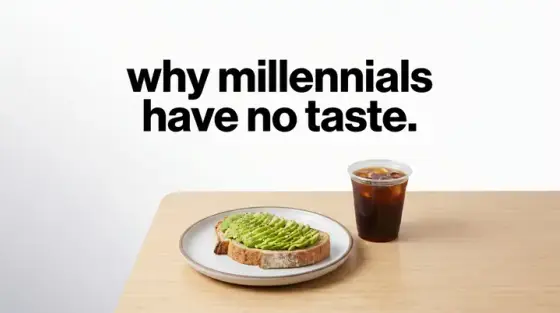
- The minimal object. One object on a plain background with a short line of text. Common in essays and documentaries; it stands out in a feed full of faces precisely because it is quiet.
- The before and after. Two halves, one change: a messy room and a clean one, a beginner and an expert, a price before and after. A template for every transformation, review or comparison video.
- The headline poster. A large headline across the top third and a dramatic image below. Works for news, explainers and list videos where the claim itself is the hook.
- The series frame. The same color band, logo position and font on every episode, with only the image and number changing. Turn your best cover into the template for the rest of the series by pasting your own channel.
- The arrow and circle. A real photo with one arrow or circle pointing at the detail that matters. Common in tech, chess and investigation videos; keep it to one mark per thumbnail.
Choosing and customizing a template
Choosing a template: pick by your niche and by the job of the video, not by what looks prettiest at full size. A tutorial needs the result to be visible, a story needs a face or a mystery, a review needs the product large. Preview your favorite at small size before committing; our free thumbnail tester shows it in a YouTube-style feed.
Keeping your own identity: a template is a starting point. Change at least one of the color, the font or the composition so your channel is recognizable, and keep that choice the same across videos. Viewers learn to spot a channel by its covers long before they remember its name.
Prefer to do it by hand?
All the manual steps are covered by our free browser tools: study what already works with the YouTube thumbnail downloader, crop your image to the exact 1280×720 with the thumbnail resizer, and squeeze it under YouTube’s upload limit with the 2 MB compressor. No signup, nothing leaves your browser.