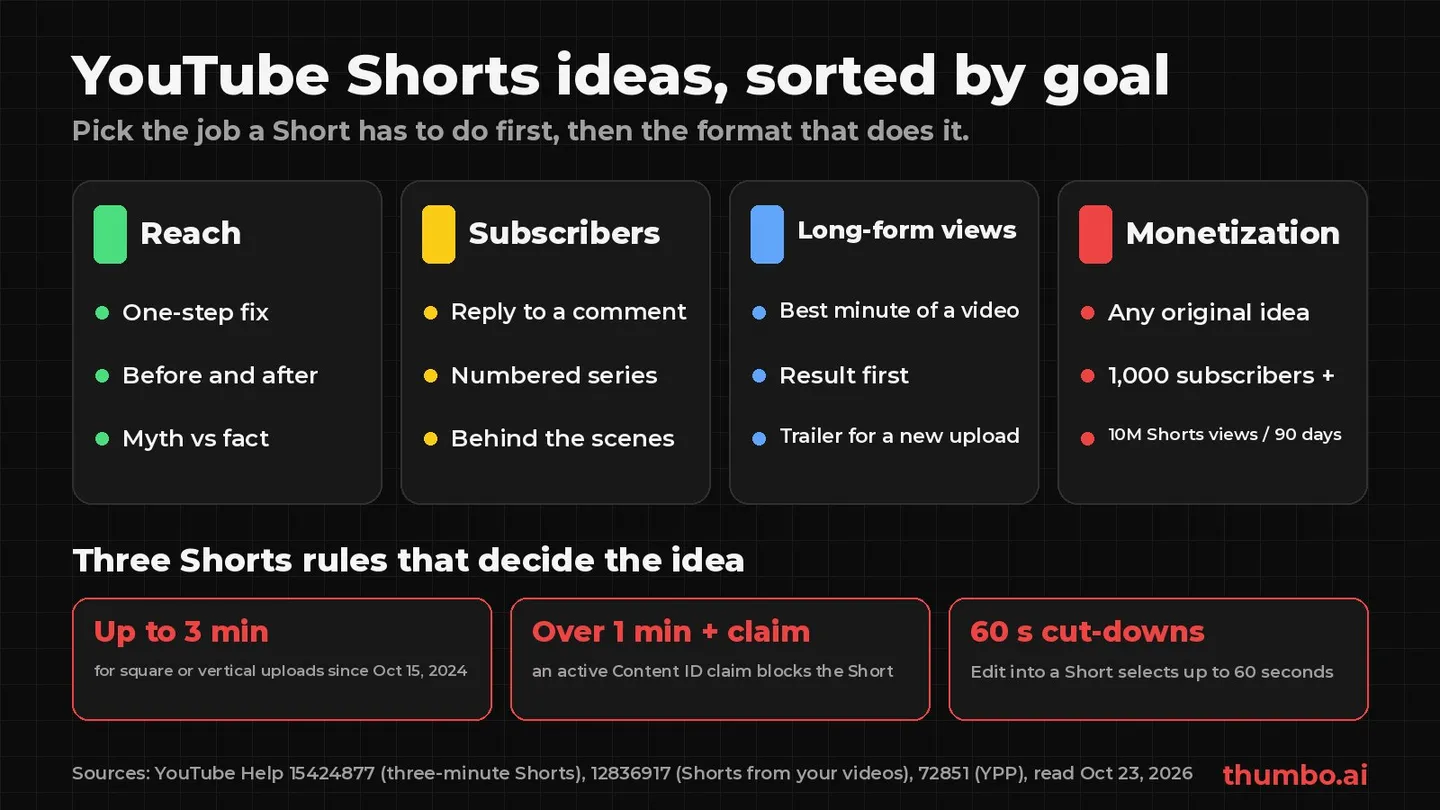
YouTube Shorts ideas work best when each one is picked for a job. A Short can bring in viewers who have never seen the channel, turn them into subscribers, send them to a long video, or count toward the Shorts path into the YouTube Partner Program. The same idea rarely does all four, so a list sorted by goal is more useful than a list sorted by niche.
This guide gives 30 Shorts ideas grouped by the goal they serve, built around features YouTube actually offers in 2026: three minute Shorts, replying to comments with a Short, editing a long video into a Short, remixing and related video links. Every rule below comes from YouTube Help pages read on October 23, 2026. Some idea lists that rank for this topic still say Shorts must run 15 to 60 seconds; that limit is out of date at both ends.
Table of Contents
- What Changed for Shorts in 2026
- Match the Idea to a Goal
- 30 YouTube Shorts Ideas
- Shorts Ideas Compared
- Shorts Ideas YouTube Will Not Monetize
- How Long Each Idea Should Run
- Turning Shorts Viewers into Long-Form Viewers
- The First Frame and the Shorts Thumbnail
- Shorts Ideas Action Plan
- FAQ
What Changed for Shorts in 2026
Three rules shape which ideas fit the format today:
- Shorts can run up to 3 minutes. YouTube’s three-minute Shorts page says any video “uploaded on or after this date with a square or vertical aspect ratio up to three minutes in length will be categorized as Shorts”, with the date being October 15, 2024. YouTube’s upload page lists the same two conditions: “Up to 3 minutes” and “a square or vertical aspect ratio”. No minimum length is listed.
- The second minute has a copyright condition. On the same three-minute page: “Shorts longer than one minute that have an active Content ID claim, regardless of the policy, will be blocked on YouTube.” Ideas built on other people’s music or clips belong under one minute.
- YouTube builds idea formats into the app. Shorts can now reply to comments, sample other videos, and be cut from a channel’s own long videos. Several of the 30 ideas below exist because of these tools.
Frame size, safe zone and export settings are covered in the YouTube Shorts size guide; this article is about what to put in the frame.
Match the Idea to a Goal
Pick the goal first, then the idea. Each goal has a different signal that shows whether it worked:
| Goal | What the Short has to do | Ideas that fit | Check after 2 weeks |
|---|---|---|---|
| Reach | Stop a stranger mid-scroll | Fast tips, before and after, myths | Views from viewers new to the channel |
| Subscribers | Show what the channel is like every week | Comment replies, series, behind the scenes | Subscribers gained from the Short |
| Long-form views | Make a viewer want the full video | Cut-downs, result-first teasers, trailers | Clicks on the related video link |
| Monetization | Earn qualified views without breaking the reuse rules | Any original idea above, repeated often | Shorts views toward the YPP threshold |
The monetization row has a hard number behind it. YouTube’s Partner Program page lists a Shorts path: “Get 1,000 subscribers with 10 million qualified Shorts views in the last 90 days.” Only public Shorts in the Shorts Feed count: private, unlisted and deleted Shorts, ad campaigns and image posts do not. The same page notes that watch hours from Shorts views in the Shorts Feed do not count toward the 4,000 hour long-form threshold.
30 YouTube Shorts Ideas
Each idea notes the goal it serves best. Most work in any niche that teaches, makes or reviews something.
Teach Something Fast
The most reliable reach format: one problem, solved before the viewer can swipe.
- 1. The one-step fix. One common problem and the single change that solves it, shown on screen. Goal: reach.
- 2. Myth vs fact. A belief the audience holds, then the evidence that it is wrong, with the evidence on screen. Goal: reach.
- 3. The setting nobody uses. One feature in a tool, camera or app that saves time, shown in use. Goal: reach.
- 4. The mistake seen most often. The error beginners make in the niche, shown wrong and then right. Goal: reach and subscribers.
- 5. One searched question, answered. A question people type into search, answered in the first sentence and then shown. Goal: reach.
- 6. A measured mini test. Two methods, products or settings given the same task, with the result timed, weighed or counted on camera. Goal: reach.
Show the Work
Visual proof carries these Shorts, so they work without sound.
- 7. Before and after. The finished result first, then a fast rewind to the starting point. Goal: reach.
- 8. Timelapse of a build. A project from blank to done, compressed, with a still of the result at the end. Goal: reach.
- 9. The full process in steps. A recipe, repair or design in five to eight labeled steps. Process Shorts are where the 3 minute limit pays off. Goal: reach and subscribers.
- 10. What is inside. An object taken apart, or a finished piece broken into its parts. Goal: reach.
- 11. Fail and fix. Something that went wrong in a real project and how it was fixed. Goal: subscribers.
- 12. Cheap vs expensive. The budget and premium version of the same thing tested side by side, with the result shown. Goal: reach.
Talk to Your Audience
These ideas turn one-time viewers into people who come back.
- 13. Reply to a comment with a Short. YouTube has a built-in format for this. According to YouTube Help, Shorts made as replies “will let the commenter know and show up in the comment feed below the original comment”, and the comment appears as a sticker that can be moved and resized. Goal: subscribers.
- 14. The FAQ series. One question from comments or email per Short, numbered so viewers can find the rest. Goal: subscribers.
- 15. Behind the scenes of the channel. How a video was planned, filmed or edited, including what was cut. Goal: subscribers.
- 16. A day in the work. The desk, kitchen, studio or job site during a normal working day. Goal: subscribers.
- 17. One opinion, with reasons. A clear take on a debate in the niche, with two reasons and one example. Goal: subscribers.
- 18. Viewers pick the test. Ask in a comment reply or at the end of a Short which option to test next, then make the winner. Goal: subscribers.
Cut Down Your Long Videos
The fastest source of ideas is a channel’s own back catalog. YouTube’s Shorts from your videos page explains the built-in route: on the watch page of a public long-form video, tap Remix, then Edit into a Short, and “Select up to 60 seconds of your video”. Shorts made this way “are linked back to your original video”. If less than 60 seconds is selected, the Shorts camera can record extra segments up to 60 seconds in total.
- 19. The best moment. The single most surprising or useful minute of a long video. Goal: long-form views.
- 20. The result first. The final answer or outcome, with the full method left to the long video. Goal: long-form views.
- 21. A trailer for a new upload. The hook and two best moments of a video going live this week. Goal: long-form views.
- 22. One chapter per Short. A long tutorial split into chapter-sized Shorts, each complete on its own. Goal: reach and long-form views.
- 23. The bonus tip. Something that did not fit in the long video, filmed fresh. Goal: subscribers.
- 24. The update. A correction or new result for an older video that still gets views. Goal: long-form views.
Two limits from the same page: private and unlisted videos and “videos with third-party copyright claims cannot be used with this feature”, and sounds from the Audio Library cannot be added to Shorts made from a channel’s own videos. Editing in an outside app and uploading a vertical file avoids the 60 second selection cap, within the 3 minute limit.
Remix and Respond
Remixing is allowed and credited, as long as the Short adds something. YouTube’s remix page says remixed Shorts “are attributed back to the original work”, and for music videos lists Green Screen, Cut (“sample a 1-5 second segment of a music video”) and Sound (“sample up to 90 seconds of the audio”).
- 25. Green screen commentary. A video or image as the background while you explain, correct or add context. Goal: reach.
- 26. Use this sound, with your own scene. A trending sound from the Sound button, paired with footage from your niche that gives it a new meaning. Goal: reach.
- 27. A response to another Short. A short Cut of a creator’s Short followed by your answer, test or counterpoint. Goal: reach and subscribers.
The monetization policy draws the line here. Among allowed examples, YouTube’s channel monetization policies list “Reaction videos where you comment on the original video” and “Edits to remixed content on Shorts like adding original content to a song from our library”. Remixes without your own commentary or footage fall under the reused content rules below.
Series and Business Shorts
Formats built to repeat give a channel a reason to be followed.
- 28. A numbered challenge series. “Day 12 of” a skill, build or habit, with visible progress in every episode. Vary the angle and the result so episodes do not feel templated. Goal: subscribers.
- 29. Weekly niche news, with an opinion. One change in the niche each week and what it means for the viewer, said in your own words. Goal: subscribers.
- 30. Product or service demo. One job a product does, shown from start to finish, with the price or the next step at the end. Goal: reach for businesses.
Shorts Ideas Compared
| Idea group | Gear | Effort per Short | Best goal | Typical length |
|---|---|---|---|---|
| Teach something fast | Phone, screen recorder | Low | Reach | Under 60 seconds |
| Show the work | Phone on a mount | Medium | Reach | 30 seconds to 3 minutes |
| Talk to your audience | Phone | Low | Subscribers | Under 60 seconds |
| Cut down long videos | Existing uploads | Lowest | Long-form views | Up to 60 seconds with the built-in tool |
| Remix and respond | YouTube app | Low | Reach | Under 60 seconds if anything could be claimed |
| Series and business | Depends on topic | Medium | Subscribers | 30 to 90 seconds |
The lengths are suggestions based on the rules quoted in this guide, not YouTube recommendations.
Shorts Ideas YouTube Will Not Monetize
Some popular Shorts shortcuts match examples on YouTube’s not-allowed list in the monetization policies almost word for word:
| Common Shorts shortcut | Matching example on YouTube’s policy page |
|---|---|
| Viral clip compilations from TikTok or Instagram | ”Short videos you compiled from other social media websites” |
| Clips from a TV show cut together | ”Clips of moments from your favorite show edited together with little or no narrative” |
| Reposting a popular Short | ”Content uploaded many times by other creators” |
| Silent reaction faces over someone else’s video | ”Content that gets views from mostly non-verbal reactions to your videos without added voice commentary” |
| Reading headlines or posts aloud | ”Content that exclusively features readings of other materials you did not originally create, like text from websites or news feeds” |
| The same template with new words each day | ”Similar or repetitive content with low educational value, commentary, narratives, or minimal variation across videos” |
The policy applies “even if you have permission from the original creator”, because reused content is separate from copyright. It also applies to the channel as a whole: “monetization may be removed from your entire channel.” Reposting your own clips from other apps is different from compiling other people’s; the test on the policy page is whether “viewers can tell that there’s a meaningful difference between the original video and your video.”
How Long Each Idea Should Run
Three minutes is a ceiling, not a target. A practical way to choose:
| If the Short… | Keep it | Why |
|---|---|---|
| Uses music or clips you do not own | 60 seconds or less | Over one minute, an active Content ID claim blocks the Short on YouTube |
| Is cut from your own video with the built-in tool | Up to 60 seconds | The Edit into a Short tool selects up to 60 seconds |
| Teaches a multi-step process | As long as the steps need, up to 3 minutes | The full limit applies to uploads since October 15, 2024 |
| Is a tip, myth or reply | As short as the answer allows | The answer is the payoff; extra seconds delay it |
For music in longer Shorts, YouTube’s three-minute page says “You can use most songs for up to 90 seconds in a 3 minute Short. However, some tracks may be limited to 60 or 30 seconds.” Royalty-free tracks from the YouTube Audio Library “won’t receive a Content ID claim”, which makes them the safe choice past the one minute mark.
Turning Shorts Viewers into Long-Form Viewers
A Short that gets views but sends nobody to the channel’s long videos only does half the job for a channel that earns from long-form. YouTube offers two direct links:
- Related video. In YouTube Studio, open Content, click the Short and select a related video from the channel. According to YouTube Help, viewers “will see a clickable link below your channel handle”. The linked video can be public or unlisted, and the feature needs advanced feature access.
- Edit into a Short. Shorts cut with YouTube’s tool link back to the source video automatically, as covered above.
Ideas 19 to 24 are built for this. A result-first Short (idea 20) with a related video link to the full tutorial is the simplest version: the Short answers “what”, the long video answers “how”. For more on how YouTube connects formats, see how the YouTube algorithm works.
The First Frame and the Shorts Thumbnail
In the Shorts feed the first frame does the work a thumbnail does elsewhere, so open on the subject: the finished dish, the broken part, the result. Keep text inside the vertical safe zone; the YouTube thumbnail resizer has a 1080 x 1920 “Shorts / vertical” preset that shades everything outside Google’s safe zone template in the preview.
The thumbnail still matters outside the Shorts feed, for example on the home, explore and subscription pages. YouTube’s custom thumbnails page recommends 2160 x 3840 for Shorts with “a minimum height of 640 pixels”, and warns: “Vertical videos with 16:9 custom thumbnails will be replaced by an auto-generated 4:5 thumbnail on the home, explore, and subscription pages.” Custom Shorts thumbnails can only be added in YouTube Studio on a computer, from a verified account. The steps are in how to add a thumbnail to YouTube Shorts.
For a series, use the same layout on every cover so the Shorts tab reads as a set: one subject, two to four words, the same font. The thumbnail font previewer compares bold fonts side by side, and the YouTube Shorts thumbnail maker page has cover layout ideas for the tall 9:16 frame. To make the covers without designing each one, Thumbo has a 9:16 format on its first screen: describe the Short and it composes a vertical cover from scratch.
Shorts Ideas Action Plan
- Pick one goal for the next 30 days: reach, subscribers, long-form views or the Shorts YPP path.
- Choose two idea groups that serve it, one cheap (comment replies, cut-downs) and one stronger (process, measured tests).
- Mine the back catalog first. List the 10 best minutes across existing long videos and make Shorts from them, with related video links.
- Write 20 titles before filming. If 20 different Shorts do not come easily, the format is too narrow.
- Set a length rule per idea: 60 seconds or less with any claimed music or clips, up to 3 minutes only when the steps need it.
- Check every idea against the not-allowed table, especially compilations, reposts and readings.
- Make a 9:16 thumbnail for each Short, in one layout per series.
- Review after two weeks with the signal from the goal table, and drop the weakest idea group rather than the whole plan.
For long-form topic ideas, the guide to how-to video ideas lists formats that pair well with Shorts cut-downs.
FAQ
What are good YouTube Shorts ideas for beginners?
Fast tips, before and after clips and comment replies need the least gear: a phone is enough. They also carry the lowest policy risk, because the footage is the creator’s own. Channels with existing long videos should start by cutting their best minutes into Shorts with YouTube’s Edit into a Short tool.
How long should a YouTube Short be?
Shorts can run up to 3 minutes for uploads since October 15, 2024, and YouTube lists no minimum. Keep any Short with music or clips you do not own at 60 seconds or less, since a Short over one minute with an active Content ID claim is blocked. Otherwise, use only as many seconds as the idea needs.
Can I post the same video to TikTok, Instagram Reels and YouTube Shorts?
Your own original video can be uploaded to several platforms. The reused content policy targets other people’s material: “Short videos you compiled from other social media websites” are on YouTube’s list of content that cannot be monetized.
Do reaction Shorts get monetized?
They can. YouTube’s monetization policies list “Reaction videos where you comment on the original video” as allowed. Reactions that are “mostly non-verbal” without voice commentary are on the not-allowed list. Copyright rules still apply separately.
How do Shorts help a channel get monetized?
The YouTube Partner Program has a Shorts path: 1,000 subscribers and 10 million qualified Shorts views in the last 90 days. Only public Shorts in the Shorts Feed count. Details on the payout side are in the YouTube Shorts monetization guide.
Do YouTube Shorts need a thumbnail?
In the Shorts feed the first frame is what viewers see, but other surfaces such as the home, explore and subscription pages show a thumbnail. Upload it at 9:16, since a 16:9 thumbnail on a vertical video is replaced by an automatic 4:5 crop on the home, explore and subscription pages.