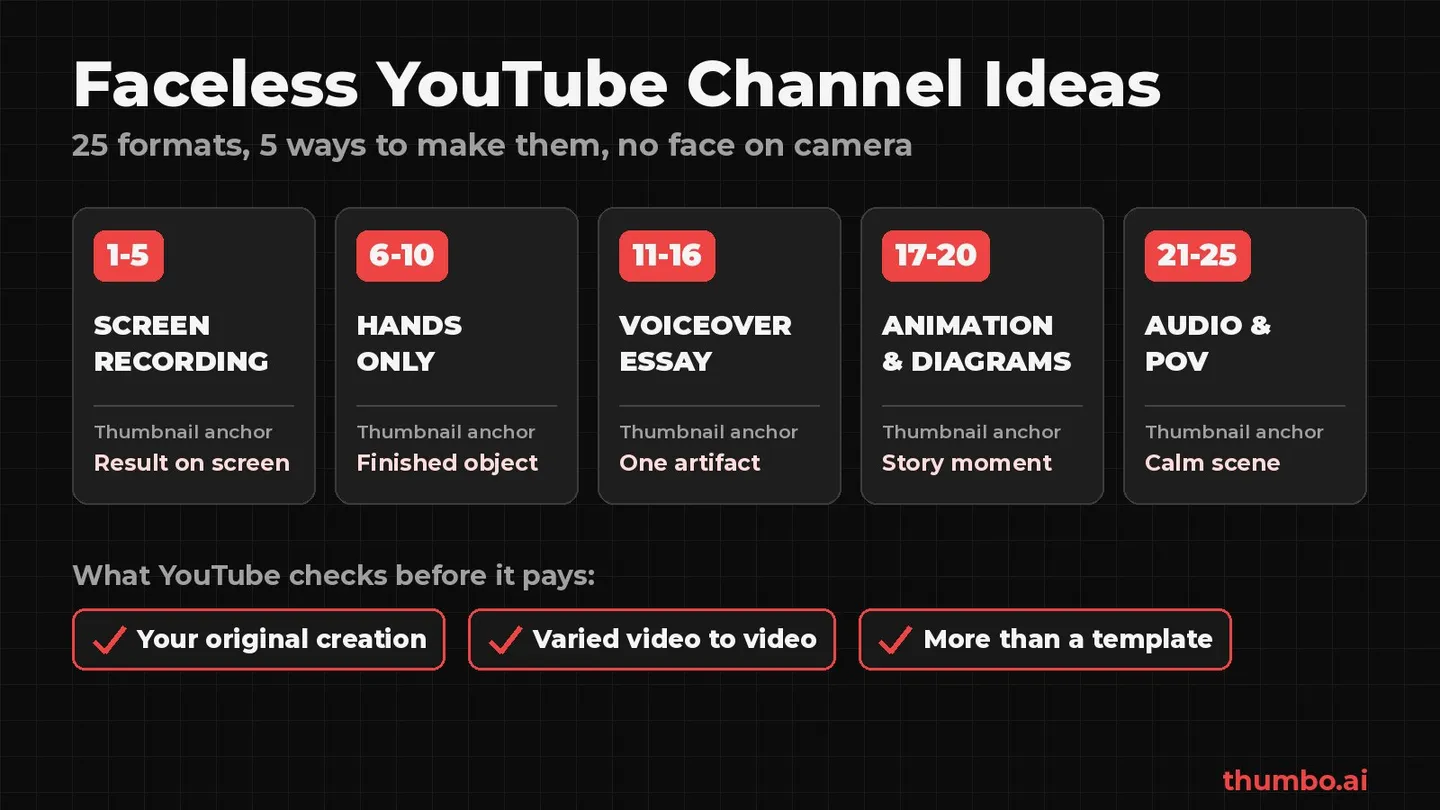
Faceless YouTube channel ideas are easy to find and easy to get wrong. The format itself is fine: YouTube’s monetization rules do not require a face on camera. What they do require is content that is your original creation, varied from video to video, and more than a template. A faceless channel is judged on that rule, not on the missing face.
This guide gives 25 faceless channel ideas grouped by how they are made, shows what makes each one original enough for YouTube’s review, and covers the part most idea lists skip: what goes on the thumbnail when there is no face to put there.
Table of Contents
- What YouTube Checks on a Faceless Channel
- How to Pick a Faceless Idea: Four Tests
- 25 Faceless YouTube Channel Ideas
- Faceless Formats Compared
- Faceless Formats YouTube Will Not Monetize
- Using AI on a Faceless Channel: What to Disclose
- Thumbnails Without a Face
- When a Faceless Channel Can Earn Money
- Faceless Channel Action Plan
- FAQ
What YouTube Checks on a Faceless Channel
Every rule in this section comes from YouTube’s channel monetization policies, read on October 18, 2026. The page says monetizing content should “Be your original creation” and should “Not be mass-produced, generic, repetitive, or manipulative.”
Three parts of that policy decide most faceless channels:
- Generic or repetitive content. Content “that looks like it’s made with a template, or that may feel repetitive to viewers after watching several videos in a row from the same channel.” A shared intro and outro is fine; the policy explicitly allows the “Same intro and outro for your videos, but the bulk of your content is different.”
- Reused content. Material repurposed from YouTube or elsewhere “without adding significant original commentary, substantive modifications, or educational or entertainment value.” This applies “even if you have permission from the original creator”, because it is separate from copyright.
- The whole channel is judged. Reviewers may look at the channel’s “Main theme”, “Most viewed videos”, “Newest videos”, “Biggest proportion of watch time”, “Video metadata (including titles, thumbnails, and descriptions)” and the “About” section. One weak series can cost monetization on the entire channel.
None of this says a person has to appear. The policy’s test is whether “the substance of the video feels original” and whether, when automated tools or templates are used, “the final product must still demonstrate your creative vision.”
How to Pick a Faceless Idea: Four Tests
Run every idea below through these four questions before filming anything:
| Test | Question | Fails when |
|---|---|---|
| Demand | Do people already search for or watch this topic? | The topic only exists because it is easy to produce |
| Originality | What does each video add that only this channel provides: footage, testing, research, a skill? | The answer is “a voiceover over other people’s clips” |
| Variety | Will video 30 be materially different from video 1? | Every episode is the same script with new nouns |
| Packaging | Is there one object, scene or result that can carry the thumbnail? | The topic has nothing visual to show |
The fourth test is the easiest to skip. A face is the default thumbnail anchor on YouTube; a faceless channel has to pick a replacement before it starts, and some topics simply do not have one.
25 Faceless YouTube Channel Ideas
Each idea lists what makes it original and the thumbnail anchor that replaces a face.
Screen Recordings and Software
The cheapest faceless format to start: a computer, a microphone and real skill.
- 1. Single-tool tutorials. One program, such as a spreadsheet app, a video editor or a design tool, with one named problem solved per video. Original because: the screen recording is your own work in the program. Thumbnail: the finished result next to the tool’s interface.
- 2. Budget and spreadsheet walkthroughs. Building a budget, a debt payoff tracker or a savings plan cell by cell. Original because: each video builds a different, usable template. Thumbnail: the finished sheet with one highlighted number. The finance thumbnail maker has formats built for this.
- 3. Coding builds. A small app, script or website built from an empty folder to a working result. Original because: the code and the decisions are yours. Thumbnail: the working result on a screen, not the code.
- 4. App and software tests. Two or three apps given the same task, with the method shown on screen. Original because: the test itself is new information. Thumbnail: the two products side by side with a one-word verdict.
- 5. Data stories. One question answered with a public dataset and charts made for the video. Original because: the analysis and charts are made for this video. Thumbnail: the single chart line that answers the question.
Hands-Only and Overhead
A camera pointed at the work, never at the creator.
- 6. Overhead cooking. Recipes filmed from above, hands and ingredients only. Original because: the cooking is real and filmed by you. Thumbnail: the finished dish, large, in its best light. The cooking thumbnail maker is built around that layout.
- 7. Repair and restoration. Fixing electronics, furniture, tools or bikes, start to finish. Original because: the before and after are physical proof. Thumbnail: a before and after split of the object.
- 8. Art process. Drawing, painting, lettering or sculpting, filmed over the work surface. Original because: the artwork exists only on this channel. Thumbnail: the finished piece with the hand still in frame.
- 9. DIY home projects. Shelving, small renovations, garden builds. Original because: each project is a different build in a different space. Thumbnail: the finished space, bright and wide.
- 10. Long-term product tests. One product used for weeks, with wear, failures and measurements shown. Original because: nobody else has this unit’s history. Thumbnail: the product with one visible flaw or result.
Voiceover Explainers and Essays
The script carries the video; visuals support it. This group carries the most policy risk, because the cheapest version is a voice reading text over stock footage.
- 11. History explainers. One event or decision per video, told with maps, timelines and public-domain archive material. Original because: the research, structure and argument are yours. Thumbnail: one artifact or map detail, not a collage.
- 12. Personal finance concepts. How a tax rule, interest calculation or account type works, with worked examples. Original because: the worked examples are calculated for the video. Thumbnail: one number and the object it belongs to.
- 13. Science and “how it works” explainers. How a machine, process or natural event works. Original because: the explanation and diagrams are built for the video. Thumbnail: the object cut open or mid-process.
- 14. Business case studies. Why a product launch failed, how a company priced something, what a public filing shows. Original because: the analysis is the product. Thumbnail: the product or one key object, with a short claim the video backs up.
- 15. Documentary deep dives. Unsolved cases, disasters or investigations built from public records and named sources. Original because: the sourcing and narrative are yours. Thumbnail: the key artifact alone on a dark background. The documentary thumbnail maker covers this style.
- 16. Book analysis. An argument about a book, such as what it gets wrong or how its ideas hold up, not a read-aloud summary. Original because: the opinion and testing are yours. Thumbnail: the book as an object with a short verdict.
Animation and Diagrams
Drawn or animated visuals replace footage entirely.
- 17. Whiteboard and diagram explainers. A concept drawn step by step while the narration explains it. Original because: every diagram is drawn for the lesson. Thumbnail: the finished diagram’s most surprising part. See the education thumbnail maker.
- 18. Original animated stories. Your own characters and storylines. YouTube’s policy lists “using AI to visualize a unique character and narrative you invented” as allowed, as long as episodes do not repeat the same plot. Original because: the characters and plots exist nowhere else. Thumbnail: the main character at the story’s turning point.
- 19. Map and geography animations. Borders, trade routes, population or travel distances animated on a map. Original because: the map sequence answers a question no stock clip does. Thumbnail: the map region with one bold line or highlight.
- 20. Scale and comparison infographics. How big, how fast, how expensive, with every number sourced on screen. Original because: the comparisons and sourcing are yours. Thumbnail: two objects at true relative size.
Audio-First and Camera-on-the-World
The sound or the place is the content.
- 21. Field-recorded ambience. Rain, forests, cities and cafes recorded on location. Original because: the recordings are yours, made in a real place. Thumbnail: the place at the time of day it was recorded.
- 22. Guided meditation and sleep stories. Original scripts narrated in your own voice. Original because: both the writing and the voice are yours. Thumbnail: a calm scene with one soft focal point.
- 23. Faceless podcast. A conversation or solo show with a visual format: chapter titles, waveforms, illustrated key points. Original because: the conversation is new. Thumbnail: the episode’s sharpest question as text on a consistent background.
- 24. POV walking and travel tours. A city, trail or building filmed from eye level, with narration or captions on what is worth seeing. Original because: the trip and the guidance are yours. Thumbnail: the single best view from the walk.
- 25. Study-with-me and work-with-me sessions. A desk, hands and a timer in real time. Original because: each session is recorded live, though the format is close to the repetitive line, so vary the subject, the length and the setup. Thumbnail: the desk scene and the session length.
Faceless Formats Compared
| Format group | Starting gear | Main skill | Policy risk | Thumbnail anchor |
|---|---|---|---|---|
| Screen recordings | Computer, microphone | Expertise in a tool | Low | Result on screen |
| Hands-only | Camera on a mount | A craft | Low | Finished object or before and after |
| Voiceover essays | Microphone, editing software | Research and writing | Medium to high, depends on visuals | One artifact or number |
| Animation | Drawing or animation software | Illustration, motion | Low with original stories, high with repeated plots | Character or diagram moment |
| Audio-first | Recorder or microphone | Sound, voice | Medium, varies by channel | Calm scene |
| Camera-on-the-world | Camera, stabilizer | Planning, narration | Low | The best view |
“Policy risk” here is a judgment of how close each format’s cheapest version sits to the generic, repetitive and reused content rules quoted above, not a YouTube rating.
Faceless Formats YouTube Will Not Monetize
Several popular faceless shortcuts match examples on YouTube’s own not-allowed lists almost word for word:
| Common faceless shortcut | Matching example on YouTube’s policy page |
|---|---|
| AI images and text-to-speech over a scraped script | ”Image slideshows, templated storylines, or scrolling text with minimal or no narrative, commentary, or educational value” |
| Reading forum posts or news articles aloud | ”Content that exclusively features readings of other materials you did not originally create, like text from websites or news feeds” |
| Viral clip compilations | ”Short videos you compiled from other social media websites” |
| Music mixes of other artists | ”Collections of songs from different artists (even if you have their permission)“ |
| Sped-up or slowed songs | ”Songs modified to change the pitch or speed, but are otherwise identical to the original song” |
| The same story with new names every episode | ”Videos where characters are put in the same situation over and over again with the same outcome” |
| Mass-produced AI videos | ”AI-generated content made with generic or unoriginal templates giving the impression of mass production without adding the creator’s original, authentic insights or perspective” |
Every idea in the list above can slide into one of these rows if it is produced lazily. The fix is always the same: add footage, testing, research or opinion that only this channel has.
Using AI on a Faceless Channel: What to Disclose
AI tools are common on faceless channels, and YouTube’s AI disclosure rules are narrower than many creators assume. Creators must disclose AI content that:
- “Makes a real person appear to say or do something they didn’t do.”
- “Alters footage of a real event or place.”
- “Generates a realistic scene that didn’t actually occur.”
- “Creates music that’s the main focus of the video.”
The same page lists what does not need disclosure, including “Production assistance, like using generative AI tools to create or improve a video outline, script, thumbnail, title, or infographic” and “Cloning one’s own voice to create voice overs or dubs.” Disclosure is made in YouTube Studio under “AI use”, and YouTube states that “Disclosing AI content alone won’t limit a video’s audience or impact its eligibility to earn money.”
Disclosure and monetization are separate questions. A disclosed AI video can still fail the generic or repetitive content rule if it adds nothing of the creator’s own.
Thumbnails Without a Face
On a faceless channel the thumbnail does the job a host’s face does elsewhere: it is how viewers recognize the channel in a feed. Reviewers also look at thumbnails as part of a channel’s metadata, so they need to match the video as closely as the title does. YouTube’s thumbnails policy rules out “A thumbnail that misleads viewers to think they’re about to view something that’s not in the video.”
The anchors that replace a face are few:
- A single hero object, lit on a calm background.
- Hands doing the action, which adds a human presence without an identity.
- A finished result or a before and after.
- A place or scene with one clear focal point.
- Bold text as the image when the topic has nothing physical to show.
The faceless YouTube thumbnail ideas page has 32 layouts built on these anchors, organized by niche. For backgrounds behind an object, the guide to YouTube thumbnail backgrounds covers which types keep the subject readable.
Practical rules for faceless thumbnails:
- Pick one anchor type per series and repeat it, so the channel is recognizable without a face.
- Keep text to three to five words, and test fonts with the free thumbnail font previewer, which shows a title in 12 fonts with outline and shadow options.
- Check it in a feed, not on a canvas. The free YouTube thumbnail previewer shows the thumbnail and real title on home, search, sidebar and mobile layouts, in dark and light themes, without uploading the file anywhere.
- Upload the right size. YouTube’s custom thumbnails page recommends 3840 x 2160 for videos and 2160 x 3840 for Shorts, with a 2 MB limit on mobile and 50 MB on desktop. Custom thumbnails require a verified account.
Designing an object-led cover for every upload is slow, and stock photos rarely match the exact video. Thumbo’s AI thumbnail generator has a faceless mode: describe the video, pick a style, and it composes an object- or scene-led cover with no people in it. Under the disclosure page quoted above, an AI-made thumbnail counts as production assistance.
When a Faceless Channel Can Earn Money
A faceless channel qualifies for the YouTube Partner Program on the same terms as any other channel. YouTube’s YPP eligibility page lists two paths:
| Path | Subscribers | Plus |
|---|---|---|
| Long-form | 1,000 | 4,000 qualified watch hours in the last 12 months |
| Shorts | 1,000 | 10 million qualified Shorts views in the last 90 days |
Two details from the same page matter for faceless channels. Meeting the thresholds starts a review, it does not guarantee entry. And channels “will lose monetization when they violate any of the YouTube channel monetization policies”, “regardless of their watch hours and subscriber count”, so the originality rules apply for as long as the channel earns. YouTube also notes updated YPP terms that start February 1, 2027 and must be accepted in YouTube Studio by January 31, 2027.
The full application steps are in the YouTube Partner Program application guide. For choosing a topic area before a format, the guide to the best niches for YouTube compares ten niches.
Faceless Channel Action Plan
- Pick one format group from the 25 ideas that matches a skill you already have: a tool, a craft, research or a voice.
- Run the four tests. Write one sentence on what makes each video original, and list ten video ideas that are clearly different from each other.
- Choose the thumbnail anchor for the series before filming, and make the first three thumbnails in the same style.
- Make five videos before publishing the first one, so the channel looks consistent on day one and the format is proven repeatable.
- Check every video against the not-allowed table above, especially for readings, compilations and repeated templates.
- Disclose realistic AI content in YouTube Studio when it meets YouTube’s criteria.
- Review after 30 videos. Look at which thumbnails get clicked and which videos hold viewers, and drop the weakest series rather than the whole channel.
FAQ
Can faceless YouTube channels be monetized?
Yes. YouTube’s monetization policies do not require a person on camera. A faceless channel has to meet the same thresholds as any channel and pass the same review, which checks that content is original, not mass-produced and not reused without significant added value.
What is the easiest faceless YouTube channel to start?
Screen-recorded tutorials and hands-only formats need the least gear and carry the lowest policy risk, because the footage is automatically your own work. A computer and a microphone are enough for tutorials; a phone on an overhead mount is enough for cooking, crafts and repairs.
Are AI faceless channels allowed on YouTube?
AI tools are allowed, but YouTube’s policy names “AI-generated content made with generic or unoriginal templates giving the impression of mass production” as not monetizable. AI that helps build original stories, diagrams or thumbnails is fine. Realistic AI scenes, altered real events and AI music as the main focus need disclosure.
Do I need to disclose an AI-generated thumbnail?
No, according to YouTube’s disclosure page, which lists using generative AI tools to create or improve a thumbnail as production assistance that does not need disclosure. The thumbnail still has to follow the thumbnails policy and must not mislead viewers about what is in the video.
What should a faceless thumbnail show instead of a face?
One clear anchor: a hero object, hands doing the action, a finished result, a before and after, a single scene, or bold text when nothing physical fits. Pick one anchor type per series and repeat it so viewers recognize the channel in their feed.
Can I use stock footage on a faceless channel?
Licensed stock footage is not banned, but a video made only of stock clips with a voice reading a script is close to the “image slideshows” and “readings” examples on YouTube’s not-allowed list. Use stock as support for your own research, recordings, diagrams or commentary, not as the whole video.
Thumbnail makers for your niche
What gets the click depends on the niche: a podcast cover, a finance explainer and a true horror story each need a different look. Each page below shows real example covers, idea lists and text tips for one niche, and makes the thumbnail for you with AI.
Podcast Thumbnail Maker
Guest-and-quote episode covers that stay on-brand every week.
Finance Thumbnail Maker
Credible covers for investing, market news and personal-finance explainers.
Education Thumbnail Maker
Clear, outcome-promising covers for tutorials and explainers.
Tech Thumbnail Maker
Product-hero and AI-news covers for reviews, explainers and tutorials.
Business Thumbnail Maker
Founder, coaching and side-hustle covers built on proof, not hype.
Documentary Thumbnail Maker
Cinematic, editorial covers for story-driven long-form.
Music Thumbnail Maker
Cover-art energy for singles, sessions, beats and reactions.
Horror Thumbnail Maker
Unsettling covers for true scary stories, creepypasta and iceberg explainers.
Faceless thumbnail ideas
What to put on the cover when your channel never shows a face.