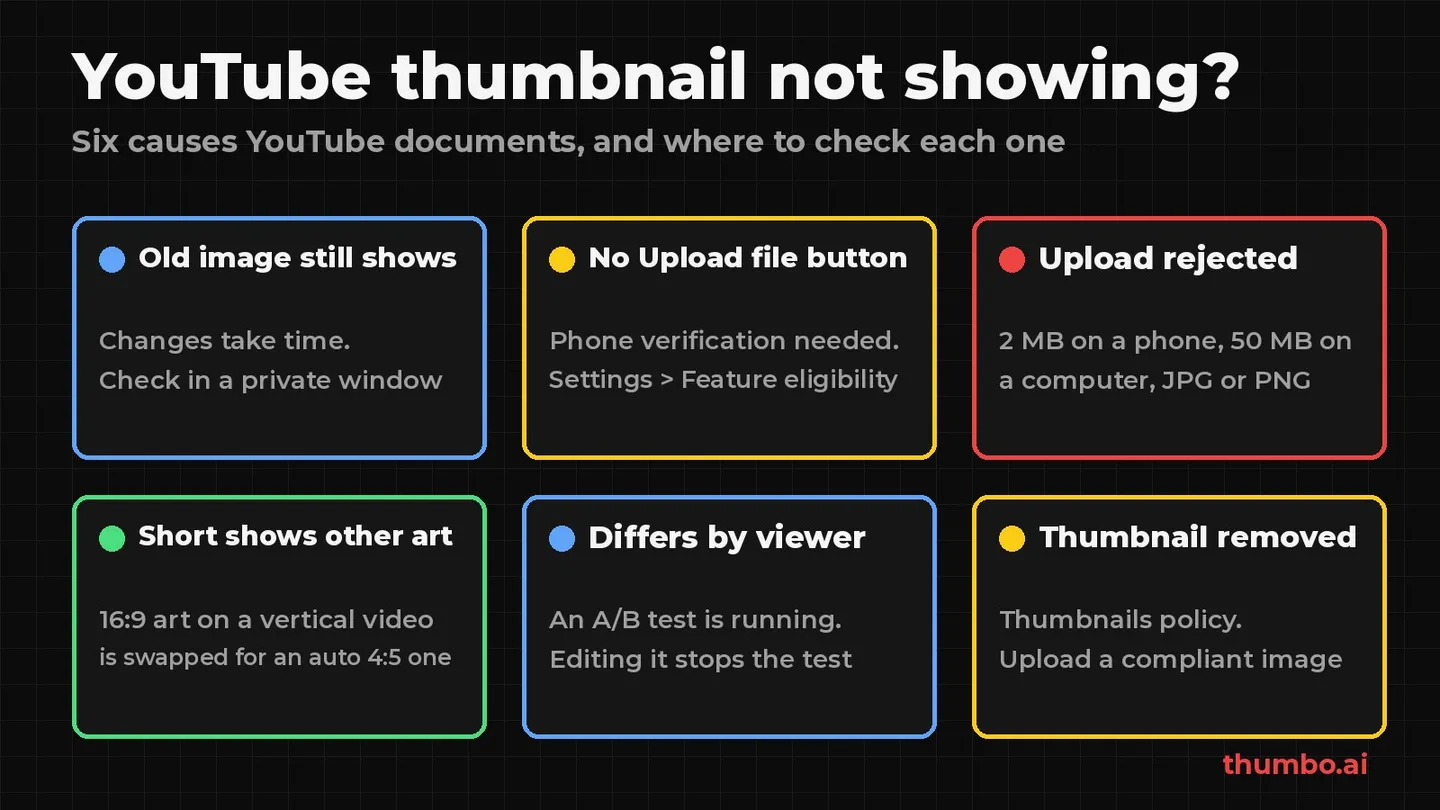
A YouTube thumbnail not showing almost always has one of six causes: the change has not spread across YouTube yet, the channel cannot upload custom thumbnails, the file was rejected, a vertical video got an automatic image, an A/B test is showing other versions, or YouTube removed the image. Each one has a different fix, and most take a few minutes once you know which one you have.
There is also a seventh case that has nothing to do with the channel: thumbnails that do not load for you as a viewer, on every video. That is a browser, app or connection problem and is covered near the end.
Most guides on this topic give the same generic list (clear the cache, re-upload, try 1280 x 720). This one starts from what YouTube’s own help pages say, all read on November 1, 2026: Add custom thumbnails, Feature eligibility, A/B test titles & thumbnails and the Thumbnails policy.
Table of Contents
- Quick Diagnosis: Which Problem Do You Have?
- The New Thumbnail Has Not Appeared Yet
- There Is No Option to Upload a Custom Thumbnail
- The Upload Fails or the File Is Rejected
- A Vertical Video or Short Shows a Different Image
- An A/B Test Is Showing Other Thumbnails
- YouTube Removed or Turned Off the Thumbnail
- The Thumbnail Is Missing in Embeds or Link Previews
- Thumbnails Not Loading for You as a Viewer
- How to Avoid Thumbnail Problems on the Next Upload
- Thumbnail Troubleshooting Action Plan
- FAQ
Quick Diagnosis: Which Problem Do You Have?
| What you see | Most likely cause | Fix |
|---|---|---|
| The old image still shows after you saved a new one | The change is still spreading | Wait, then check in a private window or on another device |
| No Upload file or Custom thumbnail option | Account not verified, custom thumbnails not enabled | Verify the phone number, check Feature eligibility |
| No upload option for a Short on your phone | Custom Shorts thumbnails are computer-only | Use YouTube Studio on a computer |
| The upload fails on a phone | File over 2 MB | Compress it, or upload from a computer (50 MB) |
| “Daily custom thumbnail limit reached” | The channel hit its daily limit | Try again in 24 hours |
| A vertical video shows a frame instead of your image | A 16:9 thumbnail on a vertical video | Upload a 9:16 thumbnail |
| Different people see different thumbnails | An A/B test is running | Let it finish; editing the thumbnail stops it |
| Your thumbnail is gone and a frame is back | Removed under the Thumbnails policy | Upload a compliant image, or appeal a strike |
| Every video on YouTube shows grey boxes | A problem on your device or connection | Private window, disable extensions, clear cached images, update the app |
Find your row, then jump to the section below for the details.
The New Thumbnail Has Not Appeared Yet
Often nothing is wrong here at all. Every route on YouTube’s custom thumbnails page ends with the same note: “It may take time for your thumbnail changes to appear on YouTube.” YouTube does not give a number of minutes or hours.
Two things make the delay look worse than it is:
- Your own browser keeps the old image. Browsers store images from pages you have visited so the pages open faster. Chrome’s help page on deleting browsing data describes this cache plainly: “Chrome remembers parts of pages to help them open faster during your next visit.” The feed you are looking at may simply be your copy of yesterday’s page.
- Different surfaces update at different times. The watch page, search, the home feed and apps can each show the new image at a different moment.
How to check without fooling yourself
- Open YouTube Studio, then Content, and open the video. If the new image sits under “Thumbnail”, the save worked.
- Open the video’s public link in a private or incognito window, which does not use your normal cache.
- Check on a second device or a phone on mobile data.
- If Studio shows the new image and a private window shows it too, the change is live. Other places will follow.
What not to do: upload the same file again and again. Each upload counts toward the channel’s daily custom thumbnail limit (see below), and repeated uploads do not make the change spread faster.
There Is No Option to Upload a Custom Thumbnail
If the Upload file button (computer) or the Custom thumbnail option (phone) is missing, the channel cannot upload its own image yet. YouTube’s help page says you can choose from auto-generated options “or upload your own if your account is verified”. Until then, the only choices are frames from the video.
Check Feature eligibility
YouTube splits features into standard, intermediate and advanced. Custom thumbnails are listed as an intermediate feature, and the Feature eligibility page says that to access intermediate features “you must verify your phone number”. A/B testing is an advanced feature, which needs channel history or ID or video verification.
To see what the channel has:
- On a computer, sign in to YouTube Studio.
- Click Settings, then Channel, then Feature eligibility.
- Look for “Enabled” next to custom thumbnails.
If it is not enabled, verify the phone number and come back. No file, size or browser trick will make the upload button appear before that. The full walkthrough for adding and replacing thumbnails, including verification, is in how to add or change a thumbnail on YouTube.
Shorts and phones
A verified channel can still miss the button on a Short. YouTube’s note: “Custom thumbnails for Shorts are currently only available to add in YouTube Studio on a computer.” On a phone there is no way to upload one for a Short. Open YouTube Studio on a computer, select Content, then Shorts at the top, and use Upload file under “Thumbnail”. The guide to adding a thumbnail to a YouTube Short walks through it step by step.
The Upload Fails or the File Is Rejected
When the button is there but the upload does not go through, check the file against YouTube’s limits:
| Rule | Videos | Shorts |
|---|---|---|
| Formats | JPG or PNG | JPG or PNG |
| Upload limit on a phone | 2 MB | Not available on a phone |
| Upload limit on a computer | 50 MB | 50 MB |
| Recommended size | 3840 x 2160 | 2160 x 3840 |
| Minimum | 640 pixels wide | 640 pixels tall |
| Aspect ratio | 16:9 | 9:16 |
The trap is the phone limit. YouTube lists it as “2 MB for video thumbnails or 10 MB for podcasts” on mobile, against “50MB for video, Shorts, and podcast thumbnails” on a computer. A full-size 3840 x 2160 export can easily be several megabytes, so a file that uploads fine from a laptop can fail from the Studio app. Either upload from a computer or make a second, smaller copy: the free compress image to 2MB tool shrinks an image under the limit in the browser.
Other file problems to rule out:
- Unusual format. YouTube asks for “image formats such as JPG or PNG”. If a WebP or HEIC file (the iPhone camera default) will not go through, export or convert it to JPG.
- Too small. Anything under 640 pixels wide for a video is below YouTube’s minimum.
- Wrong shape. A square or 4:3 image will not fill a 16:9 slot. The YouTube thumbnail resizer crops any image to 16:9 or 9:16 presets in the browser.
Daily custom thumbnail limit reached
If you see “Daily custom thumbnail limit reached”, the channel has uploaded as many custom thumbnails as it can for the day. YouTube’s fix is short: “try again in 24 hours.” The limit is not one fixed number: “Limits may vary by country/region or channel history”, and “Community Guidelines strikes will affect how many custom thumbnails you can upload.”
Channels with intermediate access have a limited daily limit; channels with advanced access have a higher one. If a channel keeps hitting the limit, YouTube suggests it “might be able to verify your identity to upgrade to advanced access, which usually has higher limits.”
A Vertical Video or Short Shows a Different Image
You uploaded a thumbnail, it shows in Studio, but the home feed shows a frame from the video instead. If the video is vertical and the thumbnail is 16:9, this is by design. YouTube’s help page: “Vertical videos with 16:9 custom thumbnails will be replaced by an auto-generated 4:5 thumbnail on the home, explore, and subscription pages. Your custom thumbnail will still appear on the watch feed, watch history, and non-mobile platforms.”
The fix is a vertical 9:16 thumbnail, recommended at 2160 x 3840. A video is also more often vertical than people expect: YouTube’s A/B test page notes that “Video uploads up to three minutes in length that are square or taller in aspect ratio will be considered a Short.” The Shorts thumbnail guide covers layout and size for vertical covers.
An A/B Test Is Showing Other Thumbnails
If the channel has advanced features, someone may have started a test with A/B Testing, which sits in the Title box or under “Thumbnail” in the video details. During a test, YouTube shows up to 3 versions to different viewers at the same time, so you may see one thumbnail while a friend sees another. Two details explain most confusion:
- Some viewers only ever see the default. “We may maintain a small percentage of traffic as a control group of viewers that are excluded from the experiment. The control group will only see the default thumbnail and title.”
- Editing stops the test. “If a video’s title or thumbnail is changed during the test, the test will automatically stop.” Uploading a new thumbnail by hand mid-test ends the experiment.
When the test ends, “the option with the highest watch time will be shown to all viewers”. If there was no clear winner, “the first title or combination of title and thumbnail that you uploaded will be shown to all viewers.” So a thumbnail that “came back” after a test may simply be the first version you uploaded.
One more trap: if any thumbnail in a test is below 1280 x 720, YouTube downscales all of the test’s thumbnails to 854 x 480. A test of soft, small images can look like a broken thumbnail. Upload every version at full resolution.
YouTube Removed or Turned Off the Thumbnail
Thumbnails are held to the Community Guidelines like the video. The Thumbnails policy lists, among other things, sexual imagery, “Violent imagery that intends to shock or disgust”, “Vulgar or lewd language” and “A thumbnail that misleads viewers to think they’re about to view something that’s not in the video.”
What happens depends on how serious the problem is:
| Situation | What YouTube does |
|---|---|
| Not suitable for all audiences, but within the guidelines | May age-restrict the video or remove the thumbnail, no strike; “you can upload another thumbnail” |
| Violates the policy | Removes the thumbnail and may issue a strike; a first violation is usually a warning |
| Repeat offenses | May remove custom thumbnail privileges for 30 days, or terminate the account |
| Considered inappropriate for some searches | ”YouTube may turn off custom thumbnails for certain search results” |
If a strike is issued, YouTube sends an email and shows an alert in the channel settings. You can appeal, and “If your appeal is approved and you haven’t already replaced the thumbnail, we may restore it.” Note the condition: replacing the image first means the original will not be restored.
The last row is the confusing one. A thumbnail can look fine on the watch page and be hidden in some search results. If an image is borderline, replace it with one that shows what is actually in the video. The guide on clickbait thumbnails shows where YouTube draws the line.
The Thumbnail Is Missing in Embeds or Link Previews
The custom thumbnail is not only for YouTube’s own pages. YouTube’s help page says it “will be used as the preview image in the embedded player”, so a correct upload also fixes embeds on your site, after the same delay.
Problems outside YouTube usually come from how a site or app fetches the image:
- A hard-coded maxresdefault link. Some sites and plugins build the image address by hand as
i.ytimg.com/vi/VIDEO_ID/maxresdefault.jpg. That file does not exist for every video. In a check on November 1, 2026, the 2005 video “Me at the zoo” returned a 404 error formaxresdefault.jpgandsddefault.jpg, and a normal image forhqdefault.jpg(480 x 360). YouTube’s own oEmbed response for the same video points athqdefault.jpg. A site that only asks for maxresdefault shows a broken or grey image for videos like that. - An old preview stored by the app. A chat app or social site may save a link preview the first time a link is shared. Sharing the link again later can still show the image that was saved then.
To see which sizes exist for a given video, paste its link into the free YouTube thumbnail downloader, which lists every size YouTube serves for it, up to 1280 x 720.
Thumbnails Not Loading for You as a Viewer
If every video shows grey boxes, not only yours, the channel is fine and the problem is on your side. Work through these in order:
- Open YouTube in a private window. If thumbnails load there, an extension or stored data in your normal profile is the cause.
- Turn off extensions one at a time, starting with ad blockers, privacy and “YouTube enhancer” extensions, which can block image requests.
- Clear cached images and files. In Chrome, select More, then Delete browsing data, and tick cached images and files (Chrome Help).
- Check the connection. Switch between Wi-Fi and mobile data, and turn off a VPN or proxy for a moment.
- On a phone, update the YouTube app, then clear its cache in the phone’s app settings, or reinstall it.
- Try another device on the same network. If thumbnails fail everywhere on that network, a network filter may be blocking YouTube’s image server.
If thumbnails fail for everyone at once, on every device, it is likely a YouTube-side problem and the only fix is to wait.
How to Avoid Thumbnail Problems on the Next Upload
Most thumbnail problems are decided before the upload:
- Check Feature eligibility once on a new channel, before the first upload day.
- Export two files per thumbnail: a full-size JPG for computer uploads and a copy under 2 MB for phone uploads.
- Make vertical art for vertical videos. A 9:16 thumbnail for every Short and every video that is square or taller.
- Set the thumbnail before publishing, in the upload details, so the video never goes live with a random frame.
- Do not edit during an A/B test, and upload every test version at full resolution.
- Keep the image honest. It should show something that is actually in the video.
Before uploading, the free YouTube thumbnail previewer shows the image next to other videos on home, search, sidebar and mobile layouts, which catches text that disappears at small sizes. For the full list of YouTube dimensions, see the YouTube video and thumbnail size guide.
If the slow part is making the image in the first place, Thumbo’s AI thumbnail generator creates 16:9 thumbnails and vertical 9:16 Shorts covers from a topic, a style and your photos.
Thumbnail Troubleshooting Action Plan
- Check Studio first. If the new image sits under “Thumbnail” in the video details, the upload worked.
- Check in a private window and on a second device before doing anything else.
- No upload button? Settings, Channel, Feature eligibility; verify the phone number if custom thumbnails are not enabled.
- Short? Upload from YouTube Studio on a computer, with a 9:16 image.
- Upload failing? JPG or PNG, under 2 MB on a phone, at least 640 pixels wide.
- Limit message? Wait 24 hours instead of retrying.
- Different viewers, different images? Look for a running A/B test and leave it alone until it ends.
- Thumbnail gone? Check email and channel settings for a policy notice, then upload a compliant image or appeal.
- Grey boxes everywhere? Fix the browser, app or connection, not the channel.
FAQ
Why is my YouTube thumbnail not showing after I changed it?
Most often the change has not spread yet. YouTube says “It may take time for your thumbnail changes to appear on YouTube”, and your browser may also show a stored copy of the old image. Check the video in YouTube Studio and in a private window; if both show the new image, the change worked.
Why can’t I upload a custom thumbnail on YouTube?
Custom thumbnails are an intermediate feature that needs a verified phone number. In YouTube Studio, open Settings, Channel, Feature eligibility and check that custom thumbnails are enabled. For Shorts, custom thumbnails can only be added in YouTube Studio on a computer.
Why does my Short show a different thumbnail on the home feed?
If you used a 16:9 thumbnail on a vertical video, YouTube replaces it with an auto-generated 4:5 thumbnail on the home, explore and subscription pages. Upload a 9:16 thumbnail instead, ideally 2160 x 3840 pixels.
How long does it take for a YouTube thumbnail to update?
YouTube does not give a time. Check the video details in Studio first, where the saved image appears under “Thumbnail”; other places follow later. If the old one still shows after a while, check in a private window or on another device before uploading again.
Why do YouTube thumbnails not load on my computer or phone?
When thumbnails are grey on every video, the cause is usually an extension, stored browser data, the app version or the connection. Try a private window, turn off extensions, clear cached images and files, update the app and switch networks.
Thumbnail makers for your niche
What gets the click depends on the niche: a podcast cover, a finance explainer and a true horror story each need a different look. Each page below shows real example covers, idea lists and text tips for one niche, and makes the thumbnail for you with AI.
Podcast Thumbnail Maker
Guest-and-quote episode covers that stay on-brand every week.
Finance Thumbnail Maker
Credible covers for investing, market news and personal-finance explainers.
Education Thumbnail Maker
Clear, outcome-promising covers for tutorials and explainers.
Tech Thumbnail Maker
Product-hero and AI-news covers for reviews, explainers and tutorials.
Business Thumbnail Maker
Founder, coaching and side-hustle covers built on proof, not hype.
Documentary Thumbnail Maker
Cinematic, editorial covers for story-driven long-form.
Music Thumbnail Maker
Cover-art energy for singles, sessions, beats and reactions.
Horror Thumbnail Maker
Unsettling covers for true scary stories, creepypasta and iceberg explainers.
Faceless thumbnail ideas
What to put on the cover when your channel never shows a face.